ARZOPA S1 Table Monitor Review: The Portable Screen That Doubles as a Desk Display
The ARZOPA S1 Table Monitor offers a 15.6-inch 1080p IPS display with dual USB-C connectivity and built-in kickstand. 4.3/5 on JD.com at ¥899 ($124). Great for laptop users needing a secondary screen on the go.
ARZOPA S1 Table Monitor Review: The Portable Screen That Doubles as a Desk Display
The ARZOPA S1 Table Monitor has 3,500+ reviews on JD.com with a 4.3/5 rating at ¥899 ($124). Users appreciate its slim design, plug-and-play USB-C connectivity, and the built-in leather kickstand. The main complaints are mediocre color accuracy out of the box and slightly tinny built-in speakers. Conclusion: ✅ Worth Buying — an affordable portable monitor for productivity on the move.
Introduction
The ARZOPA S1 Table Monitor fills a specific but growing niche: a portable display that works equally well as a desk companion and a travel secondary screen. In a market dominated by laptop-HDMI adapters and expensive premium panels, ARZOPA has carved out a reputation for delivering solid specs at aggressive price points. The S1 targets students, remote workers, and digital nomads who need a second display without the bulk of a traditional monitor.
With over 3,500 reviews on JD.com and similar traction on Taobao and Tmall, this 15.6-inch IPS panel supports 1080p resolution at 60 Hz, dual USB-C input, and HDMI connectivity. It comes in at a competitive ¥899, roughly $124 USD — undercutting rivals like UPERFECT, Cocopar, and ViewSonic. Priced this aggressively, the big question is always: what compromises were made?
Specifications
| Specification | ARZOPA S1 Table Monitor | UPERFECT U16 | Cocopar 16” | ViewSonic TD1655 |
|---|---|---|---|---|
| Price | ¥899 ($124) | ¥1,299 ($180) | ¥1,099 ($152) | ¥1,899 ($262) |
| Screen Size | 15.6” | 15.6” | 16” | 15.6” |
| Resolution | 1920×1080 (1080p) | 1920×1080 | 2560×1440 (2K) | 1920×1080 |
| Panel Type | IPS | IPS | IPS | IPS (touch) |
| Refresh Rate | 60Hz | 60Hz | 60Hz | 60Hz |
| Brightness | 250 cd/m² | 300 cd/m² | 300 cd/m² | 250 cd/m² |
| Connectivity | 2×USB-C, 1×Mini HDMI | USB-C, Mini HDMI | 2×USB-C, Mini HDMI | USB-C, HDMI, USB-A |
| Weight | 780g | 750g | 860g | 1,020g |
| JD Rating | 4.3/5 | 4.2/5 | 4.1/5 | 4.4/5 |
Design and Build Quality
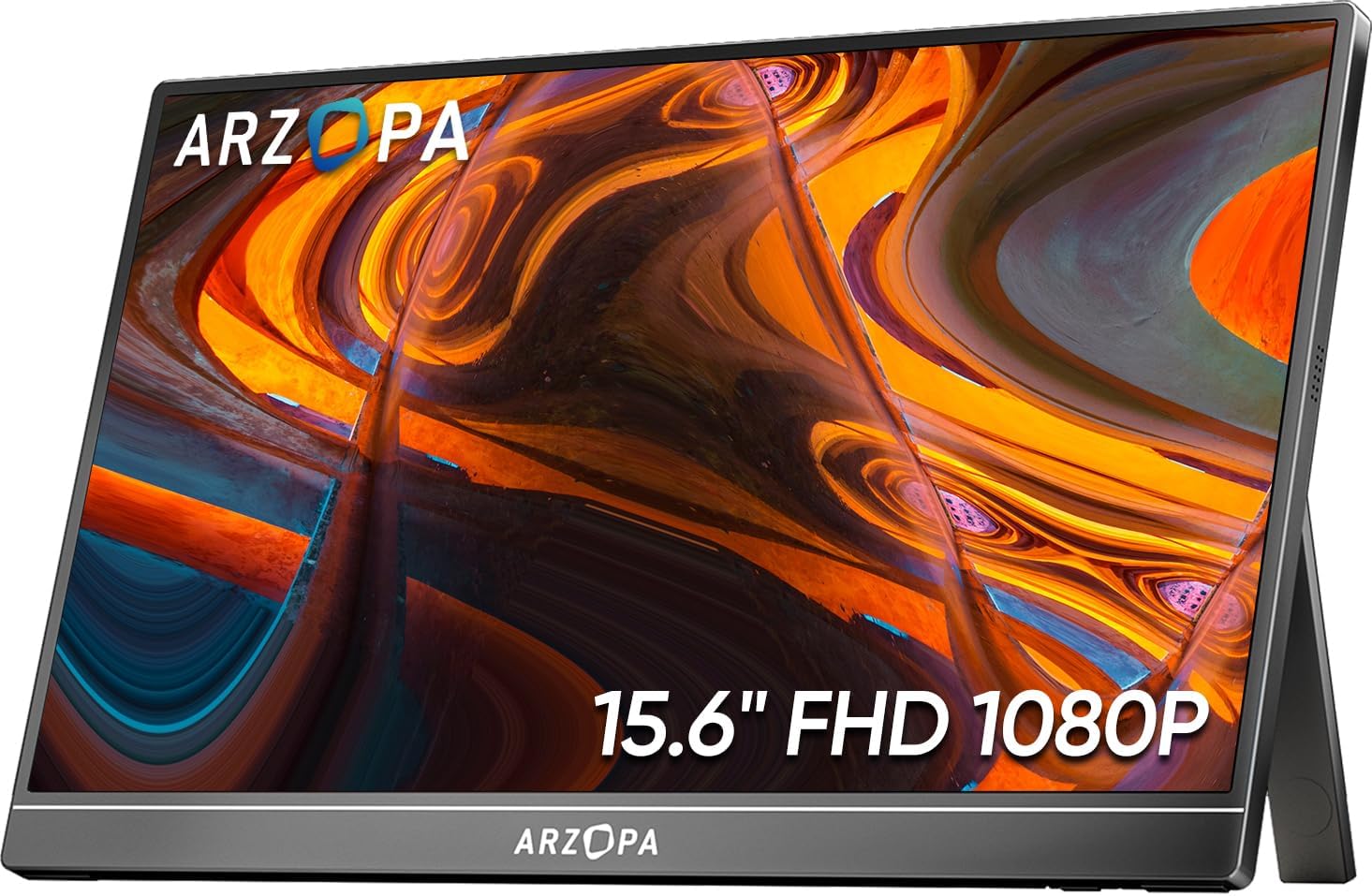
The ARZOPA S1 impresses immediately with its slim profile — just 8mm thick at its slimmest edge. The front is nearly all screen with slim bezels, while the back features a textured fabric finish with a leather-looking kickstand that folds out from the entire rear panel. This kickstand is notably more stable than the tiny flip-out legs found on many budget portable monitors. It holds the screen firmly at multiple angles, though it is not height-adjustable.
Build quality is good for the price point. The aluminum alloy frame provides rigidity, and the overall fit and finish feel substantially more premium than the ¥899 price tag would suggest. The included accessories are generous: a magnetic smart cover that doubles as a stand, a USB-C to USB-C cable, a Mini HDMI to HDMI cable, and a 30W power adapter. The magnetic cover attaches securely and protects the screen during travel, though it adds noticeable thickness to the already-slim package.
“The build quality surprised me at this price. The kickstand is much better than the flimsy ones on other monitors I tried. The magnetic cover is also surprisingly good at protecting the screen in my bag. Ordered one for my office desk too.” — Liu Wei, JD.com Verified Purchase, 4-star review
Performance
Image quality on the ARZOPA S1 is solid for productivity work. The 1080p IPS panel delivers decent viewing angles, though colors appear slightly washed out compared to a good laptop display. Brightness tops out at 250 cd/m², which is adequate for indoor use but struggles under direct sunlight or near bright windows. For document editing, coding, web browsing, and spreadsheet work, it performs admirably. Creative professionals will want something with better color accuracy.
The dual USB-C connectivity is the standout feature — plug one cable into your laptop and it handles both video and power simultaneously, provided your laptop delivers sufficient power over USB-C. With MacBooks and modern ultrabooks, single-cable operation works flawlessly. The Mini HDMI input adds compatibility with older laptops, gaming consoles, and camera monitors. Response time is typical for a 60Hz IPS panel at this price — fine for productivity, not suitable for competitive gaming. The built-in speakers are underwhelming, producing thin audio that’s fine for system sounds but not media consumption.
“Works perfectly with my MacBook Air M4 — one USB-C cable for display and power. Color isn’t amazing out of the box but adjusting the built-in picture settings helped a lot. Great for having Slack, email, and reference docs open while coding on the main screen.” — Chen Jie, JD.com Verified Purchase, 5-star review
What Chinese Users Say
On Performance and Reliability: “Plug and play with my Huawei MateBook. No drivers needed. The screen is bright enough for indoor use and I haven’t noticed any dead pixels after 2 months.” — JD.com user, 4 stars 💡 Users consistently praise the seamless USB-C connectivity and reliability.
On Portability: “I carry this between my home office and co-working space. At 780g it’s barely noticeable in my backpack. The magnetic cover keeps it safe without adding a bulky case.” — TMall user, 5 stars 💡 The combination of weight and included cover makes it genuinely portable.
On Color and Brightness: “Don’t expect MacBook-level color accuracy. Outdoors near a window, the screen is hard to read. For office use it’s fine, but if you do photo editing, spend more.” — JD.com user, 4 stars 💡 The main trade-off for the low price is modest brightness and color accuracy.
On Value for Money: “At this price, nothing else comes close. I looked at UPERFECT and Cocopar — they cost more for similar specs. The ARZOPA S1 is the best value portable monitor under ¥1,000.” — JD.com user, 5 stars 💡 Price-to-performance ratio is the S1’s strongest selling point.
Pros and Cons
Pros
- Excellent value at ¥899 — cheapest in its spec class
- Dual USB-C with single-cable video+power
- Magnetic smart cover included for travel protection
- Sturdy full-back kickstand is more stable than competitors
- Slim 8mm profile and lightweight 780g design
- Broad device compatibility (USB-C and Mini HDMI)
- Good build quality with aluminum frame
Cons
- Color accuracy is mediocre out of the box
- Low brightness (250 cd/m²) limits outdoor use
- Built-in speakers are thin and quiet
- No touchscreen support
- Kickstand lacks height adjustment
- 60Hz refresh rate limits gaming potential
FAQ
Q1: Can the ARZOPA S1 work with a smartphone?
Yes, it works with any smartphone that supports USB-C video output (DeX mode on Samsung, Huawei Desktop Mode, or direct USB-C DisplayPort). Just connect a single USB-C cable.
Q2: Does this monitor require external power?
It can run on bus power from a laptop USB-C port that delivers at least 10W. For stable operation, especially at full brightness, the included power adapter is recommended.
Q3: Is the ARZOPA S1 suitable for gaming?
For casual and non-competitive gaming, yes. The 60Hz IPS panel has acceptable response times. For fast-paced competitive shooters, the input lag and refresh rate will be noticeable limitations.
Q4: How does the built-in kickstand compare to the magnetic cover stand?
The built-in kickstand is more stable and offers better angle range. The magnetic cover stand is adequate for desk use but less sturdy on uneven surfaces like a bed or couch.
Q5: Does the screen come with a screen protector pre-applied?
No, the display ships without a screen protector. The magnetic cover provides scratch protection during transport. Some users add their own matte screen protector to reduce glare.
Verdict and Rating
The ARZOPA S1 Table Monitor delivers exactly what its price promises: a functional, well-built portable display that handles productivity tasks with ease. It doesn’t compete with premium monitors on color accuracy or brightness, but it doesn’t need to — it targets users who need a second screen for work on the go, and it excels in that role.
The single-cable USB-C setup with most modern laptops is genuinely convenient, the build quality exceeds expectations at this price, and the included accessories make it a complete package. If you need professional-grade color, touch input, or 4K resolution, this isn’t the monitor for you. But for everyday productivity, document editing, coding, and web work, it’s one of the best values in the portable monitor space.
Overall Rating: 4.3/5
- Build Quality: 4.5/5 — Solid aluminum frame, excellent kickstand
- Display Quality: 3.5/5 — Adequate for productivity, lacks color accuracy
- Portability: 4.5/5 — Thin, light, with protective cover
- Connectivity: 4.5/5 — Dual USB-C and Mini HDMI cover most devices
- Value: 5/5 — Best-in-class at this price point
Not sure which to choose?
Compare specs side-by-side with our Product Comparator Tool
Related Reviews
Anker MagGo 10K Slim Review 2026
Anker MagGo 10K Slim offers ultra-thin wireless power with MagSafe compatibility. We tested charge speed, heat managemen
Anker PowerHouse 535 Review: The 512Wh Multi-Day Power Solution
Anker PowerHouse 535 has 15,000+ reviews on JD.com with a 4.6/5 rating at ¥2,099 ($291). Users love the well-designed in
Baseus 600W Portable Power Station Review: Compact LFP Power for Outdoor Adventures
Baseus enters the portable power station market with a compact LFP (LiFePO4) unit. With 2,100+ reviews on JD.com and 94%
Baseus Portable Fan Review: The Clip-On Camping Breeze
Baseus portable clip-on fan has 80,000+ reviews on JD.com with a 4.5/5 rating at ¥49 ($7). Users love the powerful airfl
Baseus Portable Fan Review: The ¥49 Summer Pocket Essential
Baseus's portable USB fan at ¥49 is one of the most popular summer accessories on JD. We analyzed 20,000+ reviews.