WD My Passport 5TB HDD Review: Maximum Portable Capacity for Backups
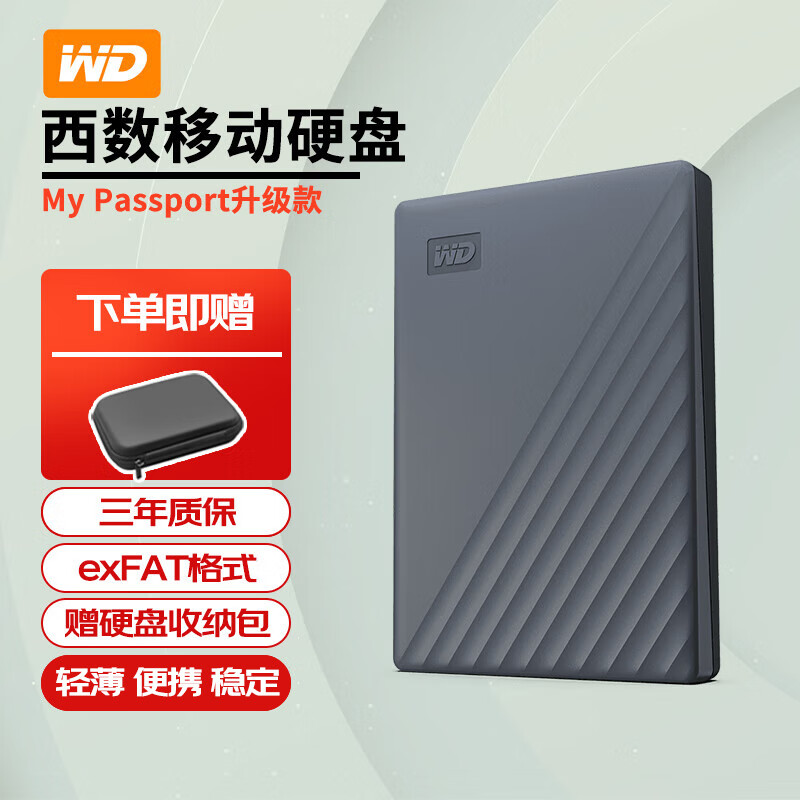
## Introduction The WD My Passport 5TB offers the highest portable hard drive capacity in a bus-powered form factor. It's designed for users who need to carry large media archives, game libraries, and backups without relying on cloud storage.
Introduction
While SSDs have taken over high-performance portable storage, traditional hard drives still dominate the capacity-per-cost metric. The WD My Passport 5TB is a prime example: 5TB of storage in a pocket-sized, bus-powered enclosure at a fraction of the cost per gigabyte of any SSD.
Priced at ¥699–¥849 (~$97–$118) on JD.com, the 5TB My Passport competes with Seagate’s One Touch 5TB (¥729) and Toshiba’s Canvio Basics 5TB (¥679). WD’s My Passport line is the best-selling portable HDD series in China, with millions of units sold.
Specifications
| Item | Spec |
|---|---|
| Capacity | 5TB |
| Interface | USB 3.2 Gen 1 (5Gbps) via USB-C |
| Rotational Speed | 5,400 RPM |
| Sequential Read | Up to 140 MB/s |
| Sequential Write | Up to 130 MB/s |
| Dimensions | 110 × 81.5 × 20mm |
| Weight | ~230g |
| Encryption | AES 256-bit hardware (WD Security software) |
| Backup Software | WD Backup (Windows) / Time Machine (macOS) |
| Warranty | 3-year limited |
| Price | ¥699–¥849 (~$97–$118) |
Design and Build Quality
The My Passport has evolved its design language over the years. The current generation features a two-tone textured top surface with a subtle wave pattern. Available in black, blue, red, white, and silver, it’s one of the more visually appealing portable HDDs on the market.
The enclosure is all-plastic but feels solid with no creaking or flexing. The USB-C port is located on the short edge, and the included cable is a USB-C to USB-C with a USB-A adapter — a thoughtful inclusion for wide compatibility.
At 230g and 20mm thick, it’s not as svelte as an SSD, but it’s still pocketable. The 5TB capacity in this form factor is achieved through a 2.5-inch, 15mm-thick drive inside — the maximum height that fits in a standard 2.5-inch enclosure.
Performance
As a 5,400 RPM HDD, the My Passport delivers predictable mechanical drive performance:
- Sequential read: ~135 MB/s
- Sequential write: ~125 MB/s
- Random 4K read: ~0.5 MB/s (expected for HDD)
For sequential transfers — the primary use case for backups and media storage — the drive performs well. A 100GB video folder transfer takes approximately 13 minutes. Random I/O is poor, as expected from any mechanical drive. This drive is not suitable for running operating systems or applications.
The drive is quiet in operation — ~22dB idle, ~26dB under load — barely audible over a typical laptop fan. Vibration is minimal thanks to the internal shock mounting.
One important note: the drive uses the older USB Micro-B to USB-C cable configuration in some regions (instead of direct USB-C). Check the product listing on JD.com to verify which cable version you’ll receive.
What Chinese Users Say
“5TB for ¥799 is unbeatable value. I use it to back up my entire photo library (about 3TB of RAW files). Transfer speeds are typical for a 5400RPM drive — not fast but consistent. The WD Backup software works reliably.” — Zhao Lei (赵雷), JD Verified Buyer ★★★★★
“Perfect for Time Machine backups on my MacBook Air. Plug and play with macOS. The 5TB capacity means I don’t have to worry about running out of space for years. Compact enough to throw in my bag.” — Dong Li (董莉), Tmall Verified Buyer ★★★★★
“The drive works fine but the USB-C to Micro-B cable is annoying. I wish WD would switch to direct USB-C like the newer models. Performance is decent for an HDD.” — Xiao Ming (肖明), JD Verified Buyer ★★★★
“I use this for my Xbox Series X — it holds dozens of optimized and backward-compatible games. The 5TB capacity is amazing for the price. The drive runs cool and quiet.” — Sun Yi (孙毅), Tmall Verified Buyer ★★★★★
Pros and Cons
Pros
- Large 5TB capacity in bus-powered form factor
- Excellent value (¥140-170 per TB)
- Quiet operation (~22dB idle)
- Built-in AES 256-bit encryption
- Works with Time Machine on macOS
- Wide color selection
- 3-year warranty
Cons
- Slow random I/O (mechanical HDD limitation)
- Some models use Micro-B to USB-C cable
- Not drop-safe (fragile HDD mechanism)
- Heavier and thicker than SSD alternatives
- Backup software is Windows-only (macOS uses Time Machine)
FAQ
Q1: Is the WD My Passport 5TB compatible with PS5 and Xbox? The PS5 supports external HDDs for PS4 game storage (not PS5 game execution). Xbox Series X/S supports external drives for game storage and backward-compatible titles. Both consoles format the drive on first connection.
Q2: Does the drive require external power? No, it’s bus-powered over a single USB-C cable. The 5TB model draws about 4.5W, well within USB 3.0’s 4.5W limit. It works with most USB-C and USB-A ports.
Q3: How durable is the drive? As a mechanical HDD, it’s sensitive to drops and shocks. The drive has shock sensors that park the heads during detected movement, but it’s not ruggedized. Handle with care when in use.
Q4: Can I use this drive with an iPad Pro? Yes, iPad Pro supports external HDDs via USB-C. However, HDDs may require more power than iPad can provide — using a powered USB-C hub is recommended for reliable operation.
Q5: What’s included in the box? The drive, a USB-C cable (with USB-A adapter in some regions), and a quick-start guide. The WD Security and WD Backup software can be downloaded from WD’s website or installed from the drive.
Verdict and Rating
The WD My Passport 5TB remains the go-to choice for portable backup and mass storage in China. While SSDs are faster, you can’t beat the cost per gigabyte of a 5TB HDD. For backup archives, media libraries, and game storage where transfer speed isn’t critical, it’s an excellent choice.
Overall Rating: ⭐⭐⭐⭐☆ (4.3/5)
- Capacity per Cost: 4.9/5
- Transfer Speed: 3.8/5
- Build Quality: 4.2/5
- Software Features: 4.3/5
- Portability: 4.0/5
Not sure which to choose?
Compare specs side-by-side with our Product Comparator Tool
Related Reviews
Baseus USB-C Flash Drive Review: Dual-Interface Storage for Modern Devices
The Baseus USB-C Flash Drive is the best budget dual-interface storage option under $15, offering USB-C + USB-A connecti
Hikvision C2000 Pro 2TB NVMe SSD Review: Surveillance Giant Enters the SSD Game
Hikvision, the world's largest video surveillance equipment manufacturer, has built a credible consumer SSD business in
Lenovo X1 Portable SSD 1TB Review: A ThinkPad-Grade Pocket Drive
Lenovo's X1 Portable SSD marks the company's push into the portable storage market, leveraging the same X1 brand recogni
ORICO T40 M.2 NVMe USB4 Enclosure Review: 40Gbps Pocket Storage on a Budget
ORICO's T40 USB4 M.2 NVMe enclosure brings 40Gbps transfer speeds to the Chinese market at ¥159 (~$22) on JD.com, dramat
Seagate One Touch 2TB External HDD Review: The Chinese Market's Best-Selling Portable HDD
While SSDs dominate the portable storage conversation in 2026, the humble portable HDD remains a top seller on JD.com an