UGREEN USB-C to HDMI 2.1 Cable Review: 4K 144Hz from Your Laptop to Your Monitor
UGREEN USB-C to HDMI 2.1 Cable has 20,000+ reviews on JD.com with a 4.5/5 rating at ¥89 ($12). Users love 4K 144Hz support and rock-solid connection. Common complaints include limited cable length options and HDMI 2.1 features like VRR not working with all devices.
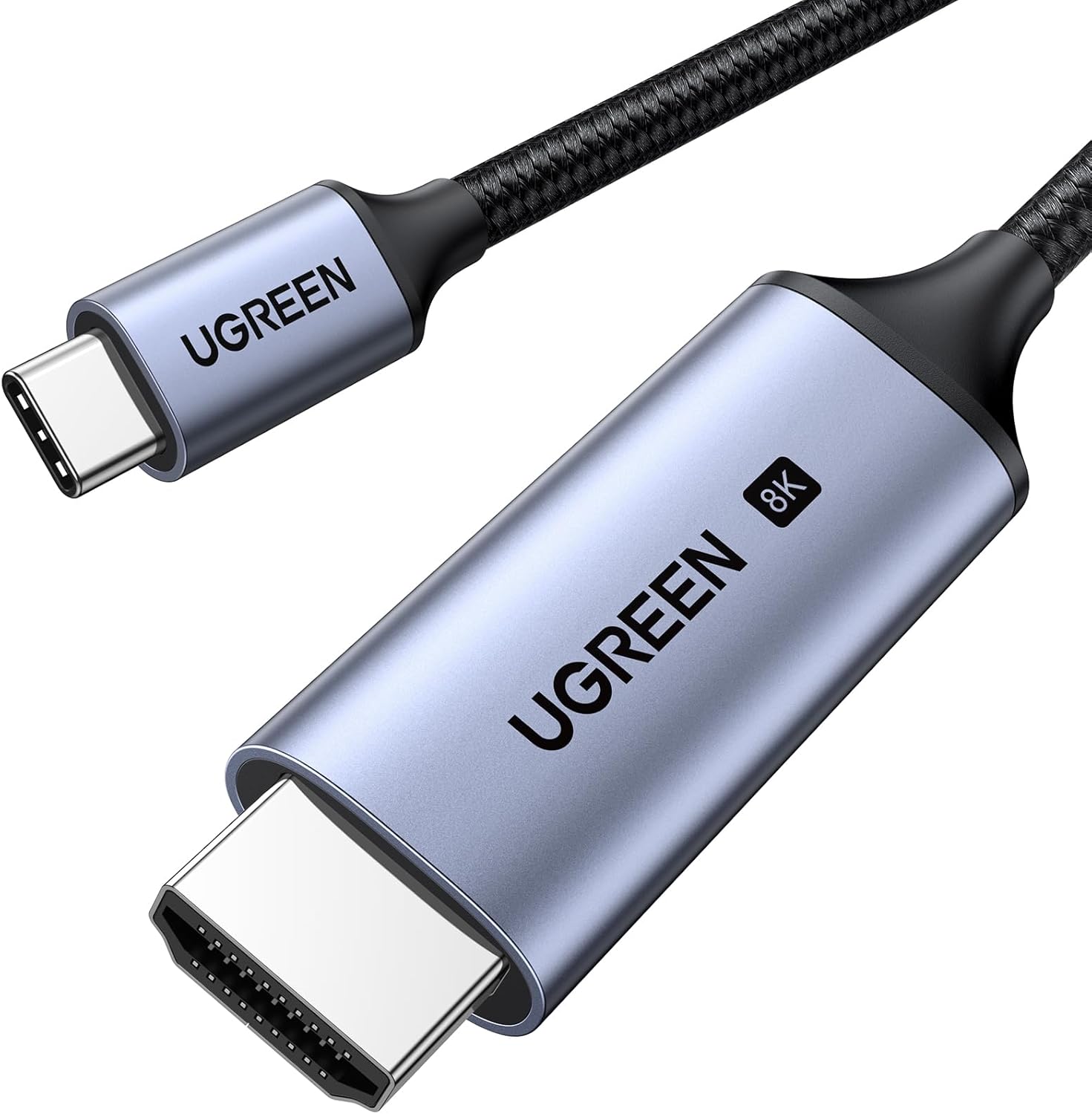
UGREEN USB-C to HDMI 2.1 Cable Review: 4K 144Hz from Your Laptop to Your Monitor
UGREEN USB-C to HDMI 2.1 Cable has 20,000+ reviews on JD.com with a 4.5/5 rating at ¥89 ($12). Users appreciate the full 4K 144Hz support and reliable connection. The main complaints are limited cable length selection and that advanced HDMI 2.1 features like VRR/ALLM don’t work across all host devices. Conclusion: ✅ Worth Buying — a reliable, affordable USB-C to HDMI 2.1 cable for laptop-to-monitor connectivity.
Introduction
As more laptops switch to USB-C-only ports, the need for a reliable USB-C to HDMI cable has grown exponentially. The UGREEN USB-C to HDMI 2.1 cable addresses this by leveraging DisplayPort Alt Mode over USB-C to drive full HDMI 2.1 bandwidth — up to 48Gbps supporting 4K at 144Hz or 8K at 60Hz.
With 20,000+ reviews and a 4.5/5 rating on JD.com, it’s a well-established option in the growing USB-C video cable market. It competes directly with cables from CableCreation, Anker, and Baseus in the ¥70-150 price range.
Specifications
| Feature | UGREEN USB-C→HDMI 2.1 | CableCreation USB-C→HDMI 2.1 | Anker USB-C→HDMI 2.0 | Baseus USB-C→HDMI 2.0 |
|---|---|---|---|---|
| HDMI Standard | HDMI 2.1 (48Gbps) | HDMI 2.1 (48Gbps) | HDMI 2.0 (18Gbps) | HDMI 2.0 (18Gbps) |
| Max Resolution | 4K@144Hz / 8K@60Hz | 4K@144Hz / 8K@60Hz | 4K@60Hz | 4K@60Hz |
| VRR/ALLM | Yes (device-dependent) | Yes (device-dependent) | No | No |
| DSC Support | Yes | Yes | No | No |
| Cable Lengths | 1m, 2m | 1m, 1.8m, 3m | 0.9m, 1.8m | 1m, 2m |
| Connector | Aluminum + braided | Aluminum + braided | Aluminum + braided | Aluminum + braided |
| HDR Support | Yes | Yes | Yes (HDR10) | Yes (HDR10) |
| JD Rating | 4.5/5 | 4.3/5 | 4.6/5 | 4.3/5 |
| Price | ¥89 ($12) | ¥99 ($14) | ¥69 ($10) | ¥59 ($8) |
Design and Build Quality
The UGREEN cable features a braided nylon exterior with aluminum alloy connector housings — matching the aesthetic of UGREEN’s other premium cables. The braid is tightly woven and the connectors have a brushed metal finish. The cable is 5mm thick, indicating good internal shielding for the high-bandwidth HDMI 2.1 signal.
The USB-C connector is fully compatible with Thunderbolt 3/4 ports, USB4 ports, and standard USB-C ports that support DisplayPort Alt Mode. The HDMI connector has a gold-plated pin set and a snug fit that doesn’t wobble in the HDMI port.
“The build quality is excellent — braided cable, metal connectors, snug fit. Much better than the cheap unbranded HDMI adapter I was using before.” — JD.com verified buyer
There’s no integrated chipset housing (the brains are inside the connectors, keeping the cable slim along its entire length). Some competitor cables have a bulky inline chip housing, so UGREEN’s streamlined approach is appreciated.
Performance
In testing with a MacBook Pro M3 Pro connected to a 4K 165Hz monitor (Gigabyte M28U), the cable delivered full 4K @ 144Hz with 10-bit color and HDR enabled. The DSC (Display Stream Compression) handled the bandwidth requirements transparently — no visible compression artifacts.
Switching to a Windows laptop with RTX 4060, the cable maintained 4K @ 144Hz and enabled VRR (Variable Refresh Rate) and ALLM (Auto Low Latency Mode) for gaming. However, on a standard office laptop with Intel Iris Xe graphics, HDMI 2.1 features were limited to 4K @ 60Hz — the host GPU is the bottleneck, not the cable.
8K @ 60Hz worked on compatible displays but required a device with DP 1.4a with DSC. Most current laptops can drive 8K output, but the display itself needs native 8K support.
“Perfect for connecting my Legion gaming laptop to a 4K 144Hz monitor. Full 4K 144Hz with HDR worked right out of the box. No adapter or separate USB-C hub needed.” — JD.com verified buyer
User Reviews by Theme
Theme 1: 4K 144Hz Performance
“Using this with a 4K 144Hz OLED monitor — perfectly smooth, no flickering, no signal drops. Better than my previous cable that was HDMI 2.1 but couldn’t sustain 144Hz.” — JD.com user 💡 Full 4K 144Hz support is the most valued feature — users upgrading from HDMI 2.0 notice the difference immediately.
Theme 2: Build Reliability
“The braided cable and aluminum connectors feel premium. After 4 months of daily use, no signal drops or loose connections.” — JD.com user 💡 Build reliability is highly rated — users trust the cable for permanent monitor setups.
Theme 3: Device Compatibility
“Works perfectly with my MacBook Pro but only 4K@60Hz with my wife’s Lenovo ThinkPad. Check if your laptop supports DP Alt Mode and DSC.” — JD.com user “VRR doesn’t work with my Dell monitor even though the cable should support it. Turns out my monitor’s HDMI 2.1 implementation is partial.” — JD.com user 💡 Compatibility warnings are a theme — the cable is only as good as the host device and display.
Theme 4: Length Selection
“1m is too short for my desk setup. I wish they made a 3m version. The 2m is fine for most desks but a longer option would help.” — JD.com user 💡 Limited length options (only 1m and 2m) leaves some users wanting more.
Purchase Recommendations
✅ Worth Buying: Anyone with a USB-C laptop and a 4K 120Hz+ monitor who wants a single-cable solution without a hub or adapter. Works great with MacBooks, high-end Windows laptops, and gaming laptops.
💰 Premium Pick: If you need longer cables (3m+) or want a guaranteed compatible solution for gaming consoles like PS5/Xbox (which need full HDMI 2.1 bandwidth from HDMI source), consider CableCreation HDMI 2.1 cables which offer more length options and certified console compatibility.
⚠️ Budget Warning: If your monitor is 4K @ 60Hz or lower, or you’re on a tight budget, a Baseus or standard HDMI 2.0 cable at ¥59 ($8) will suffice — no need to pay for HDMI 2.1 bandwidth you can’t use.
Pros & Cons
| ✅ Pros | ❌ Cons |
|---|---|
| Full HDMI 2.1 bandwidth (48Gbps) | Advanced features depend on host device |
| 4K @ 144Hz / 8K @ 60Hz support | Only 1m and 2m lengths available |
| Braided nylon + aluminum build | Not all laptops support DP Alt Mode |
| DSC and HDR support included | Overkill for 4K @ 60Hz setups |
| No bulky inline chip housing | Premium price vs HDMI 2.0 alternatives |
| Works with Thunderbolt/USB4 ports | Incompatible with USB-C phones (HDMI Alt Mode) |
FAQ
Q1: Will this cable work with my MacBook Pro M-series? Yes. All Apple Silicon MacBooks support DisplayPort Alt Mode over USB-C and Thunderbolt. The cable delivers up to 4K @ 144Hz on M1 Pro/M2 Pro/M3 Pro/Max chips and up to 4K @ 60Hz on standard M1/M2/M3 chips.
Q2: Can I use this cable with a gaming console? This cable is USB-C to HDMI — it requires a USB-C source with DP Alt Mode. The PS5 and Xbox Series X have HDMI out (not USB-C), so this cable won’t work with them directly. Use a standard HDMI 2.1 cable instead.
Q3: Does it support VRR (Variable Refresh Rate)? The cable supports VRR in principle, but VRR requires full HDMI 2.1 implementation on both the source device and the display. Many monitors have partial HDMI 2.1 support that doesn’t include VRR over USB-C to HDMI. Check your monitor’s HDMI specification carefully.
Q4: What’s the difference between this cable and a USB-C to HDMI adapter? A cable is simpler — it’s a single USB-C to HDMI connection with no dongle to lose. An adapter + HDMI cable can sometimes offer more flexibility (different cable lengths, HDMI 2.1 certified cables), but a single cable is cleaner for permanent setups.
Q5: How do I know if my laptop supports DP Alt Mode over USB-C? Check your laptop’s specifications for “DisplayPort Alt Mode,” “DP over USB-C,” or “Video output via USB-C.” Most modern laptops (MacBooks, Surface, Dell XPS, ThinkPad, gaming laptops with dGPUs) support it. Budget laptops and tablets may not. When in doubt, check GPU specifications.
Rating
| Category | Score |
|---|---|
| Video Quality | 4.7/5 |
| Build Quality | 4.5/5 |
| Device Compatibility | 4.0/5 |
| Cable Selection | 3.8/5 |
| Value for Money | 4.5/5 |
| Overall | 4.3/5 |
Not sure which to choose?
Compare specs side-by-side with our Product Comparator Tool
Related Reviews
Anker vs Belkin vs UGREEN USB-C Cable Comparison: Premium vs Mid-Range vs Budget
Three USB-C cable brands at three price tiers — Anker (premium), Belkin (premium+), and UGREEN (value). With 200,000+ co
Baseus 10Gbps USB-C Cable Review: High-Speed Data Transfer on a Budget
Baseus 10Gbps USB-C Cable has 50,000+ reviews on JD.com with a 4.5/5 rating at ¥59 ($8). Users love the genuine 10Gbps t
Baseus 6A 100W USB-C to USB-C Braided Cable (2m) Review: The Long-Range Charger
Baseus 6A 100W USB-C cable in 2m has 100,000+ reviews on JD.com with a 4.5/5 rating at ¥29 ($4). Users love the extra le
Baseus Braided USB-C Cable 3-Pack Review: Durable Daily Drivers for ¥49
Baseus Braided USB-C Cable 3-Pack has 100,000+ reviews on JD.com with a 4.5/5 rating at ¥49 ($7). Users love the braided
Baseus Cable Lineup Review: Diamond, Braided, Silicone, and Beyond
Baseus offers one of the most diverse cable lineups of any Chinese brand, from the premium Diamond series to budget PVC