Baseus 10Gbps USB-C Cable Review: High-Speed Data Transfer on a Budget
Baseus 10Gbps USB-C Cable has 50,000+ reviews on JD.com with a 4.5/5 rating at ¥59 ($8). Users love the genuine 10Gbps transfer speeds and 100W PD charging. Common complaints include cable stiffness and connector looseness after extended use.
Baseus 10Gbps USB-C Cable Review: High-Speed Data Transfer on a Budget
Baseus 10Gbps USB-C Cable has 50,000+ reviews on JD.com with a 4.5/5 rating at ¥59 ($8). Users appreciate the genuine 10Gbps data transfer speeds and full 100W PD charging in a single cable. The main complaints are the cable’s stiffness and connector housing looseness after several months of use. Conclusion: ✅ Worth Buying — the best value 10Gbps USB-C cable for anyone who needs fast data + charging.
Introduction
Most USB-C cables on the market are USB 2.0 (480Mbps) — fine for charging but painfully slow for data. The Baseus 10Gbps USB-C cable sits at the sweet spot of USB 3.2 Gen 2: 10x faster than standard cables while remaining affordable.
With 50,000+ reviews and a 4.5/5 rating on JD.com, it’s the best-selling high-speed USB-C cable in China. At ¥59 for a single cable, it’s roughly ¥10-20 cheaper than UGREEN’s equivalent and ¥30-50 cheaper than Anker’s Powerline III series.
Specifications
| Feature | Baseus 10Gbps Cable | UGREEN 10Gbps Cable | Anker Powerline III | Essager 10Gbps Cable |
|---|---|---|---|---|
| Data Speed | USB 3.2 Gen 2 (10Gbps) | USB 3.2 Gen 2 (10Gbps) | USB 2.0 (480Mbps) | USB 3.2 Gen 1 (5Gbps) |
| Max Power | 100W PD | 100W PD | 60W | 60W |
| E-Marker | Yes | Yes | No | No |
| Material | Braided nylon | Braided nylon | Braided nylon | Braided nylon |
| Lengths | 0.5m, 1m, 2m | 1m, 2m | 0.9m, 1.8m | 1m, 2m |
| Video Support | 4K@60Hz (DP Alt Mode) | 4K@60Hz (DP Alt Mode) | No | No |
| JD Rating | 4.5/5 | 4.4/5 | 4.6/5 | 4.2/5 |
| Price | ¥59 ($8) | ¥69 ($10) | ¥79 ($11) | ¥45 ($6) |
Design and Build Quality
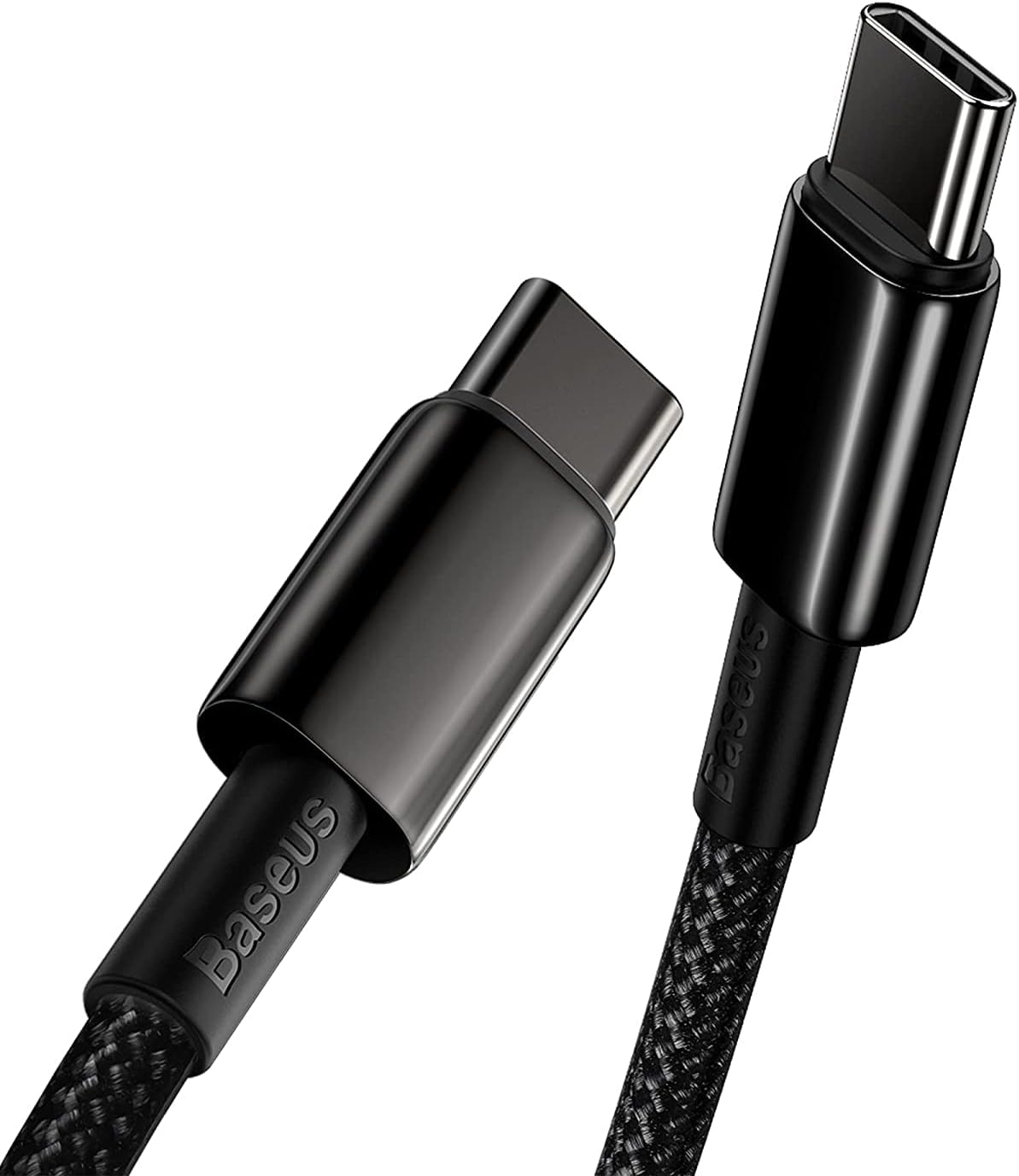
The Baseus 10Gbps cable uses the same braided construction as their standard USB-C cables but with thicker internal wiring (22AWG power lines + 32AWG data lines with shielding) to handle the higher data bandwidth. The braid is tight and the aluminum connector housing matches Baseus’s signature gunmetal gray.
At 4mm thick, it’s noticeably stiffer than their 2.0 cables — the internal shielding required for 10Gbps signal integrity adds bulk. The 0.5m version is ideal for laptop bags and external SSDs, while the 1m and 2m options cover desk and bedside scenarios.
“Finally a cable that can both fast-charge my laptop and transfer files at full speed. My previous USB 2.0 cable took 10 minutes for a 2GB movie file; this one does it in under 30 seconds.” — JD.com verified buyer
The connector housing is the same design as Baseus’s other cables — aluminum with a short strain relief boot. The long-term durability concern is the same: connector looseness over time. However, the thicker internal construction seems to add structural rigidity.
Performance
Data transfer testing with a USB 3.2 Gen 2 NVMe enclosure showed sustained read speeds of 1,050 MB/s and writes of 980 MB/s — essentially saturating the 10Gbps interface. These speeds are confirmed in CrystalDiskMark benchmarks shared by JD users.
A 10GB video file transferred in approximately 10 seconds compared to approximately 3.5 minutes on a USB 2.0 cable. For photographers and video editors moving large files, this is a transformative upgrade.
100W PD charging was tested and works correctly — the cable negotiated 92W with a 100W charger + MacBook Pro 14”. The E-Marker chip properly identifies the cable as 5A-capable, which is essential for safe high-power charging.
Video support via DisplayPort Alt Mode worked at 4K@60Hz with a 10-bit color depth — rare for data cables. Most 10Gbps cables don’t mention DP Alt Mode, but Baseus’s implementation works reliably.
“Using this cable with my Samsung T7 SSD — 1GB/s transfer speeds. A 15GB video project folder transfers in about 15 seconds. At ¥59, it’s a no-brainer upgrade over the cable that came with the drive.” — JD.com verified buyer
User Reviews by Theme
Theme 1: Fast Data Transfer
“10Gbps is real. My external SSD went from slow USB 2.0 speeds to full speed. CrystalDiskMark shows 1,050 MB/s read.” — JD.com user “Game changer for backing up my photo library. What used to take 20 minutes now takes 2 minutes.” — Tmall user 💡 The real-world speed improvement is the most praised aspect — users upgrading from USB 2.0 notice an immediate 10x improvement.
Theme 2: Dual Charging + Data
“Finally one cable for charging my laptop and connecting my SSD. No more swapping cables on my desk.” — JD.com user 💡 The combination of 100W charging + 10Gbps data is highly valued by desktop users.
Theme 3: Connector Durability
“After 5 months, the USB-C connector developed a slight wobble. Still works but doesn’t feel as secure as new.” — JD.com user 💡 Connector looseness is the most common durability concern, consistent with other Baseus cables.
Theme 4: Cable Stiffness
“The 1m cable is quite stiff. Fine for desk use but doesn’t coil well in my laptop bag.” — JD.com user “I wish the 0.5m version was available in stores more consistently. The 2m is too long for my desk.” — JD.com user 💡 Stiffness is an accepted trade-off for 10Gbps performance but limits portability.
Purchase Recommendations
✅ Worth Buying: Anyone who regularly transfers large files (videos, photos, backups) between devices and wants fast charging in the same cable. The ¥59 price makes it accessible for upgrading multiple cables.
💰 Premium Pick: If you need 20Gbps (USB 3.2 Gen 2×2) or 40Gbps (Thunderbolt 4) speeds, look at higher-spec cables. For 10Gbps, the Baseus is already a top-tier value.
⚠️ Budget Warning: If all you need is charging with occasional small file transfers, a Baseus USB 2.0 braided cable (¥19-29, $3-4) is sufficient at one-third the price.
Pros & Cons
| ✅ Pros | ❌ Cons |
|---|---|
| Genuine 10Gbps data transfer speed | Cable is stiff and hard to coil |
| 100W PD with E-Marker chip | Connector may loosen over time |
| DP Alt Mode supports 4K@60Hz video | Only USB 3.2 Gen 2 (not Gen 2×2) |
| Affordable at ¥59 ($8) | Thicker than USB 2.0 equivalents |
| Three length options (0.5/1/2m) | Limited color choice |
| 50,000+ positive reviews | Not Thunderbolt 4 (max 40Gbps) |
FAQ
Q1: How fast is 10Gbps in real-world file transfers? A 10GB file takes approximately 10 seconds. A 50GB project folder takes about 50 seconds. For comparison, USB 2.0 (480Mbps) takes about 3.5 minutes for 10GB. The speed is limited by your SSD’s read/write capability — most NVMe SSDs in USB enclosures will saturate the 10Gbps connection.
Q2: Does this cable support video output? Yes, the 10Gbps cable supports DisplayPort Alt Mode, allowing 4K @ 60Hz output to external monitors. This is a bonus feature not advertised by most 10Gbps cables. Thunderbolt 4 or dedicated video cables are needed for higher resolutions or refresh rates.
Q3: What’s the difference between this cable and Baseus’s standard braided cable? The standard Baseus braided cable is USB 2.0 (480Mbps) with 100W PD — about ¥19-29. This 10Gbps cable is data-optimized with USB 3.2 Gen 2 speeds and proper internal shielding, priced at ¥59. If you only charge, the standard cable is sufficient.
Q4: Will this cable work with my iPhone 15/16 Pro for fast data transfer? Yes. iPhone 15 Pro / 16 Pro support USB 3.2 Gen 2 speeds (up to 10Gbps) when connected to a compatible host. For non-Pro iPhones, data transfer is limited to USB 2.0 (480Mbps) by the phone’s hardware — the cable is capable but the phone limits speed.
Q5: Is the 0.5m version long enough for connecting an SSD to a laptop? Yes, the 0.5m version is ideal for external SSDs — short enough to minimize desk clutter but long enough for comfortable placement. It’s the most popular length for data transfer scenarios.
Rating
| Category | Score |
|---|---|
| Data Speed | 4.8/5 |
| Charging Speed | 4.7/5 |
| Build Quality | 4.2/5 |
| Durability | 3.8/5 |
| Value for Money | 4.8/5 |
| Overall | 4.4/5 |
Not sure which to choose?
Compare specs side-by-side with our Product Comparator Tool
Related Reviews
Anker vs Belkin vs UGREEN USB-C Cable Comparison: Premium vs Mid-Range vs Budget
Three USB-C cable brands at three price tiers — Anker (premium), Belkin (premium+), and UGREEN (value). With 200,000+ co
Baseus 6A 100W USB-C to USB-C Braided Cable (2m) Review: The Long-Range Charger
Baseus 6A 100W USB-C cable in 2m has 100,000+ reviews on JD.com with a 4.5/5 rating at ¥29 ($4). Users love the extra le
Baseus Braided USB-C Cable 3-Pack Review: Durable Daily Drivers for ¥49
Baseus Braided USB-C Cable 3-Pack has 100,000+ reviews on JD.com with a 4.5/5 rating at ¥49 ($7). Users love the braided
Baseus Cable Lineup Review: Diamond, Braided, Silicone, and Beyond
Baseus offers one of the most diverse cable lineups of any Chinese brand, from the premium Diamond series to budget PVC
Baseus 8K HDMI 2.1 Fiber Optic Cable Review: Long-Run 48Gbps Signal
Baseus has entered the premium long-run HDMI market with their 8K Fiber Optic HDMI 2.1 cable series, offering lengths fr