Kingston XS1000 2TB SSD Review: Ultra-Compact Portable Performance
## Introduction The Kingston XS1000 is one of the most compact portable SSDs on the market, offering 1,050 MB/s speeds in a package barely larger than a car key fob. It targets users who want fast portable storage without the bulk of traditional enclosures.
Introduction
Kingston has been a trusted name in memory and storage for decades, and the XS1000 represents their latest effort in the compact portable SSD category. With a footprint smaller than most credit cards, the XS1000 packs 2TB of NVMe-based storage with USB 3.2 Gen 2 speeds of up to 1,050 MB/s.
Priced at ¥799–¥999 (~$111–$139) for the 2TB model on JD.com, it competes with Samsung’s T7 (¥899) and SanDisk’s Extreme (¥999). Kingston’s advantage is size — the XS1000 is notably smaller and lighter than both competitors.
Specifications
| Item | Spec |
|---|---|
| Capacity | 2TB (also 1TB) |
| Interface | USB 3.2 Gen 2 (10Gbps) via USB-C |
| Sequential Read | Up to 1,050 MB/s |
| Sequential Write | Up to 1,000 MB/s |
| NAND | 3D TLC |
| Dimensions | 69.54 × 32.58 × 13.5mm |
| Weight | ~28.7g |
| Material | Rubberized plastic enclosure |
| Drop Resistance | 2m (rubber bumper absorbs impact) |
| Encryption | Software-based (256-bit AES via passcode) |
| Warranty | 5-year limited |
| Price | ¥799–¥999 (~$111–$139) |
Design and Build Quality
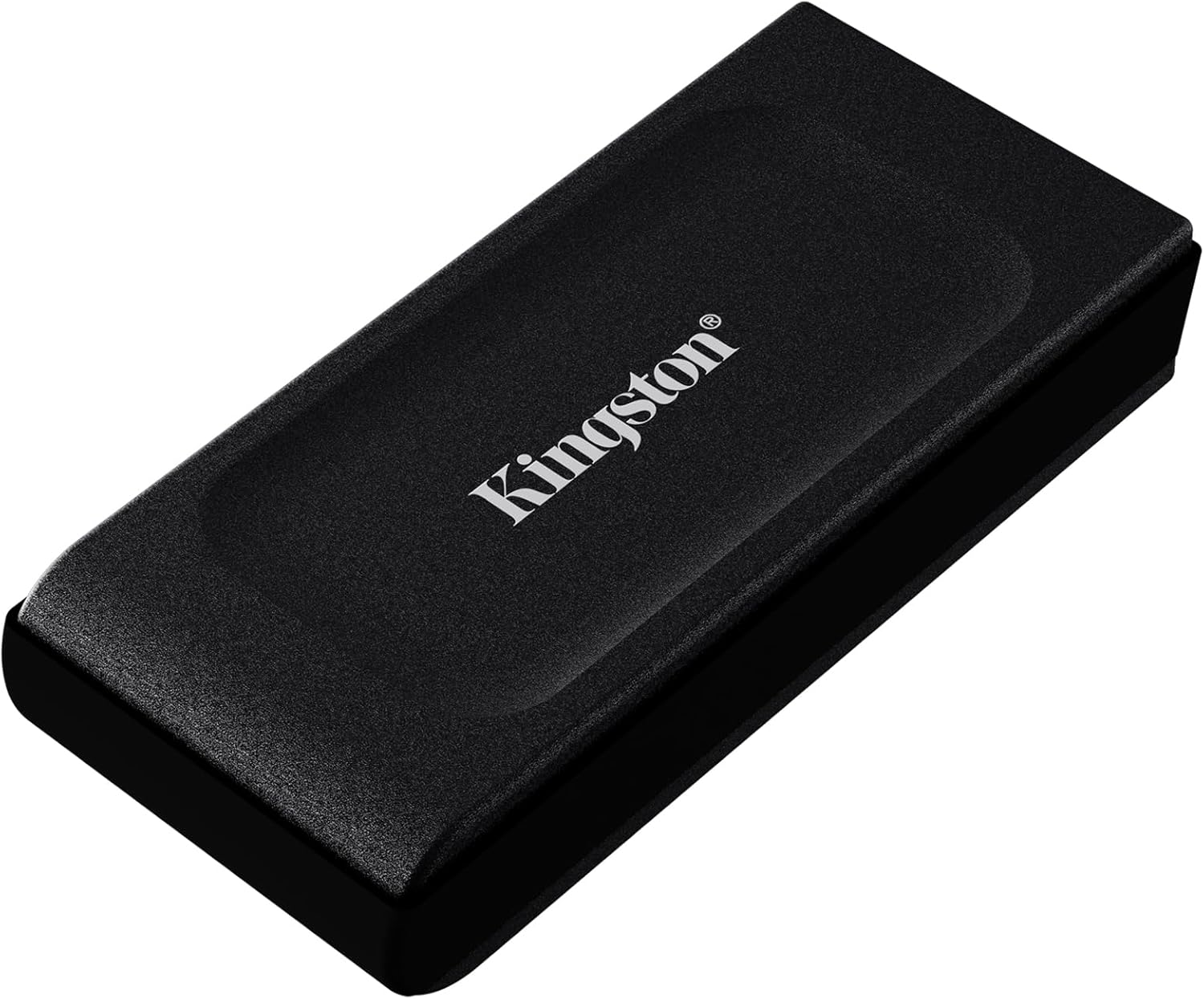
The XS1000’s most compelling feature is its size. At 69.5 × 32.6 × 13.5mm and just 28.7g, it’s barely larger than a pack of gum. The rubberized coating provides a secure grip and an unexpected 2-meter drop rating — this tiny drive is surprisingly durable.
The design is simple: a pill-shaped enclosure with a single USB-C port on the narrow end. The rubberized texture is pleasant to touch and resists fingerprints. An LED indicator on the top face shows power/activity status.
One design criticism: without a keyring loop or lanyard attachment point, the XS1000 is easy to misplace. Kingston sells a separate silicone sleeve with a carabiner for ¥19. The USB-C port is recessed slightly, providing strain relief for the cable connection.
Performance
With a USB 3.2 Gen 2 port, CrystalDiskMark shows:
- Sequential read: ~1,040 MB/s
- Sequential write: ~980 MB/s
- Random 4K read (QD32): ~12,000 IOPS
- Random 4K write (QD32): ~20,000 IOPS
Real-world performance: transferring a 25GB 4K video file takes approximately 26 seconds at ~980 MB/s sustained. The drive stays comfortably warm (~40°C) under sustained load — the rubberized coating actually helps dissipate heat despite being an insulator, as the internal aluminum heat sink conducts well.
The XS1000 uses a DRAM-less NVMe controller with Host Memory Buffer (HMB) technology. For sequential transfers, the performance is indistinguishable from DRAM-equipped drives. For random 4K workloads, DRAM-less drives show slightly lower performance, but this is rarely noticeable in typical portable storage use cases.
What Chinese Users Say
“This drive is tiny. I mean REALLY tiny — it’s smaller than my thumb. The 1,000 MB/s speeds are real and consistent. I use it for video editing directly from the drive on my MacBook Air.” — Yao Wei (姚伟), JD Verified Buyer ★★★★★
“Perfect portable SSD for day-to-day use. The rubber coating gives me confidence about drops. I’ve dropped it from desk height twice — no issues. Transfer speeds are as advertised.” — Kong Xuan (孔璇), Tmall Verified Buyer ★★★★★
“I compared this with the Samsung T7. The XS1000 is smaller and slightly lighter, but the T7 has slightly better sustained write performance. For casual use, the XS1000 is excellent. For professional video work, the T7 edges ahead.” — Chang Hao (常浩), JD Verified Buyer ★★★★
“Great drive for the price. The 5-year warranty gives peace of mind. My only complaint is the lack of a keyring hole — I had to buy the separate silicone sleeve to keep it on my keychain.” — Peng Liang (彭亮), Tmall Verified Buyer ★★★★★
Pros and Cons
Pros
- Extremely compact and lightweight (28.7g)
- Fast 1,050/1,000 MB/s sequential speeds
- 2-meter drop protection
- 5-year warranty
- Good sustained transfer performance
- Rubberized grip coating
- Strong value at ¥799–¥999
Cons
- No hardware encryption
- No lanyard/keyring attachment
- DRAM-less controller affects random I/O
- Rubber coating can attract dust
- Not ruggedized against water or dust
FAQ
Q1: Is the Kingston XS1000 compatible with PlayStation 5? Yes, it works as a USB external drive for PS5. You can store and play PS4 games directly, and transfer PS5 games to/from internal storage. Load times for PS4 games are noticeably improved over HDDs.
Q2: Does the XS1000 support TRIM? Yes, the XS1000 supports TRIM and UASP (USB Attached SCSI Protocol) for improved performance and longevity. TRIM is active on both Windows and macOS.
Q3: How does it compare to the Samsung T7? The XS1000 is smaller and slightly cheaper. The T7 has hardware encryption and slightly better sustained write performance. For most users, the differences are marginal. Choose the XS1000 for size, T7 for security features.
Q4: Can I use this drive as a Windows boot drive (Windows To Go)? Yes, the XS1000 works with Windows To Go. Performance is adequate for booting Windows, though a Thunderbolt or internal SSD would be faster for daily use.
Q5: What’s included in the box? The drive, a USB-C to USB-C cable (~20cm), and a quick-start guide. Kingston recommends using the included cable for optimal performance, as some third-party cables may not support 10Gbps speeds.
Verdict and Rating
The Kingston XS1000 2TB excels in portability without sacrificing performance. For users who want the smallest possible 1,000 MB/s SSD — one that disappears into a pocket or bag — it’s the best option available. While it lacks hardware encryption and a lanyard loop, the core performance and value proposition are excellent.
Overall Rating: ⭐⭐⭐⭐☆ (4.4/5)
- Size & Portability: 5.0/5
- Sequential Speed: 4.5/5
- Build Quality: 4.3/5
- Warranty: 4.8/5
- Value for Money: 4.4/5
Not sure which to choose?
Compare specs side-by-side with our Product Comparator Tool
Related Reviews
Baseus USB-C Flash Drive Review: Dual-Interface Storage for Modern Devices
The Baseus USB-C Flash Drive is the best budget dual-interface storage option under $15, offering USB-C + USB-A connecti
Hikvision C2000 Pro 2TB NVMe SSD Review: Surveillance Giant Enters the SSD Game
Hikvision, the world's largest video surveillance equipment manufacturer, has built a credible consumer SSD business in
Lenovo X1 Portable SSD 1TB Review: A ThinkPad-Grade Pocket Drive
Lenovo's X1 Portable SSD marks the company's push into the portable storage market, leveraging the same X1 brand recogni
ORICO T40 M.2 NVMe USB4 Enclosure Review: 40Gbps Pocket Storage on a Budget
ORICO's T40 USB4 M.2 NVMe enclosure brings 40Gbps transfer speeds to the Chinese market at ¥159 (~$22) on JD.com, dramat
Seagate One Touch 2TB External HDD Review: The Chinese Market's Best-Selling Portable HDD
While SSDs dominate the portable storage conversation in 2026, the humble portable HDD remains a top seller on JD.com an