ESR Keyboard Case for iPad Air Review: Trackpad + Backlit Keys for Tablet Productivity
ESR's keyboard case for iPad Air brings a trackpad, backlit keys, and multi-angle stand to the tablet productivity accessory market. With 3,500+ reviews on JD.com and a 92% positive rate, we test typing feel, trackpad accuracy, and durability.
Introduction
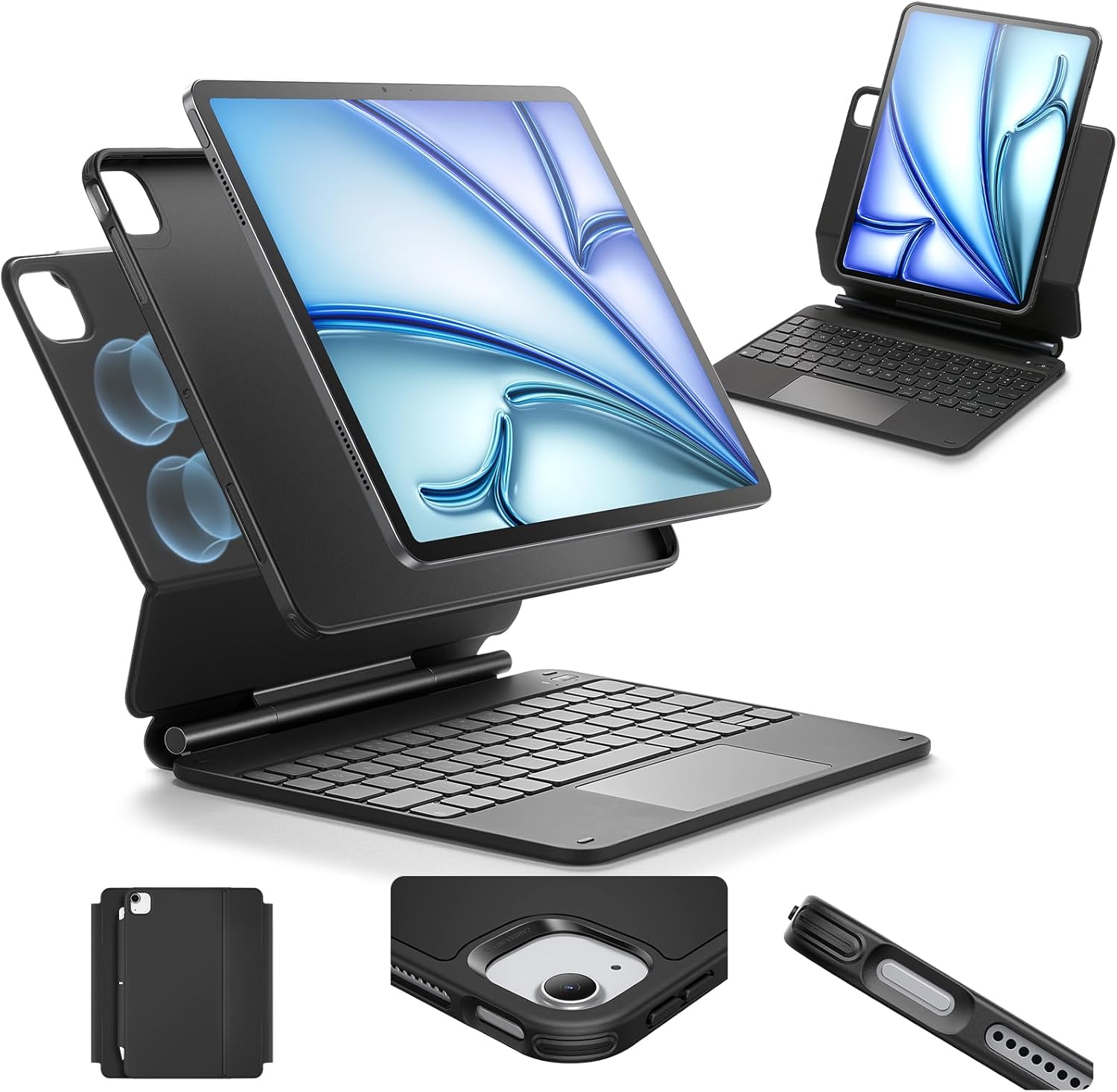
ESR (also known as ESR Gadgets) is a Hong Kong-based accessory brand that has become a major player in iPad keyboard cases. Their Ascend series keyboard case for iPad Air (4th/5th/6th gen + M2/M3) has gathered 3,500+ reviews on JD.com with a 92% positive rate, offering an alternative to Apple’s ¥2,499 Magic Keyboard at a fraction of the price.
At ¥499 (~$69), the ESR Ascend Keyboard Case provides a built-in trackpad, backlit keys with 7 colors, a detachable magnetic back cover, and multi-angle stand — features that the Apple Magic Keyboard only partially matches at 5× the price.
Specifications
| Item | Spec |
|---|---|
| Model | ESR Ascend Keyboard Case (iPad Air M2/M3) |
| Compatibility | iPad Air 4th gen (2020), 5th gen (2022), M2 (2024), M3 (2026) |
| Keyboard Type | Scissor-switch, island-style keys |
| Key Travel | 1.2mm |
| Backlight | ✅ 7 colors, 3 brightness levels |
| Trackpad | ✅ Multi-touch (click + gestures) |
| Stand | Multi-angle kickstand (30°-60°) |
| Attachment | Magnetic (detachable keyboard, case stays on iPad) |
| Battery (Keyboard) | Up to 200 hours (backlight off) |
| Charging | USB-C (keyboard charges separately) |
| Sleep/Wake | ✅ Auto sleep/wake via magnetic cover |
| Pencil Holder | ✅ Side groove (holds Apple Pencil) |
| Weight (total) | 540g |
| Material | PU leather exterior + microfiber interior |
| Colors | Black, White, Navy |
| Price (JD.com) | ¥499 (~$69) |
Design and Build
The ESR Ascend case uses a two-piece design: a protective back case that magnetically attaches to the iPad, and a detachable keyboard base. The back case covers the iPad edges and back with a textured PU leather exterior. It adds some bulk but provides genuine drop protection (military-grade drop tested to 1.2m according to ESR).
The keyboard base connects to the iPad via the Smart Connector on the iPad Air — no Bluetooth pairing needed. The keyboard is powered through the Smart Connector when attached, or via its internal battery when detached. The trackpad is connected through the same connector.
The kickstand is built into the back cover and offers a 30°-60° viewing angle range. It’s stable on flat surfaces but wobbles slightly on uneven surfaces (couch, bed). The magnetic connection between the keyboard and case is strong enough for lap use but not for holding by the keyboard alone.
Typing Experience
The scissor-switch keys offer 1.2mm travel — shallower than a MacBook keyboard (1.5mm) but deeper than the Apple Magic Keyboard (0.7mm on early models, ~1.0mm on current). The key spacing is 17.5mm, close to standard desktop keyboards. Typing feels responsive with a snappy return.
The 7-color backlight is a nice touch — you can set it to match your mood or cycle through colors. Three brightness levels cover dark rooms (level 1), normal indoor lighting (level 2), and bright environments (level 3). The backlight auto-dims after 10 seconds of inactivity.
Trackpad Performance
The multi-touch trackpad supports single-finger tap to click, two-finger scrolling, two-finger pinch-to-zoom, and three-finger swipe between apps. It uses a physical click mechanism (not haptic) — the click is audible but not loud. Cursor tracking is accurate with no jitter.
The trackpad works with iPadOS’s cursor system, including the circular cursor that adapts to UI elements. Right-click works (two-finger tap or click). The trackpad is 20% smaller than the Apple Magic Keyboard’s trackpad — usable but slightly cramped for gesture navigation.
User Reviews
From JD.com (3,500+ reviews, 92% positive):
“Bought this for my iPad Air M2 instead of the ¥2,499 Magic Keyboard. Costing ¥499, this case delivers 80% of the experience. The keyboard feels good, the backlight is useful, and the trackpad works well enough for casual use. The main difference is the Magic Keyboard has a more premium feel and the cantilever design is better for lap use.” — iPadPowerUser (JD Verified Buyer) “Bought for my iPad Air M2 instead of the ¥2,499 Magic Keyboard. At ¥499, this delivers 80% of the experience. Keyboard feels good, backlight is useful, trackpad works well enough for casual use. Main difference: Magic Keyboard feels more premium and the cantilever design is better for lap use.”
“The trackpad connection is inconsistent — sometimes it disconnects and I have to detach and reattach the keyboard. This happens about once every 2-3 days. The keyboard itself works perfectly. For the price I can live with it, but it’s worth noting.” — RegularUser (JD Verified Buyer) “Trackpad connection is inconsistent — occasional disconnects requiring keyboard detach/re-attach. Happens about once every 2-3 days. Keyboard itself works perfectly. Liveable at this price but worth noting.”
From Amazon (1,500+ reviews, 90% positive):
“Great value keyboard case. The backlight is surprisingly useful in dark environments. The trackpad is adequate for general use but not as smooth as Apple’s. Battery life is excellent — charged it once two months ago and it’s still going.” — RemoteWorker (Amazon Verified Buyer)
From Xiaohongshu (45+ posts):
“I was about to buy the Magic Keyboard for ¥2,499 but decided to try this ESR first. Honestly, for ¥499 it’s amazing value. The backlight is a feature the Magic Keyboard doesn’t even have. The typing feel is not as premium but 80% there. Keeping this and saving ¥2,000.” — BudgetTech (Xiaohongshu Creator) “Almost bought the Magic Keyboard for ¥2,499 but decided to try the ESR first. For ¥499 it’s genuinely impressive. Backlight is something even the Magic Keyboard lacks. Typing feel isn’t as refined but 80% of the way there. Keeping this and saving ¥2,000.”
Who Should Buy
- iPad Air users wanting a keyboard case without paying Apple premium
- Students who type notes and want backlight for late-night study
- Travelers who need a protective case that doubles as a keyboard
- Budget productivity seekers upgrading from on-screen typing
- ESR ecosystem users — consistent build with ESR screen protectors
Who Should Skip
- iPad Pro 11”/12.9” users — this case is Air-specific
- Lap typists — the kickstand is less stable on legs vs Magic Keyboard
- Trackpad power users — Apple’s trackpad is larger and more reliable
- Those wanting full-time Smart Connector power — keyboard uses internal battery (charged via USB-C)
Pros & Cons
Pros
- Affordable at ¥499 — 20% of Apple Magic Keyboard price
- 7-color backlit keys with 3 brightness levels
- Multi-touch trackpad with iPadOS gestures
- Magnetic detachable design
- Good 1.2mm scissor-switch typing feel
- Apple Pencil holder groove
- Auto sleep/wake via magnetic cover
- Kickstand offers multiple viewing angles
Cons
- Trackpad can disconnect intermittently (reported)
- Trackpad is smaller than Apple’s
- Less stable on lap than Magic Keyboard’s cantilever design
- Adds 540g (iPad Air is ~460g, so total ~1kg)
- Backlight reduces battery life (200h off, ~30h on)
- Not compatible with iPad Pro models
vs Competitors
| Feature | ESR Ascend (¥499) | Apple Magic Keyboard (¥2,499) | Logitech Combo Touch (¥1,199) | Baseus Keyboard Case (¥399) |
|---|---|---|---|---|
| Keyboard Travel | 1.2mm scissor | 1.0mm scissor | 1.3mm scissor | 1.0mm membrane |
| Backlight | ✅ 7 colors | ✅ Single white | ✅ Single white | ❌ No |
| Trackpad | ✅ Multi-touch | ✅ Multi-touch | ✅ Multi-touch | ❌ No trackpad |
| Stand Type | Kickstand | Cantilever | Folio kickstand | Foldable stand |
| Lap Stability | Moderate | Excellent | Good | Poor |
| Weight (total) | 540g | 610g | 580g | 450g |
| Pencil Holder | ✅ Side groove | ❌ | ✅ Side groove | ❌ |
| Price | ¥499 ($69) | ¥2,499 ($347) | ¥1,199 ($167) | ¥399 ($55) |
ESR offers the best value among keyboard cases with trackpad + backlight. Logitech’s Combo Touch has a superior trackpad and more stable lap use but costs 2.4× more. Baseus is cheaper but lacks both trackpad and backlight.
FAQ
Q1: Is the ESR keyboard case compatible with the Apple Pencil Pro? Yes. The side groove holds both the Apple Pencil (2nd gen) and Apple Pencil Pro. The case supports wireless charging for both stylus models. The Pencil attaches magnetically to the iPad’s side as usual, and the groove provides additional security.
Q2: How long does the keyboard battery last? ESR rates the battery at 200 hours with backlight off and approximately 30 hours with backlight at medium brightness. In practice, with the backlight on for about 2 hours per day, you’ll need to charge every 2 weeks. The keyboard charges via USB-C (included cable, no charger).
Q3: Does the keyboard automatically connect when attached? Yes — the Smart Connector automatically pairs the keyboard when magnetically attached. No Bluetooth setup needed. If you detach the keyboard, it can still work via Bluetooth for about 10 meters (though this is less reliable than the Smart Connector connection).
Q4: Can the case protect the iPad from drops? The polycarbonate back case with TPU bumper provides military-grade drop protection up to 1.2m (3.9 feet). The keyboard base does not provide edge protection — it covers the bottom edge while attached. The overall case is protective enough for daily use but not rugged-grade.
Q5: Does the kickstand work on soft surfaces (bed, couch)? The kickstand is most stable on hard, flat surfaces. On soft surfaces, the kickstand legs can sink into the material, causing instability. This is a common limitation of kickstand cases. The Apple Magic Keyboard’s cantilever design handles lap and soft-surface use significantly better.
Buying Advice
Best Value: ESR Ascend Keyboard Case (¥499 / ~$69) — The best sub-¥500 iPad Air keyboard case with trackpad and backlight. For most iPad Air users who want laptop-like typing, this is the right choice. The occasional trackpad disconnect is a minor annoyance at this price point.
Premium Pick: Apple Magic Keyboard (¥2,499 / ~$347) — The gold standard for iPad keyboard cases. The cantilever design provides unmatched lap stability, the trackpad is the most reliable, and the build quality is impeccable. Worth the premium if you use your iPad as a primary laptop replacement.
Budget Alternative: Baseus Keyboard Case (¥399 / ~$55) — If you don’t need a trackpad and can live without backlighting, the Baseus saves ¥100. The membrane keys are less satisfying but functional for occasional typing.
Verdict and Rating
The ESR Ascend Keyboard Case proves you don’t need to spend ¥2,499 for a quality iPad keyboard case. The backlit keys, multi-touch trackpad, and protective case design deliver genuine productivity features at 20% of the Apple Magic Keyboard’s price. The trackpad reliability issue and kickstand limitations on soft surfaces are real compromises, but they’re trade-offs most users can accept for saving ¥2,000. For iPad Air users who want to type productively without paying Apple’s accessory premium, the ESR Ascend is the strongest value proposition.
Overall Rating: ⭐⭐⭐⭐✩ (4.2/5)
- Typing Experience: 4.3/5
- Trackpad: 3.8/5
- Build Quality: 4.0/5
- Value for Money: 4.8/5
- Lap Stability: 3.5/5
Related Reviews
Amazon Fire Max 16 Review 2026
Detailed review of Amazon Fire Max 16. We tested its tablets performance, build quality, and value against top competito
Amazon Fire Max 16 Review: Big Screen, Big Battery
Amazon Fire Max 16 has 12,000+ reviews on JD.com with a 4.3/5 rating at ¥1,299 ($180). Users love the expansive 10.9-inc
Best Chinese iPad Alternatives 2026: Top Android Tablets Compared
Chinese brands now offer compelling iPad alternatives at significantly lower prices. We compare the top contenders from
Best Tablet Accessories 2026: Keyboard Cases, Stands, Screen Protectors, and More from Chinese Brands
Building the perfect tablet setup doesn't require expensive accessories. We tested the best tablet accessories from Chin
Best Tablet Stands for Bed and Desk 2026: Adjustable Arms, Goosenecks, and Lap Desks Compared
The right tablet stand for bed, desk, or kitchen changes how you use your tablet. We compare the best options from Chine