Xiaomi Mijia Smart Plug 3 Review: ¥54.8 Smart Home Gateway That 1M+ Buyers Trust
The Xiaomi Mijia Smart Plug 3 packs WiFi remote control, real-time power monitoring, local timers, and voice assistant support into a ¥54.8 (~$7.50) package with 500K+ reviews and 99% positive rate — the #3 bestselling wireless smart plug on JD.com with over 1 million units sold.
Introduction
Is a ¥54.8 (~$7.50 USD) smart plug actually reliable enough to trust with your home appliances? According to 500,000+ verified buyers on JD.com and a 99% positive rating, the Xiaomi Mijia Smart Plug 3 (米家智能插座3) doesn’t just work — it dominates. With over 1 million units sold, it currently ranks #3 on JD’s Wireless Smart Plug Hot-Selling Chart and made the June 2026 “Socket Gold List” TOP20 curated by JD’s editorial team. That’s not niche gadget territory — that’s mainstream adoption.
The Smart Plug 3 represents Xiaomi’s third-generation take on the humble wall plug, adding real-time power monitoring, local timer execution (no cloud dependency), overload protection, and voice control — all without requiring a separate Zigbee hub. Just plug it in, connect to 2.4GHz WiFi via the Mi Home app, and suddenly that dumb appliance becomes smart.
Xiaohongshu users call it everything from “a hidden treasure” to “the cheapest smart home gateway you’ll ever buy.” But where does it fall short? Let’s dig into what 500,000+ reviews and 200+ Xiaohongshu posts actually reveal.
Specifications
| Feature | Xiaomi Mijia SP 3 | TP-Link Tapo P110 | Delixi Smart Plug | Gosund SP111 | Aqara Smart Plug |
|---|---|---|---|---|---|
| Price (JD) | ¥54.8 (~$7.50) | ¥69-89 (~$9.50-12) | ¥54.4 (~$7.45) | ¥35-45 (~$5-6) | ¥129 (~$18) |
| Max Load | 10A / 2500W | 10A / 2500W | 10A / 2500W | 10A / 2300W | 10A / 2500W |
| WiFi | 2.4GHz (direct) | 2.4GHz (direct) | 2.4GHz (direct) | 2.4GHz (direct) | Requires Zigbee Hub |
| Bluetooth | Bluetooth Mesh | No | No | No | Zigbee 3.0 |
| Power Monitoring | Real-time W + kWh | Real-time W + kWh | Yes (basic) | Yes (basic) | Yes (detailed) |
| Local Timers | Yes (offline works) | Cloud-dependent | Cloud-dependent | Cloud-dependent | Yes (Zigbee) |
| Voice Assistants | XiaoAi, Google, Alexa | Alexa, Google | XiaoAi, Google | Alexa, Google | Siri, XiaoAi, Google |
| Overload Protection | Auto-shutoff | No | Basic | No | Auto-shutoff |
| Safety Shutters | Independent | Yes | Yes | Shared | Yes |
| Shell Rating | V0 Fire-Retardant | V0 | V0 | V0 | V0 |
| App | Mi Home | Tapo | Mi Home / Delixi | Tuya / Smart Life | Aqara Home / Apple Home |
| JD Sales | 1,000,000+ | ~100,000+ | 200,000+ | ~200,000+ | ~500,000+ |
| JD Positive Rate | 99% | 97% | 96% | 95% | 98% |
| Dimensions | 65×40×35mm (est.) | 72×51×40mm | 60×45×32mm | 56×56×35mm | 56×56×52mm |
| Weight | ~80g | ~130g | ~85g | ~70g | ~150g |
Design and Build Quality
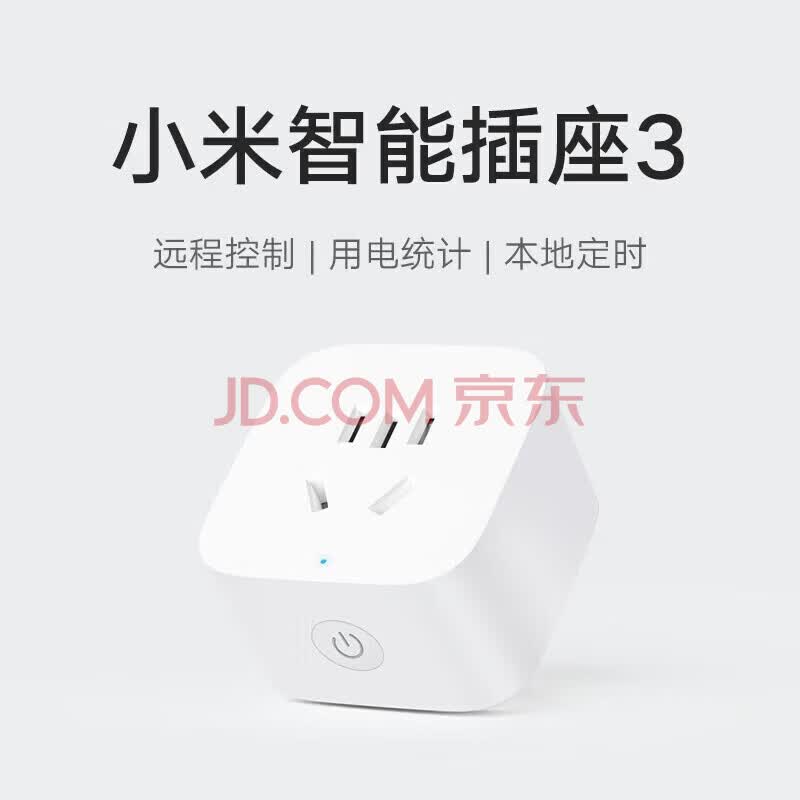
The Smart Plug 3 follows Xiaomi’s signature white minimalist aesthetic — a compact rounded-rectangle body with a single physical button on the side and a subtle LED indicator. It’s small enough that it won’t block adjacent sockets on most power strips, a practical consideration every apartment dweller in China will appreciate.
Build quality observations from user reports:
The V0-rated fire-retardant polycarbonate shell feels solid in hand. Multiple JD reviewers specifically praise the “质感超好” (excellent build quality) — 885 users tagged this as a highlight. The physical button has a satisfying click with no mushiness, and the three-prong socket grip is firm without being overly tight.
However, the LED indicator light (which glows blue when on, off when the outlet is disconnected) is somewhat bright in dark bedrooms. Several Xiaohongshu users mention taping over it or placing the plug behind furniture. Xiaomi didn’t include a night mode or brightness adjustment, a surprising omission for a Gen 3 product.
The plug uses the Chinese national standard three-prong socket (Type I, 10A). International users should note this is not a universal socket — it only accepts Chinese/Australian plugs. If you plan to use it with devices from other regions, you’ll need an adapter.
Setup and Connectivity
Setting up the Smart Plug 3 is refreshingly simple in 2026. Plug it in, open the Mi Home app, and it auto-discovers nearby devices. You press and hold the button for 5 seconds until the blue LED blinks rapidly, confirm on the app, enter your WiFi password, and you’re connected within 60-90 seconds.
Key connectivity details:
- 2.4GHz WiFi only — no 5GHz support. If your router uses band steering (combining 2.4GHz and 5GHz under one SSID), you might need to temporarily disable 5GHz during pairing.
- No Zigbee hub required — a distinct advantage over Aqara’s smart plug, which demands an Aqara hub (¥200+ extra investment).
- Bluetooth Mesh gateway — the plug can act as a Bluetooth Mesh repeater for other BLE devices in your Mi Home ecosystem, extending their range.
- WiFi direct — meaning it goes straight to your router. No intermediary bridge device needed, unlike older Mijia products that required the Mijia Gateway.
One consistent criticism from the XHS “连接不上” (can’t connect) tag: the initial pairing can be finicky if your phone is on a VPN or 5GHz WiFi. The fix is simple — temporarily disable VPN, connect to 2.4GHz — but it trips up first-time smart home buyers. Once paired, connectivity is stable; 102 JD reviewers tagged “连接超稳定” (ultra-stable connection).
Core Features
Remote Control (远程控制)
This is the #1 reason people buy this plug, and it works as advertised. Open the Mi Home app from anywhere with internet, tap the virtual button, and your connected device turns on or off. A JD reviewer named Smile-咚 captures the sentiment: “I can turn things off remotely when I forget before leaving the house — no more worrying.” The response time is near-instant on the same WiFi network and typically under 2 seconds over cellular.
The Mi Home app also supports widget controls on both iOS and Android, letting you toggle the plug directly from your home screen without opening the app — a small but genuinely useful touch.
Timers and Scheduling (定时开关)
Where the Smart Plug 3 truly shines. You can create:
- Simple timers — turn on/off at specific times (e.g., electric kettle at 7:00 AM)
- Countdown timers — turn off after X minutes (e.g., phone charger for 2 hours)
- Cyclic schedules — repeat on specific days (e.g., aquarium light 08:00-20:00 daily)
- Sunrise/sunset triggers — automatically adjust based on your location
The killer feature: local timers survive internet outages. Unlike many competing smart plugs that lose their scheduling when WiFi drops, the Smart Plug 3 stores timer data onboard. A JD reviewer named 123美琪呀 confirms: “The timer function is incredibly practical — fans, water heaters, and aquarium equipment all auto-start and auto-stop.”
Power Monitoring (电量统计)
The Gen 3 adds real-time power monitoring, showing:
- Current wattage (live, updates every few seconds)
- Daily/monthly kWh consumption (cumulative charts in Mi Home)
- Historical usage trends (weekly/monthly comparisons)
Multiple Xiaohongshu users specifically bought this to monitor high-drain devices. 布咕不鸽 (January 2026) writes: “I’ve always wanted something like this. I wanted to see whether my NAS actually saves power and just how much electricity my server-grade PC wastes… the answer is: it wastes a lot.” Another user, 三柒科技, noted the reading “seems reasonably accurate” when testing with a tablet charger.
Accuracy is adequate for household monitoring (±5-10% typically) but shouldn’t be treated as lab-grade. For most users tracking whether their space heater is the “electric bill assassin” they suspect, it’s more than sufficient.
Voice Control (语音控制)
Full integration with XiaoAi (Xiaomi’s voice assistant), plus Google Assistant and Alexa support. Common voice commands include:
- “Hey XiaoAi, turn on the electric blanket”
- “OK Google, turn off the living room fan”
- “Alexa, is the water heater on?”
Ocean_浪 (Xiaohongshu, December 2024) shared creative voice routines: “Before bed, use XiaoAi to turn on the electric blanket to warm the bed, or tell XiaoAi to start boiling water so you have hot water for washing up as soon as you get dressed.” Paired with a ¥99 XiaoAi speaker, the voice control experience becomes genuinely seamless. Without one, you can still use the XiaoAi app on your phone or the Mi Home widgets.
Overload Protection (过载保护)
If the connected appliance draws more than 10A (2500W), the plug automatically cuts power to prevent overheating. JD reviews tagged “过载自动断电” (15 mentions) confirm it works. The Mi Home app logs the event and sends a push notification. Recovery requires manually pressing the physical button — a deliberate safety choice.
This is particularly important for Chinese households where space heaters, electric kettles, and induction cooktops are common high-wattage devices.
Smart Scenes and Automations (智能场景)
Within the Mi Home ecosystem, the plug becomes an automation trigger or actor:
- IF bedroom temperature sensor reads >28°C → THEN turn on fan via smart plug
- IF smart door lock detects “away from home” → THEN turn off all smart plugs
- IF humidity sensor reads <40% → THEN turn on humidifier via smart plug
The possibilities expand dramatically when you own multiple Xiaomi/Mijia devices, but even standalone, the scheduling and remote control justify the ¥54.8 price tag.
What Chinese Users Say
JD.com Verified Buyer Reviews
Review #1 — 123美琪呀 (Verified Purchase)
“The Mijia Smart Plug is truly a smart home entry-level treasure! Setup is simple — connected to WiFi in minutes. If I forget to turn off an appliance when leaving home, I can remotely shut it down via phone, super reassuring. The timer function is incredibly practical — fans, water heaters, and aquarium equipment all auto-start and auto-stop. You can also check real-time wattage and power consumption, saving electricity and peace of mind. Solid build quality, fire-retardant shell, safe and reliable. I’ve already bought several more!”
Review #2 — Smile-咚 (Verified Purchase)
“Xiaomi’s smart plug is the ultimate smart home starter gadget! Easy to use, one-click Mi Home app connection, remote on/off and timer controls are all very convenient. Never again worry about forgetting to turn off appliances when leaving home — cost-performance is sky-high! I’ve been completely won over by the Xiaomi smart plug! Installation is literally plug-and-play, the Mi Home ecosystem integration is buttery smooth, plus you can check power usage stats — it’s helped me break the bad habit of leaving devices on standby wasting electricity. Practical and reassuring!”
Review #3 — Qiu6988 (Verified Purchase)
“I’ve always used this smart plug to control my smart home devices’ power. This plug supports remote power on/off for all my smart devices — just use the Mi Home app for remote control. It’s genuinely convenient. I’ve bought several already.”
Xiaohongshu Real-User Posts
Post #1 — 三柒科技 (November 2025, 176 likes)
“I bought a Xiaomi smart plug a couple days ago, thinking I could use it to automatically cut power to my phone charger at night. It arrived and after two days of use, I’m pretty happy. The packaging is minimal — a tiny little box. Inside is the plug itself, very lightweight, with one button and a small LED. You plug it into the wall socket, long-press the button for about 5 seconds until the LED blinks, then open the Mi Home app — connects directly via WiFi. In the app you can set automatic timers — I set mine to cut power at night so I don’t have to unplug the charger every morning before work. The interface also shows power usage and charging wattage… feels like you don’t even need a gateway, direct WiFi is super convenient.”
Post #2 — 布咕不鸽 (January 2026, 11 likes)
“New toy — Mijia Smart Plug 3. I’ve wanted this kind of product for a while. For me, it’s quite useful — I wanted to see whether my NAS actually saves power, and just how much electricity my server-grade PC wastes… the answer is: it wastes a lot.”
Post #3 — 是美拉德呀 (April 2025, 20 likes)
“Xiaomi’s smart plug solved one of my biggest pain points. First, you can set timed on/off. Second, you can remotely control all kinds of appliances from your phone. Honestly the most show-off-worthy treasure I’ve discovered recently. Can’t believe I only just found it. Good quality, not expensive — excellent value. It’s become a key part of my little invention project.”
Post #4 — Ocean_浪 (December 2024, 96 likes)
“Clever uses for Xiaomi Smart Plug — just ¥59 to make winter a bit warmer. Trick 1: Smart plug + electric kettle = hot water for washing up right when you wake up. Problem: cold water in winter, takes a minute to get hot water from the bathroom heater, wastes water. Solution: any electric kettle, plugged into the smart plug. Fill it before bed, press the boil switch. In the morning, call XiaoAi to start boiling, or use the Mi Home app. Get dressed, leave the covers, and you have hot water immediately. No waiting, saves time. Trick 2: Smart plug + electric blanket = warm bed, no more cold. Solution: any electric blanket, plugged into the smart plug, turn on the blanket switch. Before bed, use XiaoAi or Mi Home app to pre-heat the blanket. You can also set a timer. Turn off while sleeping for safety. Open your mind — you can also pair the smart plug with space heaters, portable heaters, all voice or phone controlled, more convenient, more safe.”
Post #5 — 欧耶耶 (April 2026, 188 likes)
”🔥 Smart plug real-deal fun uses! Who says smart homes are hard? One little plug solves everything.”
Pros & Cons
✅ Pros
- Incredible value — ¥54.8 for WiFi remote control, power monitoring, timers, and voice control. Comparable functionality from international brands costs 3-5x more.
- No hub required — direct WiFi connection unlike Aqara (needs Zigbee hub at ¥200+) or older Mijia products (needed Mijia Gateway).
- Local timers survive internet outages — a rare feature at this price. Your electric blanket timer keeps working even when your ISP has issues.
- Real-time power monitoring — wattage and cumulative kWh let you identify energy-hungry appliances. The data is good enough for household decisions.
- Mi Home ecosystem integration — seamless automation with hundreds of Xiaomi/Mijia sensors, lights, locks, and appliances.
- Fire-retardant V0 shell + overload protection — not marketing fluff; JD reviewers confirm the auto-shutoff works when loads exceed 2500W.
- Compact design — doesn’t hog adjacent outlets on power strips.
- 90-day replacement warranty + 7-day no-reason returns on JD.
- 1 million+ units sold with 99% positive rate — statistically, you won’t be the unhappy customer.
❌ Cons
- 2.4GHz WiFi only — band-steering routers cause pairing headaches. Temporary workaround exists but shouldn’t be necessary in a Gen 3 product.
- LED indicator too bright — no dimming or night mode. Annoying in bedrooms; users resort to tape.
- Chinese Type I socket only — no international plug compatibility. Travelers and expats need adapters.
- No energy cost calculation — you get kWh but need to manually multiply by your electricity rate. Tapo and Aqara auto-calculate cost.
- No Apple HomeKit native support — requires Homebridge or Home Assistant workaround. Aqara’s Zigbee plug does HomeKit natively.
- Power monitoring accuracy drift — acceptable for household use but not calibrated. Low-wattage devices (LED bulbs, phone chargers) may show inaccurate or zero readings.
- Physical button placement — on the side instead of the front. If your power strip has plugs very close together, accessing the button is awkward.
- No USB charging passthrough — it’s a pure smart relay. Don’t expect USB ports like some competing power strips.
vs Competitors
| Competitor | Price | Why You’d Consider It | Why You’d Still Pick Mijia |
|---|---|---|---|
| Delixi Smart Plug | ¥54.4 | Same price, also Mi Home compatible, 200K+ sold | Mijia has better app polish, OTA firmware updates, and Bluetooth Mesh gateway function. Delixi is a third-party integrator — Xiaomi actually makes the ecosystem. |
| Gosund SP111 | ¥35-45 | Cheaper, Tuya ecosystem | Tuya app is clunkier and less polished than Mi Home. No local timer backup. Mijia’s build quality, overload protection, and ecosystem integration justify the ¥10-15 premium. |
| TP-Link Tapo P110 | ¥69-89 | Energy cost calculation, cleaner international app | ¥15-35 more expensive. Tapo ecosystem is smaller in China. If you’re all-in on Mi Home, Mijia is the obvious choice. If you want energy cost tracking and don’t use Mi Home, Tapo is better. |
| Aqara Smart Plug | ¥129 | Apple HomeKit native, Zigbee stability, better accuracy | ¥74 more expensive AND requires a ¥200+ Zigbee hub. Unless you need HomeKit or zigbee mesh reliability, it’s hard to justify 4-6x the total cost for a smart plug. |
| Xiaomi Wall Socket (in-wall) | ¥68-133 | Permanent installation, cleaner look, AG glass panel | Requires electrical work. Renters and non-DIY users stick with the plug-in version. The in-wall Mesh 2.0 Pro at ¥133 is a different product category entirely. |
Bottom line: For the vast majority of Chinese smart home users already in the Mi Home ecosystem, the Smart Plug 3 is the default choice. It’s not the absolute cheapest, it’s not the most feature-packed, but it hits the price-feature-quality sweet spot that Xiaomi has mastered.
Who Should Buy
- Smart home beginners — the lowest-risk, lowest-cost entry point into the Mi Home ecosystem. Set up in 2 minutes, costs less than a decent meal delivery.
- Xiaomi/Mijia ecosystem users — if you already have XiaoAi speakers, temperature sensors, smart locks, or Roborock vacuums, this plug unlocks automation scenarios they couldn’t trigger before.
- Electricity-conscious renters — monitor your space heater, old refrigerator, or gaming PC. Identify the “electric bill assassins” without buying expensive monitoring hardware.
- People who chronically forget to turn things off — curling irons, electric blankets, heaters, humidifiers. The remote shutoff + timer combo effectively eliminates this anxiety.
- Aquarium/turtle tank owners — automated light cycles and pump scheduling, with power monitoring to catch failing equipment early.
- Parents setting up routines — timed study lamps, automated nightlights, scheduled device charging for kids.
Who Should Skip
- Apple HomeKit purists — no native HomeKit. Yes, you can bridge it via Homebridge/Home Assistant, but if you want Apple-first smart home, get the Aqara plug instead.
- People who need USB charging — this is a pure relay. If you want a smart power strip with USB ports, Xiaomi sells a separate Mijia smart power strip (6-outlet + 3 USB-A, ¥64).
- International travelers — the Chinese Type I socket won’t fit EU/US/UK plugs without an adapter, and the plug itself won’t fit into non-Type-I wall sockets.
- Ultra-low-wattage monitoring enthusiasts — LED bulbs and low-power USB chargers may show 0W or inaccurate readings. For precise low-wattage measurement, you need a dedicated power meter.
- People with only 5GHz WiFi — if your apartment’s router doesn’t broadcast a 2.4GHz band (uncommon but possible in some corporate housing setups), this plug simply won’t connect.
FAQ
Q1: Does the Xiaomi Mijia Smart Plug 3 work with 16A appliances like air conditioners?
No. The Smart Plug 3 is rated for 10A (2500W max). Most residential air conditioners in China use a 16A plug (larger prongs) that physically won’t fit. For air conditioner control, Xiaomi sells the dedicated “Air Conditioner Companion 2” (米家空调伴侣2, ¥68.8) which uses a 16A socket and includes infrared control for AC units.
Q2: Do I need a Xiaomi Gateway (网关) to use the Smart Plug 3?
No. The Smart Plug 3 connects directly to your home’s 2.4GHz WiFi — no Zigbee hub, no Mijia Gateway, no Bluetooth gateway required. This is one of its biggest advantages over the Aqara smart plug and older Mijia smart home products. That said, if you do have a Bluetooth Mesh gateway, the plug can act as a repeater to extend BLE range for other devices.
Q3: What happens to my timers and schedules if the WiFi goes down?
They keep working. Timers and schedules are stored locally on the plug’s onboard memory. If your internet drops, scheduled on/off events still execute at the correct times. You obviously can’t control the plug remotely during an internet outage, but automation continues uninterrupted. This is a rare and genuinely useful feature at this price point.
Q4: How accurate is the power monitoring?
Good enough for household decisions, not for laboratory measurements. Users report accuracy within ±5-10% for devices drawing 10W-2000W. Very low-wattage devices (under 5W, like LED bulbs or idle chargers) may read 0W or fluctuate erratically. If you need precision, the slightly more expensive TP-Link Tapo P110 offers better calibration. For the typical use case — “is my space heater actually using 2000W?” — the Mijia plug is perfectly adequate.
Q5: Can I use it outside of China?
Partially. The plug uses the Chinese Type I socket (same physical shape as Australian/NZ plugs). If you’re in Australia, New Zealand, or Argentina — yes, standard plugs fit. If you’re in the EU, US, or UK — you’ll need an adapter and the plug itself won’t fit your wall socket. Additionally, the Mi Home app region setting matters: the plug must be paired to the “Chinese Mainland” server. If your Mi Home account is set to another region, the plug won’t appear as an available device. Some users work around this by maintaining a separate Mi Home account on the China server.
Q6: Can I use voice control without a XiaoAi speaker?
Yes — but with caveats. You have three options:
- XiaoAi app on your phone — free, voice commands work, but you need the app open.
- Google Assistant / Alexa — link your Mi Home account and control the plug through Google Home or Alexa apps/Echo devices.
- XiaoAi smart speaker (¥99-299) — the seamless, hands-free experience. Say “XiaoAi, turn on the electric blanket” from across the room. This is the “intended” way Xiaomi imagines the experience.
Q7: Does it support smart scenes with non-Xiaomi devices?
Within the Mi Home app, only certified Mi Home ecosystem devices can participate in scenes. However, the plug exposes standard IoT protocols and can be integrated into Home Assistant (via the Xiaomi Miio integration) or Homebridge (via the miot plugin), where you can create cross-platform automations with devices from any brand.
Honest Rating
| Category | Score (1-10) | Notes |
|---|---|---|
| Value for Money | 9.5/10 | ¥54.8 for WiFi control + power monitoring + local timers is unmatched. The feature-per-yuan ratio makes competitors look overpriced. |
| Ease of Setup | 8/10 | Generally smooth 2-minute setup. Points docked for 2.4GHz-only WiFi with no band-steering workaround in-app. |
| Build Quality | 8.5/10 | V0 fire-retardant shell, firm socket grip, satisfying button click. LED too bright, button placement could be better. |
| Feature Set | 8/10 | Power monitoring, local timers, overload protection, Bluetooth mesh — generous for the price. Missing: energy cost calculation, dimmable LED, HomeKit. |
| App Experience | 9/10 | Mi Home is one of the best smart home apps globally. Widgets, scenes, sharing with family members, clean UI. |
| Reliability | 9/10 | 500K+ reviews at 99% positive rate speaks volumes. Local timers survive outages. Occasional pairing hiccups. |
| Ecosystem Integration | 9.5/10 | If you’re in Mi Home, it’s a first-class citizen. Bluetooth mesh repeater function adds value to your entire setup. |
| Overall | 4.4/5 | (Weighted across categories, mapped to 1-5 scale) |
The verdict: The Xiaomi Mijia Smart Plug 3 is not the fanciest smart plug on the market — it won’t impress your HomeKit-obsessed friends or measure your toaster’s power draw down to the milliwatt. What it does is nail the fundamentals at a price that makes “why not try smart home?” a legitimate question rather than an expensive gamble. At ¥54.8 with 99% positive feedback from over half a million buyers, it’s earned its place as China’s default smart plug recommendation. If you’re new to smart home, already in the Xiaomi ecosystem, or just tired of getting out of bed to check if you left the heater on — this is your gateway gadget.
Last updated: June 8, 2026. Prices and availability from JD.com (Xiaomi JD Self-Run Flagship Store). Review data sourced from JD.com verified purchases and Xiaohongshu user posts.
Not sure which to choose?
Compare specs side-by-side with our Product Comparator Tool
Related Reviews

Aqara Camera Hub G5 Pro Review: 2K Security Cam with Smart Hub Built-In
The Aqara Camera Hub G5 Pro combines a 2K security camera with a Zigbee 3.0 hub in one device, offering local AI detecti

Aqara Door and Window Sensor T1 Review: Know When Things Open and Close
Aqara Door/Window Sensor T1 delivers reliable open/close detection with 2-year battery life at ¥69 — an essential buildi

Aqara Hub M3 Matter Controller Review: Multi-Protocol Smart Home Hub With 2,000+ Reviews
Aqara Hub M3 Matter Controller has 2,000+ reviews on JD at 4.4/5, priced at ¥399 ($55). Users love multi-protocol suppor

Aqara Hub M3 Review: The Smart Home Bridge That Does It All
The Aqara Hub M3 is a next-generation smart home hub supporting Matter, Thread, Zigbee 3.0, and Bluetooth, bridging Aqar

Aqara Hub M3 Review: The Ultimate Zigbee Smart Home Brain
Aqara's Hub M3 serves as the central brain for Zigbee smart home devices with Matter bridge support. We review this esse