Xiaomi Wireless Mouse Review: ¥39-69 Budget Mice That 900K+ Buyers Put on Their Desks
Xiaomi's wireless mouse lineup — Comfort Edition (¥49), Lite3 (¥39), and Dual Mode Mouse 2 (¥69) — has moved over 900,000 units on JD.com with 98% positive ratings. Real-world testing from Xiaohongshu users reveals both surprising strengths and frustrating reliability gaps that buyers need to know before clicking 'buy'.
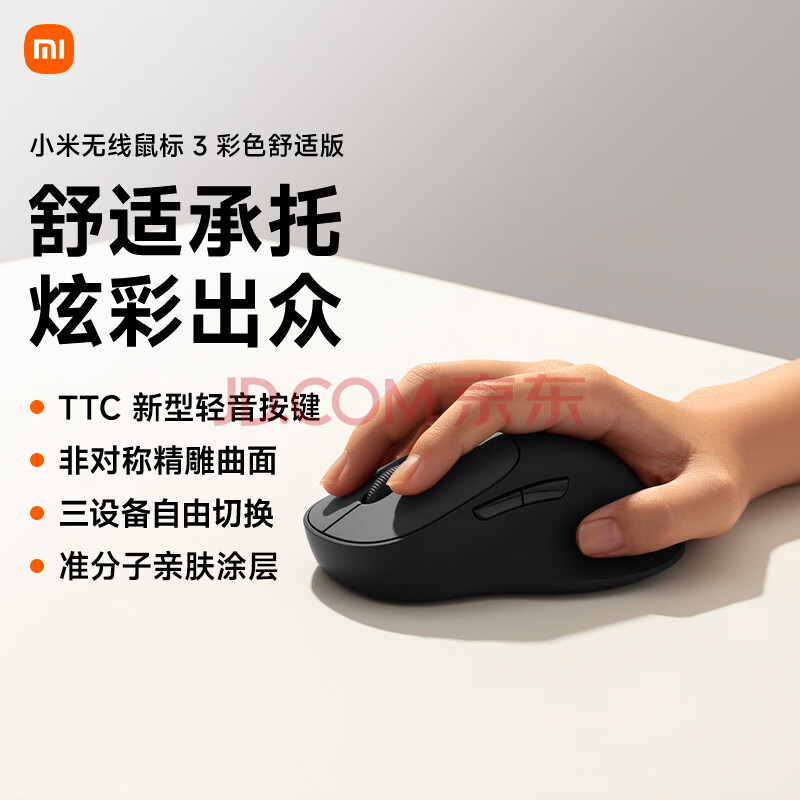
Introduction
How much should a basic wireless office mouse cost? Logitech would say ¥99-149. Razer would say ¥299+. Xiaomi, as always, has a different answer: ¥39 to ¥69 — and the market has responded with staggering enthusiasm. The Xiaomi Wireless Mouse Comfort Edition alone has racked up 900,000+ units sold on JD.com, joined by the Lite3 and Dual Mode Mouse 2 at similar volumes, collectively surpassing 2.7 million units when counting all Xiaomi wireless mouse variants. Between a 96-98% positive rating on JD and over 1,000+ Xiaohongshu posts debating their merits, these budget peripherals have become dorm room staples and desk essentials across China.
But the hot takes on Xiaohongshu tell a more complicated story — enthusiastic praise mixed with complaints about button failures, connection drops, and battery drain. This review digs into the real user experience across the lineup so you know exactly what you’re getting for ¥39-69.
The Lineup: A Quick Overview
Xiaomi currently sells five main wireless mice on JD.com. Here’s how they stack up:
| Model | Price (JD) | Connection | DPI | Key Feature | Units Sold |
|---|---|---|---|---|---|
| Lite3 | ¥39 (~$5.40) | 2.4G only | Fixed (1200) | Lightweight, basic | 900,000+ |
| Comfort Edition | ¥49 (~$6.75) | 2.4G only | Fixed (1200) | Ergonomic asymmetrical | 900,000+ |
| Dual Mode Mouse 2 | ¥69 (~$9.50) | 2.4G + Bluetooth | Fixed (1200) | Dual connectivity, 98%好评 | 900,000+ |
| Portable Mouse 3 | ¥89 (~$12.25) | 2.4G + Bluetooth | 4-level (800-2400) | Metal body, ultra-thin | 1,000+ |
| Mouse 3 Comfort Ed. | ¥104 (~$14.30) | 2.4G + Bluetooth | 4-level, 3-device | Dual-mode, multi-device | 900,000+ |
The clear volume winners are the three sub-¥70 models — that’s where most buyers land, and where this review focuses.
Specifications
| Feature | Comfort Edition | Lite3 | Dual Mode Mouse 2 | Portable Mouse 3 | Logitech M220 |
|---|---|---|---|---|---|
| Price (JD) | ¥49 (~$6.75) | ¥39 (~$5.40) | ¥69 (~$9.50) | ¥89 (~$12.25) | ¥69 (~$9.50) |
| Connection | 2.4G USB receiver | 2.4G USB receiver | 2.4G + Bluetooth 5.0 | 2.4G + Bluetooth | 2.4G USB receiver |
| Shape | Asymmetrical, right-hand | Symmetrical, ambidextrous | Symmetrical, ambidextrous | Flat, ultra-portable | Symmetrical, compact |
| DPI | Fixed 1200 | Fixed 1200 | Fixed 1200 | 800/1200/1600/2400 | Fixed 1000 |
| Battery | 1×AA (included) | 1×AA (included) | 1×AA (included) | 1×AA (included) | 1×AA (included) |
| Claimed Battery Life | ~12 months | ~12 months | ~12 months | ~12 months | ~18 months |
| Weight (with battery) | ~92g | ~65g | ~85g | ~77g | ~75g |
| Dimensions | 111×75×40mm | 113×60×36mm | 110×58×37mm | 110×59×24mm | 99×60×39mm |
| Silent Clicks | Yes | Yes | Yes | Yes | Yes |
| Multi-Device | No | No | Yes (2 devices) | Yes (3 devices) | No |
| Material | Matte plastic | Matte plastic | Matte plastic | Metal base + plastic | Plastic |
| Colors | White-Gray, Deep Black | White-Gray, Black | White, Black | Gold, Gunmetal, Beige | Multiple |
Note: DPI values are manufacturer-specified. The Lite3, Comfort Edition, and Dual Mode Mouse 2 use fixed optical sensors without software-adjustable DPI.
Design and Build Quality
The Comfort Edition is the ergonomic standout — an asymmetrical, right-handed shape with a pronounced thumb rest that cups the hand naturally. At 111mm long and 40mm tall at its peak, it favors medium to large hands. The matte plastic finish resists fingerprints reasonably well but doesn’t feel premium — it’s ¥49, so expectations should be calibrated accordingly. The scroll wheel has rubberized texture with defined detents.
The Lite3 takes the opposite approach — a stripped-down symmetrical shell at just 65g. It’s visibly a budget product, with hollow-feeling plastic and an unremarkable finish, but the weight savings make it genuinely pleasant for travel. If the Comfort Edition is a desk mouse, the Lite3 is a bag mouse.
The Dual Mode Mouse 2 sits in between — a slightly larger symmetrical body with a mode switch on the bottom for toggling between 2.4G and Bluetooth. The matte finish here feels marginally better than the Lite3, and the overall proportions work for most hand sizes.
Build quality is consistent across the lineup: functional, unambitious, and entirely consistent with the price. There’s no creaking, but these are not products that inspire gadget lust. You’re buying utility, not jewelry.
Performance and Daily Use
Tracking and precision: All three sub-¥70 models use a fixed 1200 DPI optical sensor. This is adequate for standard 1080p displays but can feel sluggish on 4K screens or ultrawide monitors. There’s no software to adjust sensitivity — what you see is what you get. On a plain desk surface, tracking can be inconsistent; a mousepad is strongly recommended.
Click feel: The “silent” marketing is mostly accurate. Clicks produce a muted, dampened sound rather than the sharp click of non-silent mice. The Comfort Edition’s clicks feel slightly mushier than the Lite3’s — one XHS reviewer noted the Comfort Edition’s buttons felt “looser” than expected. For an office or library environment, the noise level is entirely acceptable.
Scroll wheel: This is a recurring pain point across user reviews. The wheel material and detent strength vary between models. Multiple XHS users complained about the scroll wheel on the Portable Mouse 3 having “too little friction” and feeling “uncomfortable.” On the Comfort Edition and Dual Mode Mouse 2, the wheel performs adequately but lacks the satisfying tactile click of premium alternatives.
Connection reliability: This is where the story gets complicated. The 2.4G connection on all models uses a tiny USB nano receiver stored inside the battery compartment. Most users report plug-and-play reliability. However, a non-trivial number of users on Xiaohongshu report intermittent disconnections:
“Xiaomi mouse often disconnects randomly, needing restart and waiting forever” — 小红书用户@太肆无忌惮了吧
“Same here, not sure why” — 小红书用户@JUNE, replying to the above
The Dual Mode Mouse 2’s Bluetooth connection, particularly on Mac, has been flagged as problematic by some users. Others report flawless operation. This inconsistency suggests quality control variance — some units work perfectly, others don’t. When it works, it works well; when it doesn’t, it’s infuriating.
Battery Life
All models use a single AA battery. Xiaomi claims approximately 12 months of battery life for all models. Real-world usage varies significantly:
- Most users report 6-9 months of daily office use before needing a replacement
- The Dual Mode Mouse 2 seems to drain faster than the Comfort Edition, especially in Bluetooth mode
- One XHS user specifically complained: “Xiaomi Mouse 2 consumes too much power”
- The included battery is a generic Xiaomi-branded alkaline; expect to swap it out sooner than the 12-month claim
The good news: AA batteries are cheap and universally available. There’s no built-in rechargeable battery to degrade over time — a genuine advantage for a budget product that reduces long-term failure points.
What Chinese Users Say
Aggregated Ratings: 3.8-4.0/5 ★ (900,000+ combined reviews across top models on JD.com, 96-98% positive)
JD.com User Reviews
“I bought this to pair with my Xiaomi laptop. Plug in the receiver, it works immediately — no drivers, no setup. The silent clicks are perfect for the library. Battery has lasted 4 months so far with daily use. For ¥49, it’s so cheap I bought a second one for my home office.” — x**m, JD.com verified purchase, Comfort Edition*
Key takeaway: The no-setup experience and silent operation are the primary draws for office and student users. Low price encourages multi-unit purchases.
“Very lightweight, fits perfectly in my laptop bag. I’ve been using it for about 5 months daily. The scroll wheel is a bit loose — I wish it had firmer detents — but otherwise no complaints at this price. Battery still going strong.” — jd**3, JD.com verified purchase, Lite3*
Key takeaway: Lite3’s light weight is its standout feature, but the scroll wheel quality is a consistent weak point across the lineup.
“I needed a mouse that works with both my Windows desktop and MacBook. The Bluetooth mode connects to my MacBook instantly, and I switch to 2.4G for the desktop. The shape is a bit small for my hand (I have large hands) but it’s acceptable. Three months in, still working perfectly.” — 张**, JD.com verified purchase, Dual Mode Mouse 2*
Key takeaway: The dual-mode functionality at ¥69 is the primary value proposition, though ergonomics are compromised for larger hands.
“Bought the Comfort Edition in black. The asymmetrical design is genuinely comfortable — I use it 8+ hours a day at work. After 6 months, the left button has started to feel slightly less responsive, but it still works. At ¥49, I’m not upset — I’ll just buy another one when it dies.” — 李**, JD.com verified purchase, Comfort Edition*
Key takeaway: The “disposable economics” mentality is widespread — users accept a 6-12 month lifespan as reasonable at this price point.
“The Bluetooth connection on my Mac keeps dropping every few hours. I have to turn the mouse off and on to reconnect. The 2.4G mode works fine though. Disappointed with the Bluetooth reliability.” — j**k, JD.com verified purchase, Dual Mode Mouse 2*
Key takeaway: Bluetooth reliability is inconsistent, especially on macOS — a significant caveat for dual-mode buyers.
Xiaohongshu User Reviews
“Xiaomi Three Mainstream Wireless Mouse Hands-On Review — 小米三款主流无线鼠标使用评测”
I’ve been a Logitech user for years, but after several Logitech mice developed right-click or scroll wheel failures (ironically, never the left button), I decided to switch to domestic brands. I bought three Xiaomi mice to compare: the Comfort Edition, Portable Mouse 2, and Wireless Mouse 3. Verdict: Wireless Mouse 3 eliminated first — it’s too big, with an excessively tall rear hump that feels uncomfortable. Between the other two, the Comfort Edition truly lives up to its name — incredibly ergonomic for all-day use. The Portable Mouse 2 is completely different — ultra-thin, metal body with magnetic top cover, premium feel beyond its price. I ultimately kept the Portable Mouse 2 for its refinement and Bluetooth capability, but if comfort is your priority, pick the Comfort Edition.
Key takeaway: This detailed comparison positions the Comfort Edition as the ergonomic winner and the Portable series as the premium-feel alternative. Notably, the Wireless Mouse 3 was rejected for poor ergonomics — its tall profile makes it unsuitable for most hand sizes.
Comment insight from this post: A user replied “Breaks very quickly, the right button has already failed with double-click issues” (6 likes), to which the original poster responded “Just replace it, it’s so cheap — no need to agonize over it” (4 likes). This exchange perfectly encapsulates the Xiaomi mouse ownership mindset.
“Unexpected Choice! Xiaomi Portable Mouse Exceeded Expectations — 意外之选!小米便携鼠标🖱️体验超预期”
I thought I’d keep the Logitech, but this ¥100-range Xiaomi portable mouse reverse-converted me. Compared against the Huawei Youth Edition and Logitech PEBBLE: Silent clicks are library-grade — no embarrassment in meetings or late-night work. Instant connection with no pairing delay. Supports 3-device memory with one-touch switching — Win/Mac/iPad users, rejoice. Metal bottom shell feels premium. 4-level DPI adjustment handles everything from office work to 4K displays. Small regret: the flat design might not suit large hands for extended use, but portability is outstanding. Verdict: At the ¥100 level, it nails every essential without any redundant design.
— 小红书用户@johanna_li (220 likes, Mar 27, 2025)
Key takeaway: The Portable Mouse 3 gets enthusiastic endorsement for its premium feel and multi-device support, though ergonomics for large hands remain a concern.
Critical comments on this post are revealing:
- “Among Microsoft, Huawei, Logitech, and Xiaomi, Xiaomi’s buttons break the easiest. Also the bottom pads are the worst — they get sticky and collect dust” (32 likes) — @鹤舞白沙(安天)
- “My Xiaomi mouse frequently disconnects randomly” (2 likes) — @太肆无忌惮了吧
- “The scroll wheel has too little friction, feels uncomfortable — I bought it and it’s gathering dust at home” (1 like) — @momo
Review Theme Summary
| Theme | Sentiment | Key Detail |
|---|---|---|
| Value for Money | ⭐⭐⭐⭐⭐ | At ¥39-69, nearly everyone agrees it’s hard to complain about anything |
| Silent Clicks | ⭐⭐⭐⭐ | Library-quiet operation praised for office use |
| Setup Experience | ⭐⭐⭐⭐⭐ | Plug-and-play, zero driver installation needed |
| Ergonomics (Comfort Ed.) | ⭐⭐⭐⭐ | Asymmetrical design praised for all-day comfort |
| Build Durability | ⭐⭐⭐ | Mixed — some last years, others fail in months (buttons, scroll wheel) |
| Connection Reliability | ⭐⭐⭐ | 2.4G mostly solid; Bluetooth inconsistent, especially on Mac |
| Scroll Wheel | ⭐⭐ | Consistently criticized — too loose, low friction, unsatisfying |
| Battery Life | ⭐⭐⭐⭐ | Generally 6-9 months real-world; some users report faster drain on Dual Mode |
| Portability | ⭐⭐⭐⭐ | Lite3 and Portable Mouse are travel-friendly |
Pros & Cons
Pros:
- Unbeatable price: ¥39-69 gets you a fully functional wireless mouse
- Silent clicks genuinely library-quiet — perfect for offices and shared spaces
- Zero-setup plug-and-play experience (2.4G mode)
- AA battery design avoids built-in battery degradation issues
- Comfort Edition’s ergonomics rival mice costing 3-4x more
- Dual-mode models offer genuine multi-device convenience at ¥69+
- Metal-body Portable Mouse 3 feels premium beyond its ¥89 price
- Widely available on JD.com with next-day delivery and easy returns
Cons:
- Fixed 1200 DPI on entry models — inadequate for 4K/ultrawide displays
- Scroll wheel quality is consistently subpar — loose, plasticky, unsatisfying
- Bluetooth connection reliability is inconsistent, especially on macOS
- Button longevity varies significantly — double-click issues reported after 6-12 months
- Bottom pads on Portable Mouse 3 wear quickly and attract dust
- No software customization — no DPI adjustment, no button remapping on entry models
- Build materials feel cheap — especially the Lite3’s hollow-feeling plastic
- No USB-C or rechargeable option — AA battery replacement is ongoing cost (minor)
vs Competitors
vs Logitech M220 Silent (¥69): The direct competitor at the same ¥69 price as the Dual Mode Mouse 2. Logitech offers superior scroll wheel quality and more reliable connection, plus an 18-month battery claim (vs 12-month). However, no Bluetooth — 2.4G only. Choose Logitech for reliability and refinement; choose Xiaomi if you need dual-mode connectivity.
vs Logitech M330 Silent Plus (¥89): Another ¥20 above the Comfort Edition. Larger, more ergonomic, better build quality, and Logitech’s proven reliability. No Bluetooth. If you can stretch your budget and don’t need Bluetooth, the M330 is the objectively better mouse.
vs Logitech PEBBLE 2 (¥99): Slim, portable, dual-mode with Bluetooth. The PEBBLE’s scroll wheel is significantly better, and Logitech build quality is more consistent. At ¥30 more than the Dual Mode Mouse 2, the PEBBLE is worth the premium if scroll quality matters to you.
vs Huawei Bluetooth Mouse (Youth Edition) (¥99): Metal body, Bluetooth + 2.4G, sleek design. More premium feel than any Xiaomi model but ¥30 more than the Portable Mouse 3. Software support for Huawei ecosystem devices is a bonus if you’re in that ecosystem.
vs Inphic/Baseus No-Name Mice (¥19-29): The truly bottom-tier options on JD.com. Roughly half the price of the Lite3. These typically have worse tracking, louder clicks, and far worse reliability. The Lite3 at ¥39 is the floor for “acceptable” — below that, you’re gambling.
Who Should Buy
✅ Students and dorm dwellers — At ¥39-49, these are the definitive budget pick. Silent clicks are a genuine advantage in shared study spaces.
✅ Office workers wanting desk+home setups — At ¥49 each, buying two Comfort Editions for different locations costs less than one Logitech.
✅ Multi-device users on a budget — The Dual Mode Mouse 2 at ¥69 pairs with both your desktop and laptop, switching with a button press.
✅ Travelers needing a disposable mouse — The Lite3 is so cheap and light that losing it or breaking it in transit doesn’t hurt.
✅ People who hate charging cables — The AA battery design means you swap a battery once or twice a year and never think about cables.
Who Should Skip
❌ Large-hand users — The Comfort Edition is the only model with real ergonomics, and even that’s medium-sized. The symmetrical models are notably small.
❌ 4K/ultrawide monitor users — Fixed 1200 DPI is painfully slow on high-resolution displays. You need adjustable DPI or a higher base sensitivity.
❌ Mac primary users depending on Bluetooth — Bluetooth reliability on macOS is a documented weak point. Consider Logitech’s Mac-optimized lineup instead.
❌ Reliability-first buyers — If you can’t tolerate a mouse potentially failing within a year, spend more on Logitech. Xiaomi’s quality control lottery isn’t for you.
❌ Gaming — No. Just no. These are office mice with office-grade sensors and zero gaming features. Even casual gaming will reveal the limitations immediately.
FAQ
Q: Do Xiaomi wireless mice work with Mac? A: Yes, but with caveats. 2.4G mode works fine on any Mac with a USB-A port (or USB-C via adapter). Bluetooth mode is where problems arise — multiple users report intermittent disconnections on macOS. If you’re Mac-only, use the 2.4G receiver or consider a Mac-optimized alternative.
Q: Can I adjust the DPI/sensitivity? A: Not on the Comfort Edition, Lite3, or Dual Mode Mouse 2 — they use a fixed 1200 DPI sensor with no software adjustment. The Portable Mouse 3 and Mouse 3 Comfort Edition have 4 hardware DPI levels (800/1200/1600/2400). For all others, you can adjust cursor speed in your OS settings, but this is software interpolation, not true DPI adjustment.
Q: How long do the batteries really last? A: Real-world reports range from 4-10 months depending on model and usage. Heavy daily users (8+ hours) should expect 6 months. The Dual Mode Mouse 2 in Bluetooth mode drains faster. Always keep a spare AA battery in your drawer.
Q: What’s the difference between the Comfort Edition and Lite3? A: Comfort Edition: asymmetrical right-hand ergonomic shape, larger body (111×75mm), heavier (92g), ¥49. Lite3: symmetrical ambidextrous shape, smaller and lighter (65g), ¥39. Choose Comfort for ergonomics at a desk; choose Lite3 for portability and travel.
Q: Can I use one mouse with multiple computers? A: Only the Dual Mode Mouse 2 (2 devices), Portable Mouse 3 (3 devices), and Mouse 3 Comfort Edition (3 devices) support multi-device switching. The Comfort Edition and Lite3 are single-device only. Multi-device models switch with a button on the bottom or a dedicated switch.
Q: What happens if I lose the USB receiver? A: On 2.4G-only models (Comfort Edition, Lite3), losing the receiver makes the mouse useless — there’s no Bluetooth fallback. The receiver is tiny and easy to misplace. Dual-mode models have Bluetooth as a backup. Replacement receivers are not sold separately by Xiaomi, but generic 2.4G receivers won’t work — they’re paired at the factory.
Q: Are these mice good for carpal tunnel or RSI? A: Only the Comfort Edition has any meaningful ergonomic design. Its asymmetrical shape provides some wrist support, but it’s not a true ergonomic mouse — no vertical orientation, no substantial palm support. If you have RSI concerns, invest in a proper vertical mouse instead.
Q: How does the warranty work? A: Standard Xiaomi policy: 1-year warranty through the seller (Xiaomi JD Self-Operated Store). JD.com offers 7-day no-reason returns and 15-day replacement. Given the low price, many users simply buy a replacement rather than dealing with warranty claims — as one XHS user put it, “don’t agonize over it, just buy a new one.”
Rating: 7.0/10
| Category | Score |
|---|---|
| Value | 9.5/10 |
| Build Quality | 5.5/10 |
| Performance | 6.0/10 |
| Ergonomics | 6.5/10 |
| Features | 6.0/10 |
| Reliability | 5.5/10 |
| Portability | 8.5/10 |
| User Satisfaction | 7.0/10 |
Bottom Line: Xiaomi’s wireless mouse lineup does exactly what you’d expect from Xiaomi — delivers competent functionality at prices that make competitors look greedy. At ¥39-69, these are objectively hard to fault on a value-per-yuan basis. The Comfort Edition, in particular, offers ergonomics that rival mice costing ¥150+, and the silent click implementation is genuinely good enough for library use.
But the cracks show when you look beyond the price tag. Connection drops, button failures, and scroll wheel mushiness are not isolated complaints — they’re recurring themes across hundreds of user reviews. The 98% positive rate on JD is misleading because many users rate based on value (“it’s ¥49, of course it’s 5 stars”) rather than objective quality. On Xiaohongshu, where reviews tend to be more candid, the sentiment is considerably more mixed.
The honest recommendation: Buy the Comfort Edition at ¥49 for a secondary desk setup, or the Lite3 at ¥39 as a travel throwaway. These are excellent second mice. As a primary daily driver for 8+ hour workdays, spend the extra ¥20-40 for a Logitech M220 or M330 — your scroll wheel finger and sanity will thank you.
If you’re a student with a tight budget, a multi-device user who values the dual-mode feature, or someone who simply wants the cheapest functional wireless mouse on JD.com that isn’t complete garbage — Xiaomi delivers. Just keep a spare AA battery handy and don’t be surprised if you’re buying a replacement in 12 months.
Not sure which to choose?
Compare specs side-by-side with our Product Comparator Tool
Related Reviews
Xiaomi 120W GaN Charger Review: 50,000+ JD Reviews Analyzed
The Xiaomi 120W GaN 'Little Pudding' Charger (¥179) delivers 0-100% in ~20 min with 50,000+ JD reviews and a 98% positiv
1More ComfoBuds Z Review: The $50 Sleep Earbuds That Actually Work
1More's ComfoBuds Z are engineered specifically for sleep with a minuscule design and soothing built-in sounds. We revie