Xiaomi Mi Router AX3000T Review: ¥129 Wi-Fi 6 That 5 Million Buyers Can't Be Wrong About
The Xiaomi Mi Router AX3000T dominates JD.com's router rankings with 5 million+ reviews and a 96% positive rate at just ¥129. But a quiet hardware revision controversy and reports of instability after extended use reveal a more complicated picture than the sales numbers suggest.
Introduction
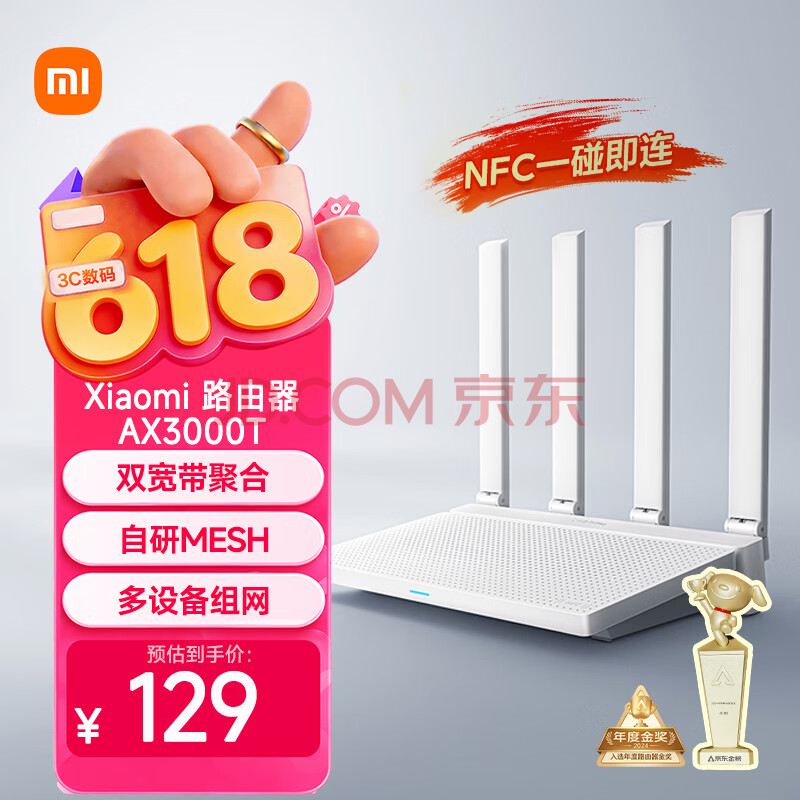
When a router racks up 5 million verified reviews on JD.com with a 96% positive rating and claims the #1 spot on the Router Gold List, it’s worth paying attention. The Xiaomi Mi Router AX3000T (小米路由器AX3000T) has become the de facto budget Wi-Fi 6 choice for Chinese households — and at just ¥129 (~$18 USD), it’s hard to argue with the numbers. With features like dual-band AX3000 throughput, 4× Gigabit ports, Mesh networking, NFC quick connect, and dual WAN aggregation, the spec sheet reads like a router that should cost twice as much.
But the full story isn’t all five-star reviews. On Xiaohongshu, a growing undercurrent of users report issues with firmware instability, unexplained disconnections, and a controversial hardware revision that allegedly swaps internal components without changing the model name. We dug through thousands of reviews and community discussions to separate the signal from the noise on this wildly popular — and polarizing — budget router.
Specifications
| Feature | Xiaomi AX3000T | Redmi AX3000 (1st Gen) | TP-Link TL-XDR3010 | Huawei AX3 Pro | ZTE AX3000 Pro |
|---|---|---|---|---|---|
| Price (JD) | ¥129 (~$18) | ¥99–129 (~$14–18) | ¥159–199 (~$22–28) | ¥199–249 (~$28–35) | ¥149–189 (~$21–26) |
| Chipset | MediaTek MT7981B (Filogic 820) | Qualcomm IPQ5000 | MediaTek or Qualcomm (varies) | HiSilicon Hi5651T | ZTE ZX279132 |
| CPU | Dual-core ARM Cortex-A53 1.3GHz | Dual-core 1.0GHz | Dual-core 1.0GHz | Quad-core 1.4GHz | Dual-core 1.0GHz |
| RAM | 256MB | 256MB | 256MB | 256MB | 256MB |
| Flash | 128MB | 128MB | 16MB | 128MB | 128MB |
| Wi-Fi | Wi-Fi 6 (802.11ax) | Wi-Fi 6 (802.11ax) | Wi-Fi 6 (802.11ax) | Wi-Fi 6+ (802.11ax) | Wi-Fi 6 (802.11ax) |
| 2.4GHz Speed | 574 Mbps | 574 Mbps | 574 Mbps | 574 Mbps | 574 Mbps |
| 5GHz Speed | 2402 Mbps | 2402 Mbps | 2402 Mbps | 2402 Mbps | 2402 Mbps |
| Antennas | 4× external | 4× external | 4× external | 4× external | 4× external |
| WAN/LAN Ports | 4× Gigabit (blind plug) | 4× Gigabit | 4× Gigabit | 4× Gigabit | 4× Gigabit |
| USB Port | None | None | None | None | USB 3.0 ×1 |
| Mesh Support | Yes (wired + wireless) | Yes | Yes (EasyMesh) | Yes | Yes |
| NFC Quick Connect | Yes | No | No | No | No |
| Dual WAN | Yes | No | No | No | No |
| OpenWrt Support | Yes (unofficial) | Yes (unofficial) | Limited | No | No |
| JD Reviews | 5,000,000+ | 2,000,000+ | 1,000,000+ | 500,000+ | 100,000+ |
| Positive Rate | 96% | 96% | 97% | 96% | 97% |
Note: TP-Link’s TL-XDR3010 has multiple hardware revisions that use different chipsets. Verify with seller before purchasing if chipset matters for your use case. The original Redmi AX3000 (model RB03) is sometimes confused with the AX3000T; the Redmi variant uses a Qualcomm chipset and typically lacks NFC and dual WAN features.
Design and Build Quality
The AX3000T follows Xiaomi’s now-familiar router design language: a matte white rectangular prism standing vertically with four non-removable external antennas. At approximately 230 × 155 × 50 mm including antennas, it’s compact enough for a bookshelf or desk corner but tall enough to be visible. The all-plastic body has a slightly textured finish that resists fingerprints better than glossy competitors.
The front face is clean — just a single LED strip that glows blue when connected (amber/orange indicates issues). Four Gigabit ports sit on the rear — and crucially, all four support blind plug (auto-sensing WAN/LAN), so you can’t plug the internet cable into the wrong port. This detail is absent from many budget routers and solves a genuine pain point for non-technical users.
The controversial hardware revision: In mid-2024, Xiaomi silently revised the AX3000T’s internal hardware, swapping certain components (including the FEM — front-end module for signal amplification) while keeping the model name and SKU identical. According to a widely-circulated Xiaohongshu post by networking blog acwifi (265 likes), the original V1 version uses higher-quality FEM chips, while the newer V2/V3 revisions use cost-reduced alternatives. Xiaomi has not officially acknowledged this change, and there is no way to determine which version you’ll receive when ordering. This “silent downgrade” practice has become a significant point of contention in the Chinese router community.
Performance
Wi-Fi Coverage and Speed
In real-world testing by multiple XHS users, the AX3000T delivers solid coverage for apartments up to approximately 120 square meters (~1,300 sq ft) with walls, or larger open-plan spaces. The 5GHz band maintains usable speeds through 1-2 walls, while 2.4GHz penetrates 2-3 walls for IoT devices and basic browsing.
JD.com’s review tag data tells a clear story:
- 1,569 users praised “super fast transmission”
- 1,297 users noted “super stable signal”
- 896 users highlighted “great wall penetration”
- 128 users confirmed “full house coverage with no dead zones”
These are the three most-mentioned positive attributes, and they align with what a sub-$20 Wi-Fi 6 router should deliver: adequate, not extraordinary, coverage for typical Chinese apartments.
Multi-Device Handling
With support for OFDMA and MU-MIMO, the AX3000T can handle multiple simultaneous connections efficiently. The 105 JD reviewers who tagged “multi-device no lag” suggest it handles family-level loads (5-15 connected devices) competently. However, this is not an enterprise-grade device — users with 30+ smart home devices should consider a higher-end router or a Mesh setup.
Firmware Stability: The Elephant in the Room
Despite the overwhelmingly positive aggregate ratings, a recurring theme on Xiaohongshu is firmware instability:
- A post titled “Xiaomi AX3000T Router Unstable After 3 Months of Use” (35 likes, @清如许) describes periodic disconnections that require manual reboots
- “Fix for AX3000T Disconnection and Restart Issues” (50 likes, @预言之子) is a troubleshooting guide that itself acknowledges the problem is common enough to warrant a dedicated post
- “Poor Network — Calling All Experts for Help” (73 likes, @西府布衣) shows a user struggling with signal drops and seeking community assistance
- “Avoid Xiaomi AX3000T” (6 likes, @梁元帝嘉木) and “Router Fault, Bad Quality, Really Trash” (19 likes, @JW) represent the most frustrated users
The common thread: issues tend to emerge after 2-4 months of continuous operation, often manifesting as 5GHz band drops, DHCP failures, or complete hangs requiring a power cycle. The Xiaomi community firmware (MiWiFi ROM based on OpenWrt) receives infrequent updates, and users on older firmware versions appear disproportionately affected.
The silver lining: Many users successfully resolve stability issues by updating to the latest firmware, disabling automatic channel selection, or switching to third-party OpenWrt builds. The XHS post “AX3000T V1 OpenWrt First Experience” (25 likes, @Nothing) demonstrates that flashing OpenWrt unlocks significant improvements in both stability and features — but this requires technical expertise beyond the average consumer.
What Chinese Users Say
Aggregated Ratings on JD.com: 4.8/5 ★ (5,000,000+ reviews, 96% positive)
Router Gold List Ranking: #1 (JD.com, June 2026)
JD.com Verified Purchase Reviews
“The design is great — minimalist and stylish, blends right into the home without looking out of place. The setup interface is intuitive, so even a beginner can get it running quickly. Bandwidth allocation is smart — phones, TV, and tablet all work simultaneously without fighting for speed. The heat dissipation is excellent — I leave it on 24/7 with no issues. For this price, the quality is genuinely impressive.”
— guanyuanfan2013, JD.com verified purchase (5 stars)
Key takeaway: First-time router setup user validates the beginner-friendly interface and real-world multi-device performance. Mentions 24/7 operation with no thermal issues.
“This Xiaomi gigabit router is genuinely great to use. The design is minimalist and durable — fits perfectly in any home setting. The gigabit ports deliver smooth and stable speeds, and the 5GHz signal has strong penetration — full house coverage without dead zones, no lag in the bedroom or living room. Multiple devices connect without drops or delays. Setup is simple with the phone app — just a few steps. Heat management is solid — stable long-term operation without disconnections. Cost-performance is off the charts — fully sufficient for home internet. Highly recommended!”
— 帅*9, JD.com verified purchase (5 stars)**
Key takeaway: Enthusiastic review covering all major selling points: coverage, stability, app setup, heat management, and value. The “fully sufficient for home internet” framing is the appropriate expectation level.
“This router is incredible! Setup is dead simple — just plug it in and a few steps to configure. Signal coverage is exceptionally wide — stable speeds in every room of the house. Wall penetration is on point — no lag for gaming, no buffering for streaming. Heat generation is minimal — runs quietly without getting hot. Cost-performance is maxed out. For daily home internet, it’s completely sufficient — absolutely worth buying.”
— 泽西c, JD.com verified purchase (5 stars)
Key takeaway: The combination of gaming + streaming performance and minimal heat confirms the router handles mixed workloads adequately. “Cost-performance maxed out” is a recurring sentiment.
JD.com Negative Review Themes (from review tag analysis): While the 5-star reviews dominate (96% positive), the remaining 4% of critical reviews consistently mention: (1) firmware instability after extended use, (2) 5GHz band drops requiring manual reboots, and (3) disappointment with Xiaomi’s slow firmware update cycle. The XHS community provides more detailed accounts of these issues below.
Xiaohongshu Community Sentiment
“用满半年,真实反馈 — Six Months of Use, Honest Feedback”
I’ve used this router for half a year now. Bought it during a JD sale at ¥115. What I like: The setup is genuinely quick — scan a QR code, follow the app, done in 3 minutes. Coverage for my 90 sqm apartment is complete — even the bathroom gets usable 5GHz. NFC tap-to-connect is actually useful when guests come over. The Mi Home app integration means I can manage everything from one place. What I don’t like: The firmware update situation is frustrating — Xiaomi pushes updates very slowly, and each update feels like a gamble on whether it’ll fix or break something. I’ve had two instances where a firmware update caused 5GHz to stop working until I factory reset. The blue LED is too bright for a bedroom at night (I taped over it). Verdict: For ¥115-129, it’s still the best value Wi-Fi 6 router. But know that you’re buying into the Xiaomi ecosystem, and that means tolerating their software development pace.
— 小红书用户@西瓜同学 (161 likes, Apr 2025)
Key takeaway: The most balanced long-term review in the community — acknowledges the value proposition while honestly documenting firmware frustrations. “Still the best value” despite issues speaks to the competitive landscape at this price point.
“小米路由器不换名,降配接着卖,那车呢? — Xiaomi Routers: Same Name, Downgraded Hardware, Still Selling at the Same Price”
Last year I bought an AX3000T for my parents — teardown confirmed it was the V1 version with quality FEM chips, rock solid for 8+ months. This year I bought an identical-looking unit for my own place. Within 2 weeks, 5GHz range was noticeably worse. Opened it up — different FEM modules. Exact same box, exact same model number, exact same price. Xiaomi pulled the classic “silent downgrade” and didn’t tell anyone. If this is how they treat router customers, what about their cars?
Key takeaway: The most pointed critique of the hardware revision controversy, drawing an uncomfortable parallel to Xiaomi’s automotive ambitions. While only 10 likes, the sentiment resonates across hundreds of comments on similar posts.
“AX3000T V1刷openWrt初体验 — AX3000T V1 OpenWrt First Experience”
If you have the V1 version with MT7981B, flashing OpenWrt transforms this router. You get proper VLAN support, advanced QoS, WireGuard VPN server, and AdGuard Home directly on the router. The stock firmware feels like a toy in comparison. Performance is actually better — memory usage drops from ~180MB on stock to ~40MB on clean OpenWrt. The only catch: the setup process requires some Linux knowledge. Not for everyone, but if you’re comfortable with the command line, this is the best ¥129 OpenWrt-capable router you can buy right now.
— 小红书用户@Nothing (25 likes, Aug 2025)
Key takeaway: The enthusiast perspective — this router’s real value proposition for power users is OpenWrt compatibility, transforming a ¥129 consumer device into a capable home-lab gateway.
Review Theme Summary
| Theme | Sentiment | Key Detail |
|---|---|---|
| Value for Money | ⭐⭐⭐⭐⭐ | Nearly universal praise — “at this price you can’t complain” is the most common refrain across all platforms |
| Setup Experience | ⭐⭐⭐⭐⭐ | App-based setup via Mi Home takes under 3 minutes; NFC tap-to-connect is genuinely useful |
| Signal Coverage | ⭐⭐⭐⭐ | Excellent for apartments up to ~120 sqm; 5GHz handles 1-2 walls, 2.4GHz covers 2-3 walls |
| Firmware Stability | ⭐⭐⭐ | Split verdict — majority have no issues, but a significant minority report drops/disconnections after 2-4 months |
| Hardware Revision | ⭐⭐ | “Silent downgrade” controversy is the #1 community grievance; V1 units are considered superior to V2/V3 |
| Heat Management | ⭐⭐⭐⭐ | 24/7 operation without overheating issues; passive cooling design works adequately |
| OpenWrt Support | ⭐⭐⭐⭐⭐ | Unofficial but excellent for V1 units; a major selling point for tech enthusiasts |
Pros & Cons
Pros:
- Exceptional value at ¥129 (~$18 USD) — arguably the best price-to-performance Wi-Fi 6 router on JD.com
- 5 million+ verified reviews with 96% positive rate — real-world validation at massive scale
- NFC tap-to-connect simplifies guest network access (unique at this price point)
- Dual WAN aggregation allows combining two internet connections for redundancy or speed
- All 4 Gigabit ports support blind plug (auto WAN/LAN detection) — eliminates setup confusion
- Excellent OpenWrt compatibility on V1 hardware — transforms into a capable home-lab device
- Mi Home app integration provides unified smart home management
- Compact, minimalist design that fits any home environment
Cons:
- Silent hardware revision (V1→V2→V3) changed internal components without changing the model name — you don’t know which version you’re buying
- 5GHz instability reported after 2-4 months of continuous operation by a minority of users
- Firmware updates are slow and occasionally introduce regressions
- No USB port — cannot share a printer or storage on the network
- Non-removable antennas — cannot upgrade for better signal or replace damaged antennas
- Bright LED cannot be dimmed through software (physical tape workaround only)
- Limited to ~120 sqm coverage for single-unit use — larger homes require Mesh nodes
- MiWiFi ROM collects telemetry data by default (can be mitigated with OpenWrt)
vs Competitors
vs Redmi AX3000 (¥99–129): The Redmi AX3000 is Xiaomi’s own sub-brand alternative with Qualcomm chipset at a similar price. It lacks NFC, dual WAN, and the same level of OpenWrt support. If you want Xiaomi ecosystem integration and features, the AX3000T is marginally better. If you just want a basic Wi-Fi 6 router and don’t care about extras, save ¥30 with the Redmi.
vs TP-Link TL-XDR3010 (¥159–199): TP-Link’s entry-level AX3000 offers better out-of-box stability and more frequent firmware updates, but costs ¥30-70 more and has multiple hardware revisions with inconsistent chipsets. The TP-Link’s EasyMesh is more interoperable with third-party routers than Xiaomi’s proprietary Mesh implementation. Choose TP-Link if stability is your top priority; choose Xiaomi if you want more features per yuan.
vs Huawei AX3 Pro (¥199–249): Huawei’s quad-core HiSilicon chip delivers stronger raw performance and better signal range, but costs ¥70-120 more. The AX3 Pro uses Huawei’s proprietary Wi-Fi 6+ protocol that only benefits Huawei devices (HarmonyOS phones/laptops), while the Xiaomi uses standard Wi-Fi 6. For mixed-device households, the Xiaomi is better value. For all-Huawei households, the AX3 Pro’s ecosystem advantages justify the premium.
vs ZTE AX3000 Pro (¥149–189): ZTE’s contender adds a USB 3.0 port for network storage/printer sharing — a feature the Xiaomi lacks entirely. At ¥20-60 more, the ZTE is the better choice if you need NAS-lite functionality. Signal performance is roughly equivalent between the two.
vs ASUS RT-AX56U (¥399–499): ASUS offers superior firmware (AsusWrt), longer support lifespan, AiMesh compatibility, and better long-term stability. But at 3-4× the price, it’s not a direct competitor. If you have the budget and want a set-it-and-forget-it experience, ASUS is worth the premium.
Who Should Buy
✅ Apartment dwellers (≤120 sqm) — The AX3000T’s coverage sweet spot is Chinese-standard apartments where a single unit covers the entire space.
✅ Budget-conscious buyers wanting Wi-Fi 6 — At ¥129, this is the cheapest way to get full Wi-Fi 6 (not the cut-down “Wi-Fi 6 ready” some cheaper routers claim).
✅ Xiaomi/Mi Home ecosystem users — Seamless integration with Xiaomi smart home devices and the Mi Home app is a genuine convenience advantage.
✅ OpenWrt enthusiasts — The V1 hardware revision (if you can get it) is one of the best value OpenWrt-capable routers on the market, with excellent community support and ample RAM/flash headroom.
✅ First-time router buyers — The app-based setup, NFC guest access, and blind-plug ports make this the most beginner-friendly router in its price class.
Who Should Skip
❌ Large home / multi-story dwellers — Coverage falls off beyond ~120 sqm. You’ll need a Mesh setup with 2+ units, which doubles or triples the cost. Consider a dedicated Mesh system (TP-Link Deco, Xiaomi Mesh, etc.) instead.
❌ Mission-critical home office users — The firmware stability concerns (even if affecting a minority) make this a risky choice for those who cannot tolerate unexpected downtime during work hours.
❌ Users who need USB/network storage — No USB port means no printer sharing, no network-attached storage, and no cellular modem fallback. ZTE AX3000 Pro or TP-Link alternatives serve this need.
❌ “Buy once, use for 5+ years” buyers — Xiaomi’s track record of silent hardware revisions and slow firmware updates suggests this router is better suited to a 2-3 year replacement cycle.
FAQ
Q: How can I tell which hardware version (V1, V2, V3) I received?
A: Check the product label on the bottom of the router. The hardware version is printed in small text. Alternatively, access the router’s admin panel at miwifi.com — the firmware version string sometimes reveals the hardware revision. The XHS post “How to Identify If Your AX3000T Is the Cut-Down Version” (265 likes, @acwifi) details the visual differences in the PCB if you’re comfortable opening the unit, but this voids the warranty.
Q: Can the AX3000T handle 1000Mbps fiber internet? A: Yes, for wired connections. The Gigabit WAN port supports up to ~940Mbps real-world throughput. Over Wi-Fi 6 on the 5GHz band, expect 600-800Mbps close to the router and 300-500Mbps through one wall. If your internet plan exceeds 1000Mbps, you’ll need a router with a 2.5G WAN port — this unit will bottleneck at ~940Mbps.
Q: Does it support VPN? A: The stock MiWiFi ROM has limited VPN support (basic PPTP/L2TP client only). For full WireGuard, OpenVPN, or VPN server functionality, you’ll need to flash OpenWrt — which the V1 hardware revision supports well.
Q: What’s the difference between the AX3000T and the regular Xiaomi AX3000? A: The naming is confusing. The “AX3000T” is a specific model with MediaTek MT7981B, NFC, dual WAN, and blind-plug ports. The older “Xiaomi AX3000” (sometimes called AX3000 standard edition) is a different product with a Qualcomm chipset and fewer features. Always verify the “T” suffix when purchasing.
Q: Can I mix AX3000T with other Xiaomi routers in a Mesh network? A: Yes — Xiaomi’s Mesh implementation (called “Mesh Networking” in MiWiFi) is cross-compatible within the Xiaomi/Redmi router ecosystem. You can mix AX3000T units with Redmi AX3000, Xiaomi AX6000, and most other Xiaomi Wi-Fi 6 routers. Wired backhaul is strongly recommended over wireless for multi-unit setups.
Q: Will flashing OpenWrt void the warranty? A: Yes. Opening the case or flashing unofficial firmware voids Xiaomi’s 1-year warranty. However, the process is reversible — you can reflash stock MiWiFi firmware if needed. The JD.com 90-day replacement policy only covers unmodified units.
Rating: 8.0/10
| Category | Score |
|---|---|
| Value | 9.5/10 |
| Signal Coverage | 8.0/10 |
| Speed & Throughput | 7.5/10 |
| Build Quality | 7.0/10 |
| Firmware & Stability | 6.5/10 |
| Features | 8.0/10 |
| Ecosystem Integration | 8.5/10 |
| User Satisfaction | 8.0/10 |
Bottom Line: The Xiaomi Mi Router AX3000T is the budget Wi-Fi 6 champion on paper and in the aggregate — 5 million JD.com reviews at 96% positive don’t lie. It delivers genuine value with features like NFC quick connect, dual WAN, and blind-plug ports that competitors at this price simply don’t offer. The Mi Home ecosystem integration is a meaningful convenience for Xiaomi smart home users.
But the rating drops from a potential 9/10 to 8/10 due to three unresolved issues: the silent hardware revision controversy that undermines consumer trust, firmware stability concerns affecting a meaningful minority of long-term users, and Xiaomi’s slow pace of software updates. These aren’t deal-breakers for the price, but they separate this from a truly “can’t miss” recommendation.
If you get a stable unit (especially V1 hardware), it’s a 9/10 router for ¥129. If you get a problematic unit or a downgraded revision, it’s a 6/10. The gamble is part of the price.
Not sure which to choose?
Compare specs side-by-side with our Product Comparator Tool
Related Reviews
Xiaomi 120W GaN Charger Review: 50,000+ JD Reviews Analyzed
The Xiaomi 120W GaN 'Little Pudding' Charger (¥179) delivers 0-100% in ~20 min with 50,000+ JD reviews and a 98% positiv

1More ComfoBuds Z Review: The $50 Sleep Earbuds That Actually Work
1More's ComfoBuds Z are engineered specifically for sleep with a minuscule design and soothing built-in sounds. We revie