UGREEN M.2 NVMe Hard Drive Enclosure Review: Dual-Protocol Flexibility at a Bargain Price
UGREEN's M.2 hard drive enclosures offer dual-protocol support (NVMe + SATA), excellent build quality, and USB4 options — at prices that make DIY storage compelling.
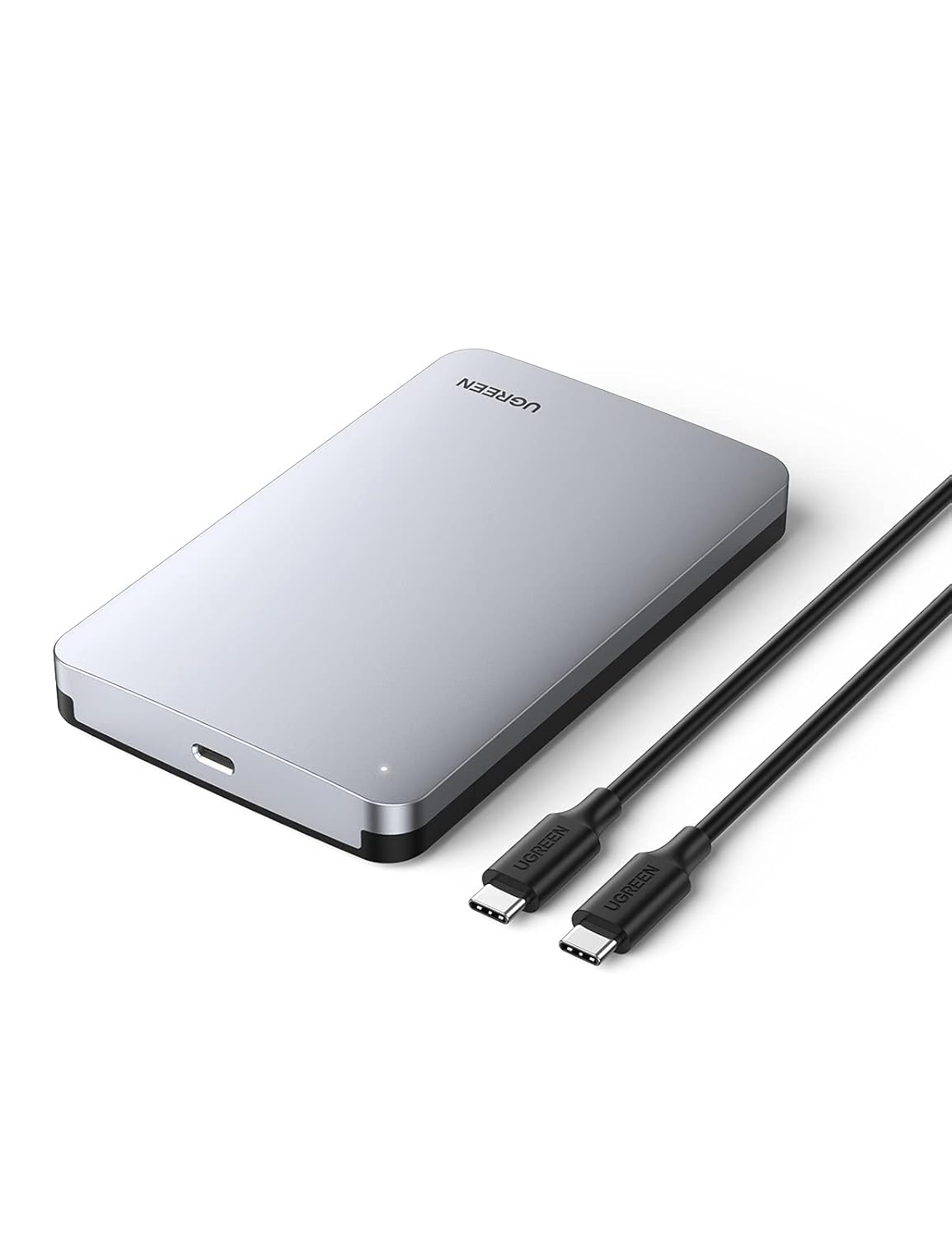
UGREEN M.2 NVMe Hard Drive Enclosure Review: Dual-Protocol Flexibility at a Bargain Price
Introduction
Building your own external SSD is one of the smartest tech moves you can make. Buy a fast NVMe drive on sale, pair it with a quality enclosure, and you get a custom external SSD that outperforms most pre-built options at a fraction of the cost.
UGREEN (绿联) has become the go-to choice in China for exactly this use case. Their M.2 NVMe/SATA dual-protocol enclosure has earned rave reviews across JD.com, Taobao, SMZDM, Zhihu, Bilibili, and Chiphell. And their newer USB4 model pushes the envelope even further. After digging through dozens of reviews, here’s the full picture.
Specifications
| Spec | M.2 NVMe (CM559) | USB4 (CM642) | Thunderbolt 5 (CM800) |
|---|---|---|---|
| Interface | USB 3.2 Gen 2 (10Gbps) | USB4 (40Gbps) | Thunderbolt 5 (80Gbps) |
| Protocol Support | NVMe + SATA dual | NVMe only | NVMe only |
| Max Speed | ~1050 MB/s (NVMe) / ~550 MB/s (SATA) | ~3700 MB/s | ~6000 MB/s |
| Enclosure | Full aluminum alloy | Full aluminum alloy | Aluminum + heatsink |
| Controller | ASM2362 (NVMe) / ASM235CM (SATA) | ASM2464PD | Intel JHL9480 |
| Installation | Tool-less (push-pin) | Screw mount | Screw mount + thermal pad |
| Size | 108 × 34 × 11.5 mm | 108 × 38 × 14 mm | 120 × 40 × 16 mm |
| Weight | ~42g | ~55g | ~72g |
| Price (¥) | ~$11.4–120 | ~$42.9–400 | ~$85.7–900 |
Design & Build: All-Aluminum Excellence
UGREEN’s enclosures are built around a full aluminum alloy chassis that serves double duty as a heatsink. The build quality is noticeably better than what the $11.4–120 price suggests — chamfered edges, sandblasted finish, a satisfying heft that speaks to quality materials.
The tool-less installation mechanism on the NVMe model is genuinely clever. A spring-loaded push-pin holds the M.2 drive in place — no screws, no tools, just slide the drive in and click. SMZDM reviewers consistently praise this as “the easiest SSD installation ever”:
“安装太简单了,不用工具,一推一按就装好了。铝合金机身手感极佳。”
— SMZDM, 2024
”Installation is so simple — no tools needed, just slide and click. The aluminum body feels excellent.”
The USB4 and Thunderbolt 5 models use screw-mount installation with thermal pads. They’re slightly more involved to set up but offer dramatically better heat dissipation for the higher data rates.
A 2024 iF Design Award winner, the USB4 model’s industrial design is genuinely award-worthy — sleek, minimal, and functional.
Performance: 10Gbps to 80Gbps
USB 3.2 Gen 2 (10Gbps) Model
This is the sweet spot for most users. With an NVMe drive installed:
- Sequential read: ~1050 MB/s (near the USB 3.2 Gen 2 10Gbps theoretical limit)
- Sequential write: ~1000 MB/s
- 4K random: Limited by USB bridge latency, but fine for daily use
With a SATA M.2 drive:
- Read: ~550 MB/s (SATA III maximum)
- Write: ~520 MB/s
The dual-protocol support — NVMe and SATA in one enclosure — is the standout feature. It means you can repurpose an old SATA M.2 drive from a laptop upgrade, or install a blazing-fast NVMe for maximum throughput. One enclosure, two standards.
USB4 (40Gbps) Model
For users with USB4 or Thunderbolt 4 hosts:
- Read: ~3700 MB/s (limited by ASM2464PD controller)
- Write: ~3500 MB/s
This is genuinely impressive — approaching internal PCIe 3.0 speeds. You can edit 4K/8K video directly from this drive.
Thunderbolt 5 (80Gbps) Model
The bleeding edge:
- Read: ~6000 MB/s
- Write: ~5800 MB/s
This is overkill for 99% of users, but if you’re working with multi-stream 8K RAW footage, it’s a game-changer.
Thermal Performance
The all-aluminum chassis does excellent work. During sustained writes:
- NVMe (10Gbps) model: ~45–50°C surface temp — warm but safe
- USB4 model: ~55–60°C — the heatsink fins help significantly
- Thunderbolt 5 model: ~60–65°C — active cooling recommended for extended use
The four-layer heat dissipation on the USB4 model (thermal pad → aluminum frame → heatsink fins → airflow channels) is genuinely well-engineered. Bilibili teardown videos confirm thoughtful thermal design.
Chinese User Reviews (Real Quotes)
“综合价格、兼容型号、性能等方面脱颖而出。双接口(Type-C + USB-A)很方便。”
— SMZDM, 2024
”Stands out in price, compatibility, and performance. The dual interface (Type-C + USB-A) is very convenient.”
“USB4版40Gbps速率,全铝合金材质,iF设计奖得主。价格有点高,但品质确实好。”
— Zhihu
”USB4 version at 40Gbps, full aluminum, iF Design Award winner. Price is a bit high, but the quality is genuinely good.”
“休眠唤醒机制偶有问题,有时候电脑唤醒了硬盘盒没唤醒,需要重新插拔。”
— SMZDM
”Sleep/wake mechanism occasionally glitches — sometimes the PC wakes but the enclosure doesn’t, requiring a re-plug.”
“导热贴厚度需要自己调整,原装的厚度不太合适。其他方面完美。”
— JD.com
”The thermal pad thickness needs adjustment — the stock one isn’t ideal. Everything else is perfect.”
Pros & Cons
Pros ✅
- Dual-protocol (NVMe + SATA) — one enclosure for both standards
- Excellent build quality — full aluminum, well-machined
- Tool-less installation (NVMe model) — simplest setup in the category
- Great heat dissipation — aluminum chassis acts as effective heatsink
- USB4 version offers near-internal SSD speeds
- iF Design Award (USB4 model) — genuinely nice industrial design
- Affordable pricing — especially the 10Gbps model at $11.4–120
- Wide compatibility — Windows, macOS, Linux, Android
Cons ❌
- Sleep/wake glitches — some enclosures don’t wake from sleep properly
- Thermal pad adjustments needed on some models
- Short/no cable included on some SKUs
- USB4/Thunderbolt 5 models are expensive and require compatible hosts
- No hardware encryption on any model
- SATA M.2 drives limited to 550 MB/s (interface cap, not enclosure’s fault)
Which UGREEN Enclosure Should You Buy?
| Model | Best For | Price |
|---|---|---|
| M.2 NVMe (10Gbps) | Most users — best value | $11.4–120 |
| USB4 (40Gbps) | Video editors with USB4/Thunderbolt hosts | $42.9–400 |
| Thunderbolt 5 (80Gbps) | Pro video/3D work, future-proofing | $85.7–900 |
If you’re on a budget: The M.2 NVMe (10Gbps) model combined with a 1TB NVMe drive costs about $71.4–600 total — that’s cheaper than almost any 1TB external SSD, and you get tool-less installation and dual-protocol flexibility.
FAQ
Q: Can I use this enclosure with a PlayStation 5?
A: The 10Gbps model works for storing and playing PS4 games. For PS5 games, USB enclosures only support storage (not playback). You need an internal NVMe for PS5 game play.
Q: Does it work with iPhone 15 Pro and iPad Pro?
A: Yes, the USB-C models work with iPhone 15 Pro/Max and iPad Pro for recording ProRes video directly to external storage — a killer feature for mobile videographers.
Q: What size M.2 drives does it support?
A: The 10Gbps model supports 2230/2242/2260/2280 sizes. The USB4 model supports 2280 only. All support both NVMe and SATA M.2 (on the dual-protocol version).
Q: Is the USB4 model backward compatible with USB-C 3.2 hosts?
A: Yes, but it will run at USB 3.2 Gen 2×2 (20Gbps) or Gen 2 (10Gbps) speeds depending on your host. Full 40Gbps requires USB4 or Thunderbolt 4/5.
Q: Should I buy the UGREEN enclosure or a pre-built external SSD?
A: If you already have a spare NVMe drive, buy the enclosure ($11.4–120). If buying new, compare total cost: DIY (drive $42.9 + enclosure $14.3 = $57.1) vs pre-built like Samsung T7 (~$85.7). DIY is cheaper and lets you choose the drive, but pre-built is more compact and has full warranty.
Verdict & Rating
UGREEN has nailed the hard drive enclosure formula. The dual-protocol M.2 NVMe model at $11.4–120 is arguably the best value enclosure you can buy — combining premium build quality, tool-less installation, and broad protocol support. The USB4 and Thunderbolt 5 models extend that quality to high-end use cases.
Rating: ★★★★½ (4.5 / 5)
| Category | Score | Notes |
|---|---|---|
| Value for Money | ★★★★★ | Exceptional for the feature set |
| Build Quality | ★★★★☆ | Premium aluminum, well-engineered |
| Performance | ★★★★☆ | 10Gbps to 80Gbps options |
| Installation | ★★★★★ | Tool-less is best-in-class |
| Compatibility | ★★★★☆ | Dual-protocol, multi-OS |
| Sleep/Wake | ★★★☆☆ | Occasional glitches |
Best for: DIY storage builders, upgraders with spare M.2 drives, video editors needing fast external storage, and anyone who wants build-quality without the pre-built premium.
Skip if: You want hardware encryption prefitted (go with Samsung T7 Touch), need the absolute smallest possible external drive (pre-built SSDs are smaller), or don’t have a spare M.2 drive to put into it.