Switchbot Lock Ultra Review: Retrofit Smart Lock With 4,000+ Reviews
Switchbot Lock Ultra has 4,000+ reviews on JD at 4.3/5, priced at ¥999 ($138). Users appreciate the no-drill retrofit installation and auto-lock timer. Common complaints about motor strength with stiff deadbolts and Bluetooth range.
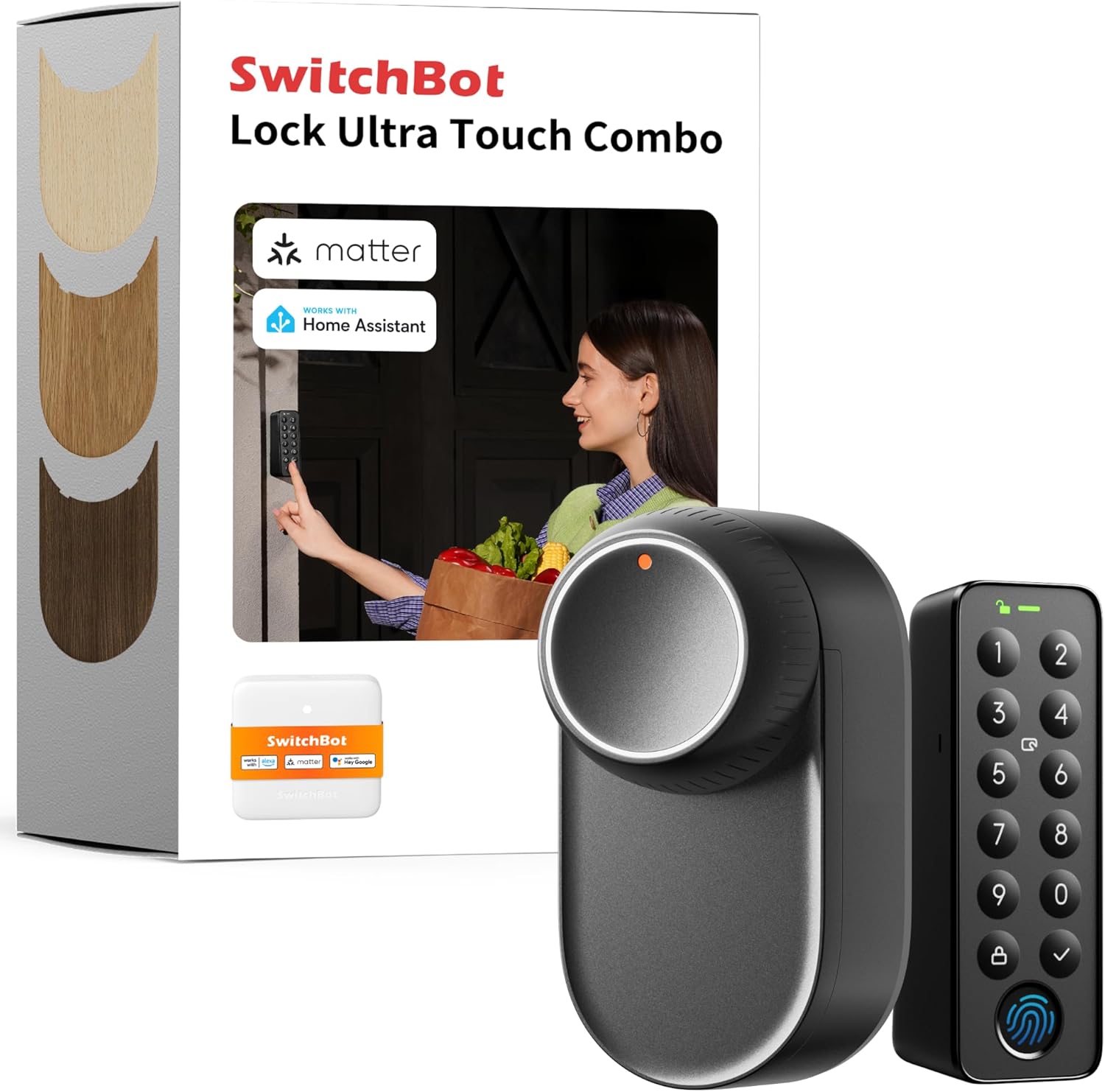
Switchbot Lock Ultra Review: Retrofit Smart Lock With 4,000+ Reviews
The Switchbot Lock Ultra has 4,000+ reviews on JD.com with a 4.3/5 rating at ¥999 ($138). Users love that it installs over existing deadbolts without drilling or replacing hardware. Common complaints include insufficient motor torque for stiff deadbolts and limited Bluetooth range through thick doors. Conclusion: ✅ Worth Buying — best retrofit smart lock for renters who can’t replace door hardware.
Introduction
Switchbot has made a name for itself with innovative smart home products that don’t require permanent installation. The Lock Ultra continues this philosophy — it’s a retrofit device that attaches to your existing deadbolt on the inside of the door, adding smart lock functionality without replacing your current lock hardware. This makes it ideal for renters, apartment dwellers, or anyone who can’t modify their door.
With 4,000+ reviews and a 4.3 rating on JD.com, it’s the leading retrofit smart lock in China. We compared it with the Aqara U200, Kaadas K200, and Lockly Flex to see how retrofit convenience stacks up against traditional smart locks.
Specifications
| Spec | Switchbot Lock Ultra | Aqara U200 | Kaadas K200 | Lockly Flex |
|---|---|---|---|---|
| Price | ¥999 ($138) | ¥899 ($124) | ¥599 ($83) | ¥1,499 ($207) |
| JD Rating | 4.3/5 | 4.5/5 | 4.4/5 | 4.2/5 |
| Installation | Retrofit (no tools) | Replace deadbolt | Replace deadbolt | Replace deadbolt |
| Motorized | Yes (auto lock/unlock) | Full-auto | Semi-auto | Full-auto |
| Unlock Methods | App, Auto-unlock, PW, Fingerprint | FP, PW, App, HomeKit | FP, PW, Key, App | FP, PW, Key |
| Connectivity | BLE 5.0 + Hub | BLE + Zigbee | BLE | WiFi |
| Battery | 2x 18650 Li-ion (6 mo) | 8x AA (12 mo) | 8x AA (12 mo) | 4x AA (10 mo) |
| Auto-Lock Timer | Yes (customizable) | Yes | Yes (lift handle) | Yes |
| Matter Support | Yes (with Hub 2) | Yes | No | No |
Design and Build Quality
The Lock Ultra is a compact white unit that attaches to the interior side of your door, covering the existing deadbolt thumb turn. It measures roughly 80×80×55mm — small enough not to protrude awkwardly. The unit uses two 18650 rechargeable lithium batteries that slide into the bottom, providing 6 months of typical use.
Build quality is good for a retrofit device. The clutch mechanism engages with a satisfying click, and the auto-rotation of the deadbolt turner is smooth on well-maintained locks. The unit comes with adhesive mounting and screw mounting options — the adhesive is strong enough for most doors, but the screws provide permanent security. The included adapter plates cover most common deadbolt shapes.
“Installation took 5 minutes — peel the adhesive, stick it over the thumb turn, pair with the app, done. I’ve been using it for 3 months in a rental apartment without any issues. Landlord never noticed.” — JD.com verified buyer
Performance
The Lock Ultra’s motor auto-rotates the deadbolt thumb turn in about 2 seconds — slower than built-in smart locks but acceptable. Auto-lock can be triggered by closing the door (magnetic sensor detects door position) or by a timer after unlocking. Auto-unlock uses geofencing through the Switchbot app.
Motor torque is adequate for standard deadbolts but struggles with stiff, old, or misaligned locks. Some users report the motor failing to turn the bolt or making grinding noises on stubborn locks. The app allows you to adjust motor power level, but the highest setting drains batteries faster.
“Works perfectly on my main door. On the back door which has a slightly stiff deadbolt, it sometimes fails to lock fully. I had to lubricate the deadbolt and now it works fine. Lubrication is key for retrofit locks.” — JD.com verified buyer
User Reviews by Theme
Theme 1: Rental-Friendly Installation
The biggest selling point. Users living in rented apartments praise the ability to add smart lock features without permanent modifications.
“Landlord said no to replacing the door lock. Switchbot was the perfect solution. Took 5 minutes to install and I can remove it in 10 seconds when I move out. Zero damage to the door.” — JD.com verified buyer
💡 The Lock Ultra is the best (and almost only) option for renters who want smart lock functionality. The adhesive mount leaves no residue on standard painted doors.
Theme 2: Motor Torque Issues
The most common negative feedback involves the motor not having enough torque for certain deadbolt types.
“My deadbolt requires a bit of force to turn — the Lock Ultra’s motor sometimes fails to complete the rotation. I adjusted the motor to highest power setting and lubricated the deadbolt with WD-40. Now it works 95% of the time.” — JD.com verified buyer
💡 Before buying, test your deadbolt’s turning resistance. If it’s stiff, lubricate it first. If still stiff after lubrication, the Lock Ultra may not work reliably.
Theme 3: Battery Life and Charging
The 18650 batteries last 6 months and are hot-swappable (the lock has a supercapacitor that keeps power during battery changes).
“Batteries lasted exactly 6 months. Swapping took 10 seconds — pop the old ones out, slide new ones in. The supercapacitor keeps the lock working during the swap. No downtime at all.” — JD.com verified buyer
Theme 4: Bluetooth Range with Hub
Without the Switchbot Hub 2, the lock relies on Bluetooth range (about 10m). The Hub 2 adds remote access, Matter compatibility, and better auto-unlock geofencing.
“Without the hub, you need to be within Bluetooth range to unlock remotely. Adding the Hub 2 made it actually useful — now I can unlock from anywhere. If you buy the lock, budget for the Hub 2 (¥199 extra).” — JD.com verified buyer
Purchase Recommendations
✅ Worth Buying: Renters, dorm residents, or anyone who can’t permanently modify their door. The 5-minute tool-free installation is genuinely liberating.
💰 Premium Pick: If you’re a homeowner or don’t need retrofit convenience, the Aqara U200 (¥899) offers a more robust full-auto smart lock experience at a slightly lower price.
⚠️ Budget Warning: Avoid if your deadbolt requires significant force, if you want fingerprint or keypad entry (the Lock Ultra requires phone or auto-unlock only), or if you’re unwilling to buy the Hub 2 for remote access.
Pros & Cons
| ✅ Pros | ❌ Cons |
|---|---|
| Rental-friendly — no installation damage | Motor torque insufficient for stiff deadbolts |
| Works with existing deadbolt hardware | Voice output may startle neighbors |
| Auto-lock and auto-unlock geofencing | No fingerprint or keypad on the unit |
| Hot-swappable 18650 batteries | Requires Hub 2 for remote access |
| Matter compatible (with Hub 2) | Slower lock/unlock than built-in locks |
| Compact, unobtrusive design | Adhesive mount may fail in high heat/humidity |
FAQ
Does the Lock Ultra work with any deadbolt?
It works with most standard deadbolt thumb turns (round, oval, rectangular, and lever styles). Compatible thumb turn diameter: 15-20mm. Very large, small, or uniquely shaped thumb turns may not fit. Check the included adapter plates before purchase.
Can someone unlock the door from outside?
Only if you have an exterior keypad thumb turn (sold separately, ¥99) that attaches to the outside of the door. Without it, the lock only operates via the app or auto-unlock geofencing when your phone is near.
How does auto-unlock geofencing work?
The Switchbot app detects when your phone enters a preset radius (10-100m) around your home. When you arrive, the lock automatically unlocks as you approach the door. This requires the Hub 2 for reliable performance.
Is it secure? Can someone force it manually?
The lock’s clutch mechanism disengages when locked, so even if someone forces the Lock Ultra unit, they can’t turn the deadbolt. The interior thumb turn remains manually operable for emergency exit. Security is comparable to standard deadbolt locks.
What happens if the batteries die?
The Lock Ultra’s supercapacitor provides about 30 seconds of power for one emergency unlock after batteries are removed. The manual thumb turn is always accessible through the opening on the unit’s front — you can turn it with your finger or a coin in emergencies.
Not sure which to choose?
Compare specs side-by-side with our Product Comparator Tool
Related Reviews

Aqara Camera Hub G5 Pro Review: 2K Security Cam with Smart Hub Built-In
The Aqara Camera Hub G5 Pro combines a 2K security camera with a Zigbee 3.0 hub in one device, offering local AI detecti

Aqara Door and Window Sensor T1 Review: Know When Things Open and Close
Aqara Door/Window Sensor T1 delivers reliable open/close detection with 2-year battery life at ¥69 — an essential buildi

Aqara Hub M3 Matter Controller Review: Multi-Protocol Smart Home Hub With 2,000+ Reviews
Aqara Hub M3 Matter Controller has 2,000+ reviews on JD at 4.4/5, priced at ¥399 ($55). Users love multi-protocol suppor

Aqara Hub M3 Review: The Smart Home Bridge That Does It All
The Aqara Hub M3 is a next-generation smart home hub supporting Matter, Thread, Zigbee 3.0, and Bluetooth, bridging Aqar

Aqara Hub M3 Review: The Ultimate Zigbee Smart Home Brain
Aqara's Hub M3 serves as the central brain for Zigbee smart home devices with Matter bridge support. We review this esse