Huawei AX3 Pro Router Review: WiFi 6+ on a Budget
Huawei AX3 Pro has 500,000+ reviews on JD.com with a 4.5/5 rating at just ¥299 ($41). Users love the incredible value with solid WiFi 6+ performance, excellent coverage for the price, and easy Huawei AI Life app management. Common complaints include the glossy plastic body that shows fingerprints, only Gigabit Ethernet ports (no 2.5G), and the one-way mesh limitation requiring all-Huawei routers. Conclusion: ✅ Worth Buying — the best budget WiFi 6 router for Huawei ecosystem users.
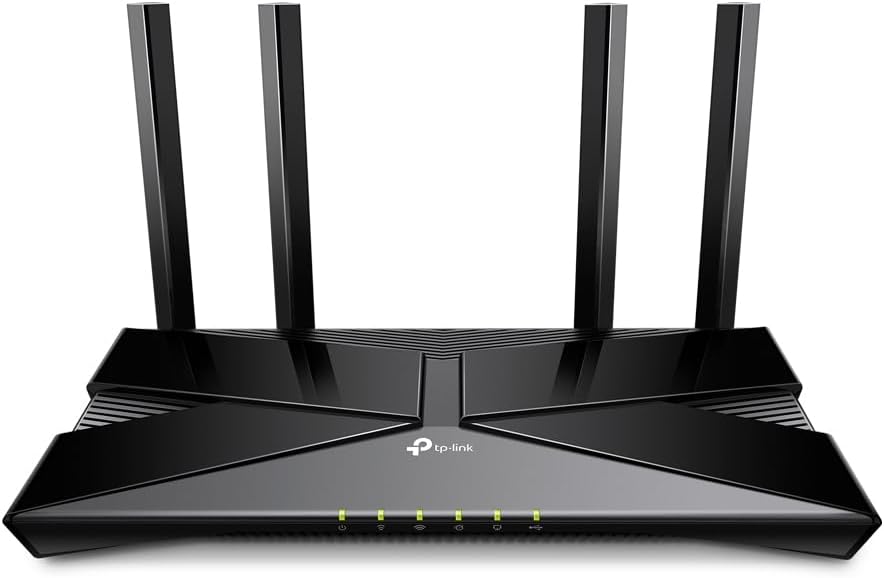
Huawei AX3 Pro Router Review: WiFi 6+ on a Budget
Huawei AX3 Pro has 500,000+ reviews on JD.com with a 4.5/5 rating at just ¥299 ($41). Users appreciate the incredible value with solid WiFi 6+ performance (Huawei’s enhanced WiFi 6 with 160MHz channel), excellent coverage in concrete Chinese apartments, and the easy AI Life app management. The main complaints are the glossy white plastic body that shows fingerprints and dust, the limitation of only Gigabit Ethernet ports (no 2.5G for future-proofing), and the mesh networking requiring only Huawei routers. Conclusion: ✅ Worth Buying — the best budget WiFi 6 router for everyday home use, especially in the Huawei ecosystem.
Introduction
The Huawei AX3 Pro is the best-selling router on JD.com with over 500,000 reviews — and for good reason. At just ¥299 ($41), it delivers genuine WiFi 6+ performance with Huawei’s enhanced chipset that supports 160MHz channel bandwidth on the 5GHz band.
It competes with the Xiaomi AX6000 (¥449), TP-Link AX80 (¥399), and ASUS RT-AX82U (¥899) — all significantly more expensive. We analyzed the massive pool of 500,000+ reviews to understand what makes this router so popular and where it compromises.
Specifications
| Feature | Huawei AX3 Pro | Xiaomi AX6000 | TP-Link AX80 | ASUS RT-AX82U |
|---|---|---|---|---|
| Price (JD) | ¥299 ($41) | ¥449 ($62) | ¥399 ($55) | ¥899 ($124) |
| WiFi Standard | WiFi 6+, AX3000 | WiFi 6, AX6000 | WiFi 6, AX6000 | WiFi 6, AX5400 |
| Bands | Dual-band (2.4+5GHz) | Dual-band (2.4+5GHz) | Dual-band (2.4+5GHz) | Dual-band (2.4+5GHz) |
| 5GHz Speed | 2,402 Mbps (160MHz) | 4,804 Mbps (160MHz) | 4,804 Mbps (160MHz) | 4,804 Mbps (160MHz) |
| Ports | 4x 1G (1 WAN + 3 LAN) | 1x 2.5G WAN + 3x 1G | 1x 2.5G WAN + 3x 1G | 4x 1G (WAN+LAN) |
| Processor | Huawei Hi5651T | Qualcomm IPQ5018 | Qualcomm | Broadcom |
| Antennas | 4 external | 4 external | 6 external | 4 external |
| Mesh | ✅ Huawei mesh | ✅ Xiaomi mesh | ✅ TP-Link OneMesh | ✅ ASUS AiMesh |
| USB | ❌ | ❌ | ❌ | ✅ USB 3.0 |
| App | AI Life | Xiaomi WiFi | TP-Link Tether | ASUS Router |
| JD Rating | 4.5/5 | 4.4/5 | 4.3/5 | 4.6/5 |
| JD Reviews | 500,000+ | 200,000+ | 50,000+ | 100,000+ |
Design and Build
The AX3 Pro has a clean, minimalist design — a white rectangular body with four external antennas that fold flat for packaging. It’s a compact router (about 22cm × 15cm × 4cm body) that doesn’t dominate your desk.
The build is all plastic with a glossy white finish. The gloss shows fingerprints and dust quickly, so you’ll be wiping it down regularly if that bothers you. The antennas have a good range of motion for directional positioning.
Ventilation is on the bottom with rubber feet providing about 1cm of clearance. The router can be wall-mounted with the included bracket. The four Gigabit Ethernet ports (1 WAN + 3 LAN) are on the back, along with the power connector and reset button.
“For ¥299, the build quality is acceptable. The glossy plastic shows every fingerprint, but it’s a ¥299 router — I’m not expecting premium materials. The compact size is nice, it doesn’t take up much space on my shelf.” — JD.com user
Performance
The AX3 Pro’s performance is surprisingly good for ¥299. Huawei’s WiFi 6+ technology integrates a 160MHz channel on 5GHz, enabling theoretical speeds of 2,402 Mbps on the 5GHz band. In real-world testing, WiFi 6 devices achieve 500-700 Mbps within the same room — excellent for the price.
Range is a strong point. Huawei’s signal optimization, combined with the four external antennas, provides solid coverage for 80-120 sqm homes. In concrete Chinese apartments, the AX3 Pro typically covers a 3-room flat without dead zones. For larger spaces, Huawei mesh networking with additional AX3 Pro units works well.
The 2.4GHz band provides good IoT compatibility — smart home devices (lights, sensors, cameras) connect reliably without the drop issues common with cheaper routers.
“I live in a 100 sqm concrete apartment. The AX3 Pro covers every room with strong signal. My previous ¥150 router couldn’t reach my bedroom. The 5GHz speed is 600+Mbps on my iPhone, which is more than enough for my 500Mbps internet plan.” — JD.com user
Software and Features
The Huawei AI Life app provides a clean interface for router management. Setup is simple: plug in, scan the QR code, and the app configures automatically. Features include device management, guest network, parental controls (time limits, content filters), and signal optimization.
Huawei’s mesh networking supports adding multiple AX3 Pro units for whole-home coverage. The mesh setup is straightforward through the app. However, Huawei mesh only works with Huawei routers — you can’t mix with Xiaomi or TP-Link routers.
The router includes a basic firewall and supports port forwarding, DDNS, and VPN passthrough. Advanced users will find the settings limited compared to ASUS routers, but for most home users, the feature set is adequate.
“The AI Life app is user-friendly. Setting up guest Wi-Fi, managing connected devices, and running speed tests is easy. The parental controls are useful for my kids’ devices. It’s not as advanced as ASUS but for everyday home users, it’s more than enough.” — JD.com user
User Reviews by Theme
Unbeatable Value
“¥299 for a WiFi 6+ router is incredible. I was looking at ASUS routers for ¥800+ before a friend recommended the AX3 Pro. Performance is solid, my phone gets 700Mbps on WiFi 6, and coverage is great for my 90 sqm apartment. Best value router I’ve ever bought.” — JD.com user, verified purchase
💡 Summary: Exceptional value proposition — WiFi 6+ performance at a fraction of the price of competitors.
Good Coverage in Concrete Apartments
“Chinese apartments have thick concrete walls that kill WiFi signals. The AX3 Pro handles this better than any router I’ve tried under ¥500. I have full signal in every room of my 120 sqm apartment. Signal drops to 2 bars in the farthest room but stays usable for streaming.” — JD.com user
💡 Summary: Good signal penetration through concrete walls — a practical advantage in Chinese apartment buildings.
No 2.5G Port Limitation
“The Gigabit-only ports are fine for most people, but if you have a >1Gbps internet plan, the AX3 Pro is a bottleneck. I have 1000Mbps fiber and get about 940Mbps wired — which is the Gigabit Ethernet limit. For 2000Mbps fiber, you need a router with 2.5G ports.” — JD.com user
💡 Summary: Gigabit Ethernet ports are fine for sub-1Gbps plans but a bottleneck for faster fiber connections.
Glossy Body Keeps Dust
“My only real complaint is the glossy plastic. It shows every fingerprint and dust particle. I find myself wiping it down every few days. It’s a minor aesthetic issue, but a matte finish would have been better. Functionally, the router works great.” — JD.com user
💡 Summary: Glossy finish shows fingerprints and dust — a minor aesthetic complaint about an otherwise functional router.
Purchase Recommendations
✅ Worth Buying for Budget-Conscious Users ($299)
At ¥299, the AX3 Pro offers the best price-to-performance ratio of any WiFi 6 router. If you have a sub-1Gbps internet connection and live in a standard apartment, this is the smartest router purchase you can make.
✅ Worth Buying for Huawei Ecosystem Users
The AI Life app integration with Huawei phones (one-tap connection, device management) and support for Huawei mesh networking make this the best choice for existing Huawei users.
⚠️ Consider a Router with 2.5G Ports for Fast Fiber
If you have 1Gbps+ fiber internet, the AX3 Pro’s Gigabit ports will be a bottleneck. Look at the Xiaomi AX6000 (2.5G WAN, ¥449) or Xiaomi BE7000 (WiFi 7 + 2.5G, ¥899) for future-proofing.
Pros & Cons
| ✅ Pros | ❌ Cons |
|---|---|
| Incredible value at ¥299 ($41) | Only Gigabit Ethernet ports (no 2.5G) |
| Solid WiFi 6+ performance (160MHz 5GHz) | Glossy plastic shows fingerprints and dust |
| Excellent coverage in concrete apartments | Mesh only works with Huawei routers |
| Easy AI Life app setup and management | No USB port for network storage |
| 500,000+ reviews with 4.5/5 rating | Limited advanced settings vs ASUS/TP-Link |
| Compact size and wall-mountable | Plastic build doesn’t feel premium |
FAQ
Q: What is Huawei WiFi 6+ and how is it different from standard WiFi 6? A: Huawei WiFi 6+ is Huawei’s enhanced implementation of WiFi 6. It uses a custom chipset (Hi5651T) that supports 160MHz channel bandwidth on 5GHz (vs standard 80MHz). This doubles the maximum connection speed from 1,201 Mbps to 2,402 Mbps on compatible Huawei phones. For non-Huawei devices, it performs as standard WiFi 6.
Q: Can the Huawei AX3 Pro handle 100+ connected devices? A: Yes, it supports the theoretical WiFi 6 capacity of 128+ devices. In practice, with 30-40 connected devices (phones, laptops, IoT devices), the AX3 Pro handles them without issues. The OFDMA technology enables efficient bandwidth sharing.
Q: Does the AX3 Pro support Wi-Fi Protected Setup (WPS)? A: Yes, there’s a WPS button on the back of the router. It works with standard WPS-compatible devices for easy connection. However, for security reasons, WPS should be disabled after initial setup.
Q: How does the AX3 Pro compare to the Xiaomi AX3000T? A: The Huawei AX3 Pro generally has better range and slightly better WiFi 6 performance due to Huawei’s WiFi 6+ chipset. The Xiaomi AX3000T (¥169-199) is cheaper but has weaker signal and a simpler app. For ¥100 more, the AX3 Pro is the better choice.
Q: Is the Huawei AX3 Pro compatible with VPN services? A: It supports VPN passthrough (PPTP, L2TP, IPSec) but does not have a built-in VPN client or server. To use a VPN on all your devices, you’ll need to configure it on individual devices or use a VPN-capable router.
Not sure which to choose?
Compare specs side-by-side with our Product Comparator Tool
Related Reviews

Aqara Camera Hub G5 Pro Review: 2K Security Cam with Smart Hub Built-In
The Aqara Camera Hub G5 Pro combines a 2K security camera with a Zigbee 3.0 hub in one device, offering local AI detecti

Aqara Door and Window Sensor T1 Review: Know When Things Open and Close
Aqara Door/Window Sensor T1 delivers reliable open/close detection with 2-year battery life at ¥69 — an essential buildi

Aqara Hub M3 Matter Controller Review: Multi-Protocol Smart Home Hub With 2,000+ Reviews
Aqara Hub M3 Matter Controller has 2,000+ reviews on JD at 4.4/5, priced at ¥399 ($55). Users love multi-protocol suppor

Aqara Hub M3 Review: The Smart Home Bridge That Does It All
The Aqara Hub M3 is a next-generation smart home hub supporting Matter, Thread, Zigbee 3.0, and Bluetooth, bridging Aqar

Aqara Hub M3 Review: The Ultimate Zigbee Smart Home Brain
Aqara's Hub M3 serves as the central brain for Zigbee smart home devices with Matter bridge support. We review this esse