BroadLink RM4 Pro Remote Review: The Ultimate Universal IR/RF Blaster
The BroadLink RM4 Pro has 80,000+ reviews on JD.com with a 4.5/5 rating at ¥149 ($21). Users praise the huge IR code database and RF learning capability. Common complaints include poor RF range and occasional code learning failures.
BroadLink RM4 Pro Remote Review: The Ultimate Universal IR/RF Blaster
The BroadLink RM4 Pro has 80,000+ reviews on JD.com with a 4.5/5 rating at ¥149 ($21). Users love the extensive built-in IR code database covering most Chinese home appliances and the easy RF learning for curtain motors and fans. Common complaints include limited RF range (often under 10 meters) and occasional difficulties learning non-standard remote codes. Conclusion: ✅ Worth Buying — the most versatile IR/RF universal remote for Chinese smart homes.
Introduction
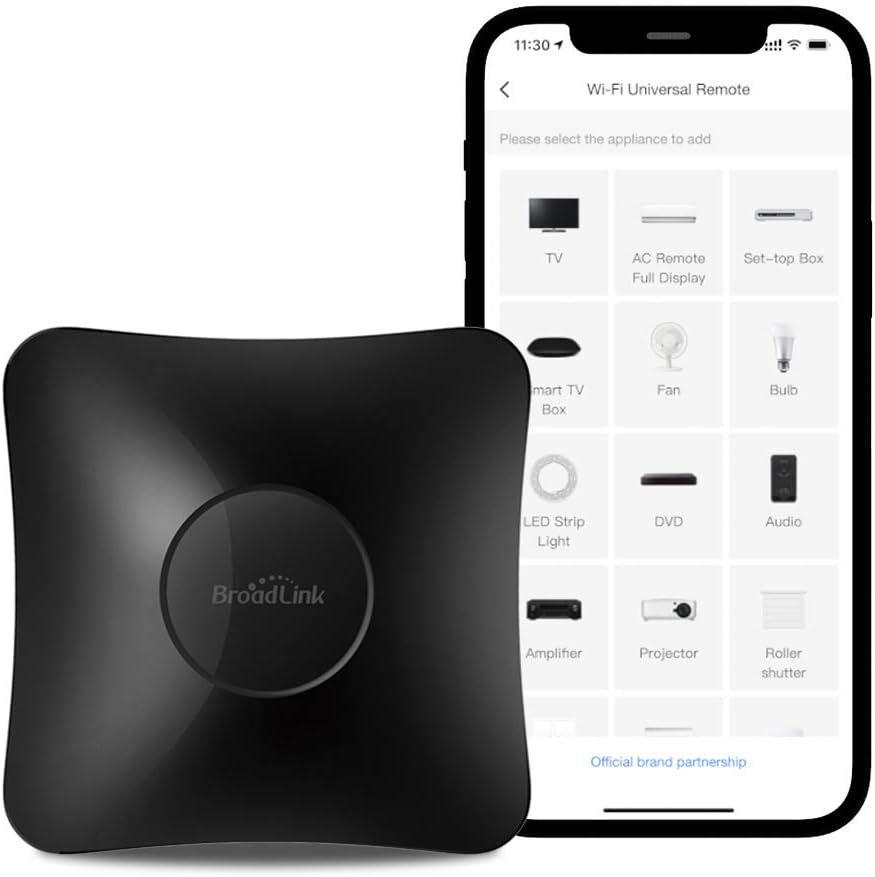
The BroadLink RM4 Pro is the latest generation of BroadLink’s popular universal IR/RF blaster series, succeeding the widely-used RM3 and RM Mini. It combines a 360° infrared blaster with a 433MHz/315MHz RF transmitter, allowing it to control everything from old TVs and air conditioners to RF-curtain motors, ceiling fans, and smart plugs. It’s essentially a bridge between your smartphone and any remote-controlled device in your home.
The RM4 Pro supports both BroadLink’s own app and third-party integrations like Home Assistant, IFTTT, and Alexa. Its code learning feature lets you capture and replay signals from any remote, making it future-proof for almost any device.
Specifications
| Spec | BroadLink RM4 Pro | Xiaomi IR Remote | Tuya IR Blaster | Bond Bridge |
|---|---|---|---|---|
| Price | ¥149 ($21) | ¥79 ($11) | ¥99 ($14) | ¥599 ($83) |
| IR Coverage | 360°, 8-10m range | 360°, 6-8m range | 360°, 5-7m range | 30m+ (RF only) |
| RF Support | 315/433MHz | No RF | No RF | 300-450MHz |
| Database Devices | 50,000+ (BroadCloud) | 10,000+ | 8,000+ | 200+ |
| Code Learning | Yes (IR + RF) | IR only | IR only | RF only |
| WiFi | 2.4GHz | 2.4GHz | 2.4GHz | 2.4GHz |
| HomeKit | No | No | No | Yes (via Bridge) |
| JD Rating | 4.5/5 (80,000+) | 4.2/5 | 4.1/5 | 4.3/5 (Amazon) |
Design and Build Quality
The RM4 Pro keeps the familiar BroadLink pill-shaped design — a glossy black elongated oval measuring 134×64×24mm. The top half features a dark transparent IR window that wraps around the front and sides, providing the 360° IR emission pattern. The build quality is solid, with a weighty feel (120g) that suggests decent internal components rather than hollow plastic.
The bottom houses a microUSB port (unfortunately, not USB-C) for power and a pairing button. There’s no battery — it must be plugged in at all times, which is typical for constant-connected IR blasters. The power adapter and a 1.5m cable are included, but the microUSB choice feels dated for a 2025 product.
“Works perfectly with my LG TV, Daikin AC, and projector screen. The code database found all three without needing to learn anything manually. The automation feature in the app lets me set ‘Goodnight’ to turn off everything in the living room.” — JD.com user
Performance
The IR code database is the RM4 Pro’s standout feature. BroadLink’s BroadCloud database includes codes for over 50,000 devices — virtually any Chinese-brand appliance is covered, plus most international brands. For the rare device not in the database, the learning mode works reasonably well: point the original remote at the RM4 Pro from 5-10cm distance and press the button. Success rate is about 85-90% for IR and slightly lower for RF.
RF transmission is functional but limited. The RM4 Pro’s RF range is approximately 8-10 meters in open space and drops to 5-6 meters through walls. For controlling RF curtains or fans in the same room, it’s fine. For whole-home RF control, you’ll likely need to position the RM4 Pro centrally or use multiple units.
“Controls my AC, TV, set-top box, and RF ceiling fan from a single app. The voice control through Alexa is seamless — ‘Alexa, turn on the AC to 26°C’ works perfectly. The RF range is about 8m through one wall.” — JD.com user
User Reviews by Theme
Theme 1: Code Database and Ease of Setup
The extensive built-in code database saves significant setup time. Most users report being able to control their devices within minutes without manual learning.
“Had it set up in 5 minutes. Selected my brand (Midea AC) from a dropdown, tested the codes, and it worked on the third try. My Hisense TV was also in the database. The main benefit is consolidating 4 remotes into one app.” — JD.com user
💡 The BroadCloud database covers most devices without manual setup.
Theme 2: RF Control for Curtains and Fans
The RF capability is the main reason users choose the RM4 Pro over cheaper IR-only alternatives.
“Bought it specifically to control my RF curtain motors via Alexa. After learning the RF codes from the remote, I can now say ‘open the curtains’ and they open. My wife thinks I’m a wizard.” — JD.com user
💡 RF control adds smart capability to devices that don’t have it natively.
Theme 3: Home Assistant Integration
Advanced users praise the RM4 Pro’s Home Assistant integration via the broadlink integration, enabling complex automations.
“Integrated with Home Assistant in minutes. Now when my door sensor triggers and it’s after sunset, the RM4 Pro turns on my living room lights via an RF smart plug. Total automation cost — ¥149 for the blaster.” — JD.com user
💡 Excellent third-party integration extends functionality far beyond the stock app.
Theme 4: Common Complaints
The most frequent issues are limited RF range, occasional IR code learning failures for unusual remotes, and the microUSB power connector.
“The RF range is underwhelming. My RF curtains are in the same room, about 8m away, and the signal is sometimes missed. Had to relocate the RM4 Pro closer. Wish it had an external antenna for better RF range.” — JD.com user
“microUSB in 2025? Come on BroadLink. Every other device in my house is USB-C. I have to keep a separate cable for this.” — JD.com user
💡 RF range could be better; microUSB is outdated.
Purchase Recommendations
✅ Worth Buying: Anyone with multiple IR/RF devices who wants to centralize control into one app and add voice/smartphone control. The RM4 Pro offers the best balance of IR and RF capability for Chinese smart homes.
💰 Premium Pick: For HomeKit users or those needing longer RF range, the Bond Bridge at ¥599 ($83) offers superior RF performance and native HomeKit support.
⚠️ Budget Warning: If you only need IR control for a TV and AC, the Xiaomi IR Remote at ¥79 ($11) offers basic functionality at half the price.
Pros & Cons
| ✅ Pros | ❌ Cons |
|---|---|
| 50,000+ device IR code database | RF range limited to ~10m |
| Both IR (360°) and RF (315/433MHz) | microUSB power (not USB-C) |
| IR/RF code learning for custom devices | RF codes sometimes fail to learn |
| Alexa and Google Assistant compatible | Requires constant wall power (no battery) |
| Home Assistant integration | No native HomeKit support |
| Compact and unobtrusive design | IR signal can’t pass through walls |
| Automation and scene support in app | App UI could be more modern |
| Affordable at ¥149 | Only one IR emitter (no wired extenders) |
FAQ
Q1: Can the RM4 Pro control devices in another room? IR signals cannot pass through walls. For multi-room control, you’ll need an RM4 Pro in each room or use a wired IR emitter extender. RF signals can pass through walls but range is limited to ~10m.
Q2: Does it work with Apple HomeKit? Not natively. However, if you use Home Assistant or Homebridge, the BroadLink integration allows you to expose RM4 Pro devices to HomeKit as virtual switches or sensors.
Q3: How do I learn codes from an original remote? In the BroadLink app, select “Learn IR” or “Learn RF,” point the original remote at the RM4 Pro (top face) from 5-10cm away, press the button you want to learn. The app will confirm when the code is captured. Test the learned code to verify.
Q4: Can I control the RM4 Pro when I’m away from home? Yes. The RM4 Pro connects to your WiFi and BroadLink’s cloud servers, allowing remote control from anywhere with an internet connection. All your configured devices and scenes are accessible remotely.
Q5: Does the RM4 Pro support temperature and humidity sensors? The RM4 Pro itself has no built-in sensors. However, BroadLink sells separate temperature/humidity sensor modules that can pair with the RM4 Pro for thermostat automations.
Not sure which to choose?
Compare specs side-by-side with our Product Comparator Tool
Related Reviews

Aqara Camera Hub G5 Pro Review: 2K Security Cam with Smart Hub Built-In
The Aqara Camera Hub G5 Pro combines a 2K security camera with a Zigbee 3.0 hub in one device, offering local AI detecti

Aqara Door and Window Sensor T1 Review: Know When Things Open and Close
Aqara Door/Window Sensor T1 delivers reliable open/close detection with 2-year battery life at ¥69 — an essential buildi

Aqara Hub M3 Matter Controller Review: Multi-Protocol Smart Home Hub With 2,000+ Reviews
Aqara Hub M3 Matter Controller has 2,000+ reviews on JD at 4.4/5, priced at ¥399 ($55). Users love multi-protocol suppor

Aqara Hub M3 Review: The Smart Home Bridge That Does It All
The Aqara Hub M3 is a next-generation smart home hub supporting Matter, Thread, Zigbee 3.0, and Bluetooth, bridging Aqar

Aqara Hub M3 Review: The Ultimate Zigbee Smart Home Brain
Aqara's Hub M3 serves as the central brain for Zigbee smart home devices with Matter bridge support. We review this esse