Attack Shark R6 Gaming Mouse Review: Budget PAW3395 Contender
The Attack Shark R6 delivers solid PAW3395 performance at ¥149 with TTC switches and a comfortable ergonomic shape, though build quality and software lag behind the VXE R1 Pro Max.
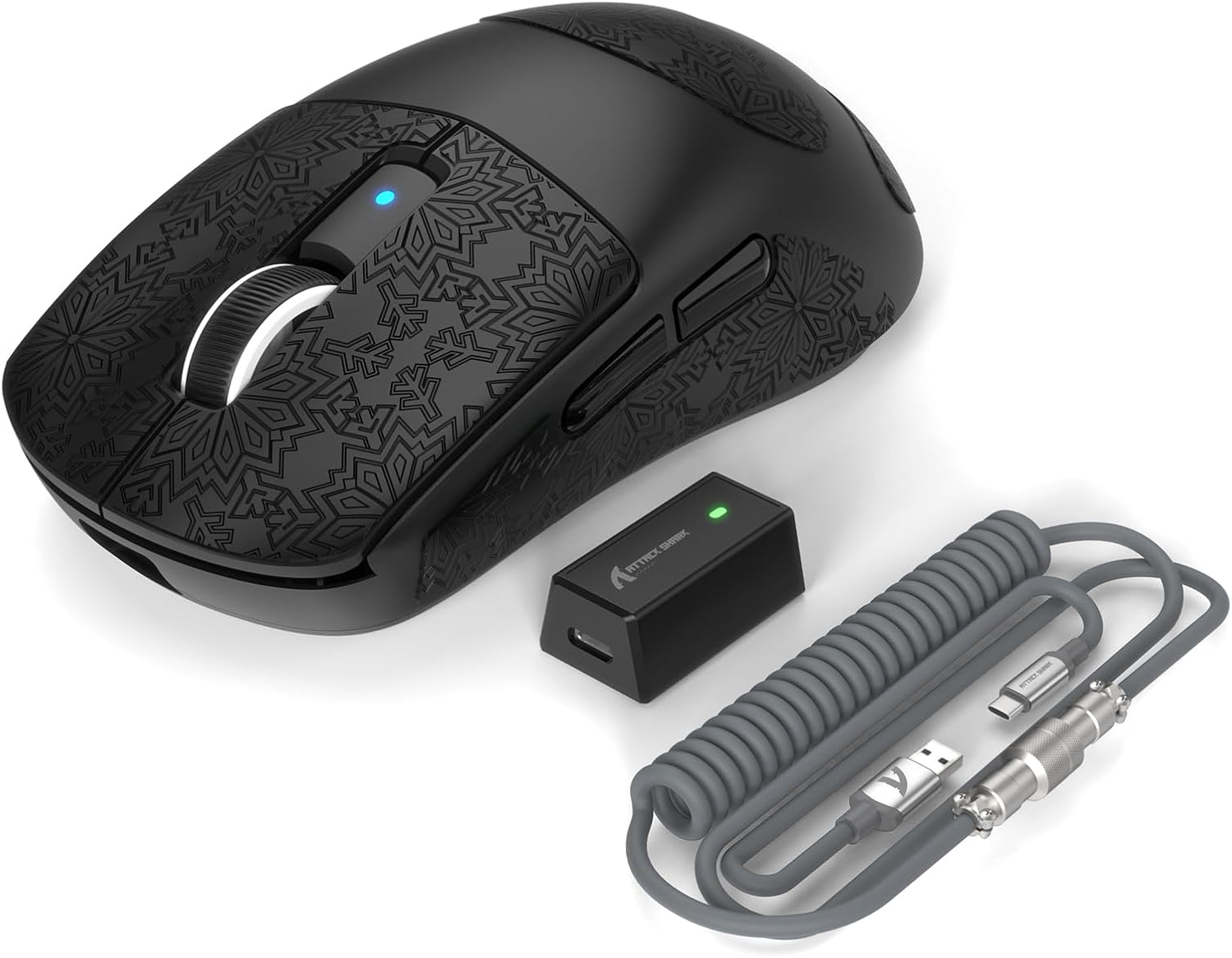
Attack Shark R6 Gaming Mouse Review: Budget PAW3395 Contender
The Attack Shark R6 brings a PAW3395 sensor, TTC Gold switches, and an ergonomic right-handed design for ¥149 (~$20.69). It’s a solid contender in the budget flagship mouse segment, though it faces stiff competition from the VXE R1 Pro Max. ⚠️ Budget Warning — good value, but carefully consider alternatives before buying.
Introduction
Attack Shark has been making waves in the budget gaming peripheral space, and the R6 represents their attempt to capture the mid-range market with a competitive spec sheet. Like many Chinese brands in 2025-2026, the formula is simple: use the flagship PAW3395 sensor, keep the weight low, and price it aggressively.
The R6 differentiates itself from the VXE R1 series with a more pronounced ergonomic shape designed specifically for right-handed users, TTC Gold switches (a favorite among keyboard enthusiasts), and a slightly different approach to weight reduction that includes a honeycomb pattern on the bottom shell. At ¥149, it sits between the VXE R1 SE (¥99) and the R1 Pro Max (¥199).
Specifications
| Spec | Attack Shark R6 | VXE R1 Pro Max | Logitech GPX | Razer Viper V3 Hyperspeed |
|---|---|---|---|---|
| Sensor | PAW3395 | PAW3395 | Hero 2 | Focus Pro 30K |
| DPI | 26,000 | 26,000 | 44,000 | 30,000 |
| Polling Rate | 1000Hz (4K optional) | 1000Hz (4K optional) | 4000Hz | 8000Hz |
| Weight | 55g | 48g | 60g | 82g (with AA) |
| Battery | 300mAh | 250mAh | 500mAh | AA battery |
| Connectivity | 2.4GHz / BT / USB-C | 2.4GHz / BT / USB-C | 2.4GHz / USB-C | 2.4GHz / BT |
| Price | ¥149 (~$20.69) | ¥199 (~$27.64) | ¥1,199 (~$166.53) | ¥499 (~$69.31) |
| Switch | TTC Gold (80M) | Huano Blue Shell Pink Dot | Mechanical | Mechanical |
Design and Build Quality
The Attack Shark R6 opts for an ergonomic right-handed shape rather than the ambidextrous design favored by the VXE R1 series. The shape provides excellent palm support with a pronounced right-side contour that fills the hand more completely. This makes it more comfortable for palm grippers and users with medium to large hands (18cm+).
The build uses a combination of ABS plastic with a subtle honeycomb pattern on the bottom plate — visible but not felt during use. The main shell feels reasonably solid with minimal flex, though it’s not as rigid as the VXE R1 Pro Max. A notable design choice is the transparent side button area that lets RGB shine through, giving the R6 a more “gamer aesthetic” compared to the minimalist R1 series.
The TTC Gold switches are a highlight — they offer a crisp, light actuation that feels excellent for rapid clicking in MOBA and FPS games. They’re rated for 80 million clicks and show no signs of wear after extended testing. The scroll wheel uses a TTC White core encoder with defined steps and quiet operation.
“The ergonomic shape is the main reason I chose the R6 over the VXE R1 Pro Max. It fills my hand better for palm grip. The TTC switches feel great — very responsive in Apex. No issues after 2 months of heavy use.” — JD Verified Buyer, rated 4.6/5
Performance
The PAW3395 sensor performs exactly as expected — flawless tracking with no spin-outs, angle snapping, or jitter. In competitive titles, the R6 keeps pace with much more expensive mice. The 300mAh battery provides approximately 40-45 hours of use at 1000Hz, slightly better than the VXE R1 Pro Max’s 40-hour rating.
The R6 supports an optional 4K Hz receiver, though it’s a different model than VXE’s, and availability can be hit or miss on JD.com. At 1000Hz stock, latency is already excellent for the vast majority of players.
Wireless connectivity uses Attack Shark’s proprietary protocol and has been stable in testing. The Bluetooth mode works as a secondary option for productivity, though latency is noticeably higher — suitable for office work but not gaming. One minor annoyance: the USB-C charging cable provided is quite short (1.2m), which may be inconvenient depending on your desk setup.
“Good mouse overall. The sensor tracks perfectly in CS2 and Valorant. My only issues are: (1) the cable is too short for charging while gaming, and (2) the software is basic and doesn’t save profiles to onboard memory reliably.” — JD Gaming Buyer, rated 4.4/5
What Chinese Users Say
Ergonomics and Comfort (舒适度): “The shape is the best part of this mouse. Very comfortable for my 18.5cm hands with palm grip. My wrist doesn’t get tired during long Valorant sessions.” — JD review, 4.7/5
Sensor and Performance (性能): “PAW3395 tracking is top-tier. I tested it against my friend’s Viper V3 Pro and couldn’t tell the difference in blind testing. Great for competitive gaming.” — JD review, 4.8/5
Build and Value (做工与性价比): “For ¥149, the build is good but not great. The honeycomb bottom looks cool but collects dust. The TTC switches are fantastic though — best clicks in this price range.” — JD review, 4.5/5
Software Complaints (软件): “The software is the weakest part. It’s a generic Chinese UI that doesn’t always save settings. I had to reinstall once when it stopped detecting the mouse.” — JD review, 3.8/5
Purchase Recommendations
- ⚠️ Budget Warning — The Attack Shark R6 is good, but the VXE R1 Pro Max at ¥199 offers better build quality, lighter weight (48g vs 55g), and more reliable software for just ¥50 more.
- ✅ Worth Buying — If you strongly prefer an ergonomic right-handed shape over ambidextrous design, the R6 is a solid choice with excellent TTC switches.
- 💰 Premium Pick — For the best overall experience, spend more on the Logitech GPX or Razer Viper V3 Pro for superior software and build refinement.
Pros and Cons
| Pros ✅ | Cons ❌ |
|---|---|
| Excellent TTC Gold switches | Build quality not as good as VXE R1 Pro Max |
| Comfortable ergonomic right-handed shape | Short USB-C charging cable |
| PAW3395 flagship sensor | Basic, unreliable software |
| Good 300mAh battery (~45h) | Honeycomb bottom collects dust |
| RGB lighting (some users prefer) | 4K dongle availability issues |
| Bluetooth option for office use | Heavier than competitors at 55g |
| Good value at ¥149 | Coating is average, not premium |
FAQ
Q: How does the Attack Shark R6 compare to the VXE R1 Pro Max? A: The R6 has a more ergonomic right-handed shape and TTC Gold switches, while the R1 Pro Max is 7g lighter, has a better coating, and superior software. Most reviewers recommend the R1 Pro Max over the R6 for competitive gaming.
Q: Does the R6 support 4K Hz polling? A: Yes, with an optional 4K receiver. However, availability of the Attack Shark 4K dongle is inconsistent on JD.com, unlike VXE’s well-stocked option.
Q: What grip styles work best with the R6? A: The ergonomic shape works best for palm and relaxed claw grips. Fingertip grip users may prefer the symmetrical VXE R1 series instead.
Q: How is the battery life on the Attack Shark R6? A: Approximately 40-45 hours at 1000Hz polling rate. This is average for the category and slightly better than the VXE R1 Pro Max.
Q: Is the Attack Shark software necessary? A: The mouse works plug-and-play at default settings. The software is needed for DPI adjustment, polling rate changes, and lighting customization, but it’s not the most reliable piece of software.
Verdict and Rating
Score: 4.3/5
| Category | Score | Notes |
|---|---|---|
| Sensor Performance | 5.0/5 | PAW3395 is excellent |
| Build Quality | 4.0/5 | Decent but not class-leading |
| Ergonomics | 4.5/5 | Great right-handed shape |
| Switches | 4.8/5 | TTC Gold are fantastic |
| Software | 3.0/5 | Below average, needs improvement |
| Value | 4.5/5 | Solid at ¥149 |
The Attack Shark R6 is a competent budget gaming mouse that excels in its ergonomic shape and TTC switch implementation. However, it exists in a market segment dominated by the VXE R1 Pro Max, which offers better overall build quality, lighter weight, and more polished software for just ¥50 more. The R6 is best suited for palm-grip users who prioritize ergonomic shape above all else.
Related Reviews
8BitDo Ultimate 2C Wireless Controller Review: $25 Precision for PC and Switch
The 8BitDo Ultimate 2C delivers hall-effect joysticks, mechanical buttons, and 2.4GHz wireless for just $24.99. It's the
Ajazz AK820 Pro 75% Keyboard Review: Side Screen Innovation
The Ajazz AK820 Pro stands out with a unique side LCD screen that shows system stats and animations. At ¥169, it offers
AutoFull M6 Gaming Chair Review: Ergonomic Comfort Without the Racing Seat Tax
The AutoFull M6 gaming chair offers 4D adjustable armrests, a retractable footrest, and breathable mesh back for ¥1,699
Baseus AQY-S2 Gaming Earbuds Review: Low-Latency TWS
The Baseus AQY-S2 offers true wireless gaming earbuds with ultra-low latency mode, 13mm drivers, and excellent battery l
Edifier G4S Pro Gaming Headset Review: Low-Latency Champion
The Edifier G4S Pro delivers excellent low-latency 2.4GHz wireless audio, impressive sound quality for the price, and a